EN
61
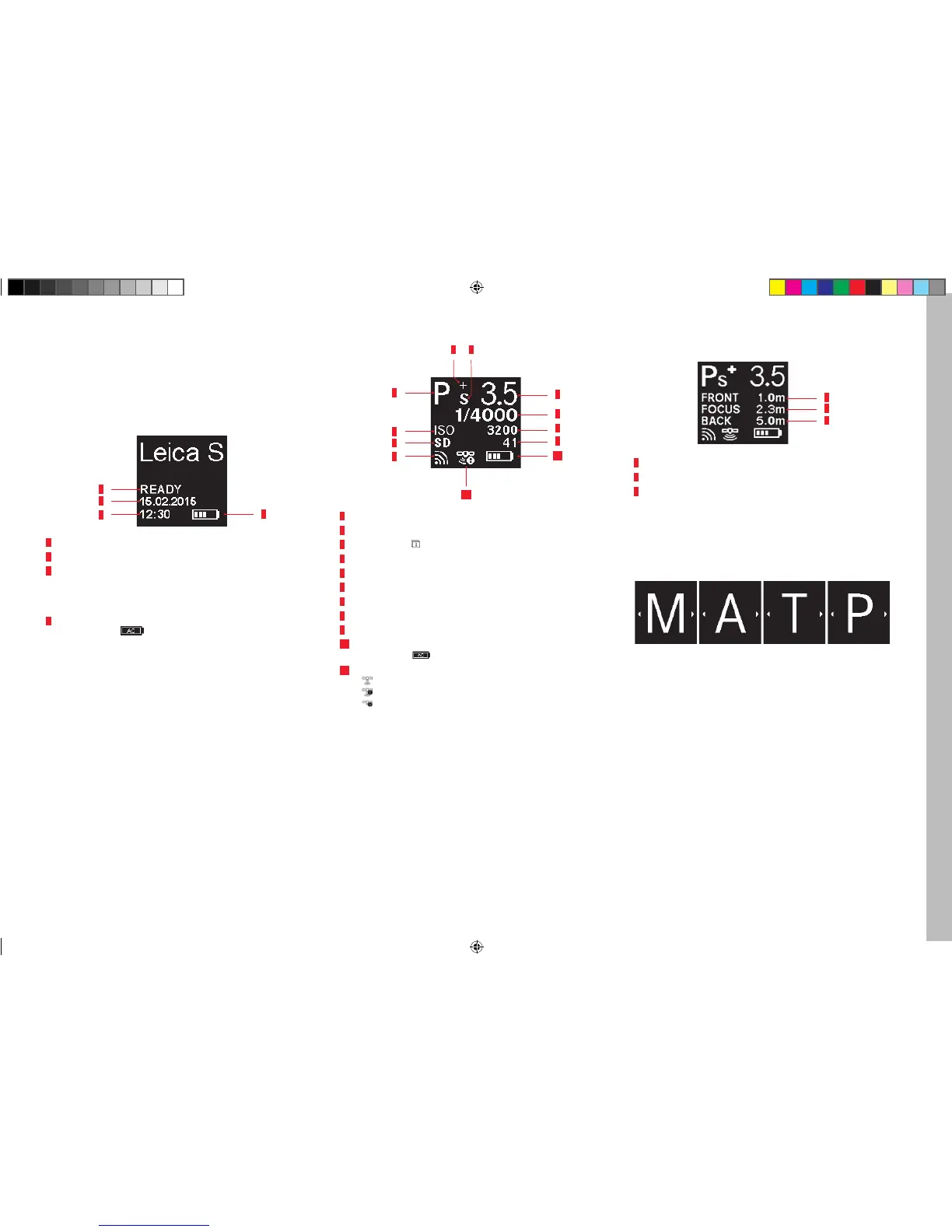
The displays
THE DISPLAYS
IN THE TOP PANEL DISPLAY
Starting view
(appears for approx. 5s after turning on the camera)
4
1
2
3
1 Time
2 Date
3 Camera / memory card status
– READY Ready for recording
– CARD SEARCH Memory card check
– No legible memory card detected
4 Battery capacity (right for battery in camera, left for battery in hand
grip) or symbol
for connected AC power pack adapter S
Standard view
10
7
11
8
3
9
1
2
3
4
5 6
1 WLAN activated
2 Memory card used
3 ISO sensitivity, alternatively interval shooting set
4 Exposure operating mode
5 Exposure compensation set
6 Program shift set
7 Aperture
8 Shutter speed
9 Picture counter
10 Battery capacity (right for battery in camera, left for battery in hand
grip) or symbol
for connected AC power pack adapter S
11 GPS
–
Last position determined up to 6 minutes ago
–
Last position determined up to 24 hours ago
–
No position data available
Depth of fi eld indicator
(for manual distance setting, press shutter button to 1st pressure point)
1
2
3
1 Front limit of the depth of fi eld range
2 Set focal plane
3 Rear limit of the depth of fi eld range
Display when setting the exposure operating mode
(appears only briefl y after holding the rear thumbwheel depressed)
Inhalt_EN.indd 61 12.10.2015 09:34:29



 To Next Page