Installation
Connect Power
This radio should be connected to 13.8V DC power
supply. It can not be connected directly to AC outlet.
Connect the radio to stabilized power supply with
supplied power cable, DC power cable can not be
replaced with a thin wire.
Connect DC power cable to DC power supply, red
wire connects positive, black wire connects negative.
Then plug the jack of the power cable into DC power
outlet of car.
Note: Make sure to turn off DC power supply and
radio before connect. DC power supply is
connected to the vehicle platform, be sure to
turn off DC power supply and drive units.
The DC power can only be connected to AC
power outlet after all connections are
completed.
Radiating of Radio
Heat radiation of mobile transceiver is a very
important problem. Heat radiation of this radio takes
advantage of the air by using a bracket to install. If the
radio installed in an airtight place, it will affect the
3
•
radio cooling. Poor cooling may cause damage to the
radio. Do not place books or other equipment on the
radio, so as not to obstruct the air flow. The distance
between the radio and the wall of car maintain a
minimum interval of 10 cm space.
Install with Bracket
An adjustable angle bracket is supplied with the radio.
Please fix the bracket on car, demount the two screws
beside the radio and lock them again through the hole
of bracket.
Note: Do not place the transceiver in the range of an
airbag deployment may be involved
Do not place the radio in the front windshield of car,
the heat of sun may cause damage to the radio.
Connect Accessories
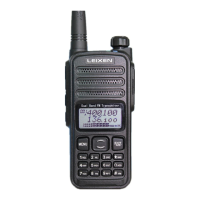
Hand Microphone: Hand microphone connection jack
is located in the top right of the front panel of radio.
Earphone: Earphone connection jack is located in the
right of the rear panel of radio. The internal speaker
will not sound when earphone is connected.
Antenna: Antenna connection is in the left of the rear
panel intercom. Antenna system is composed of an
antenna, feeder and ground network components.
Only careful consideration of the antenna system and
4


 To Next Page