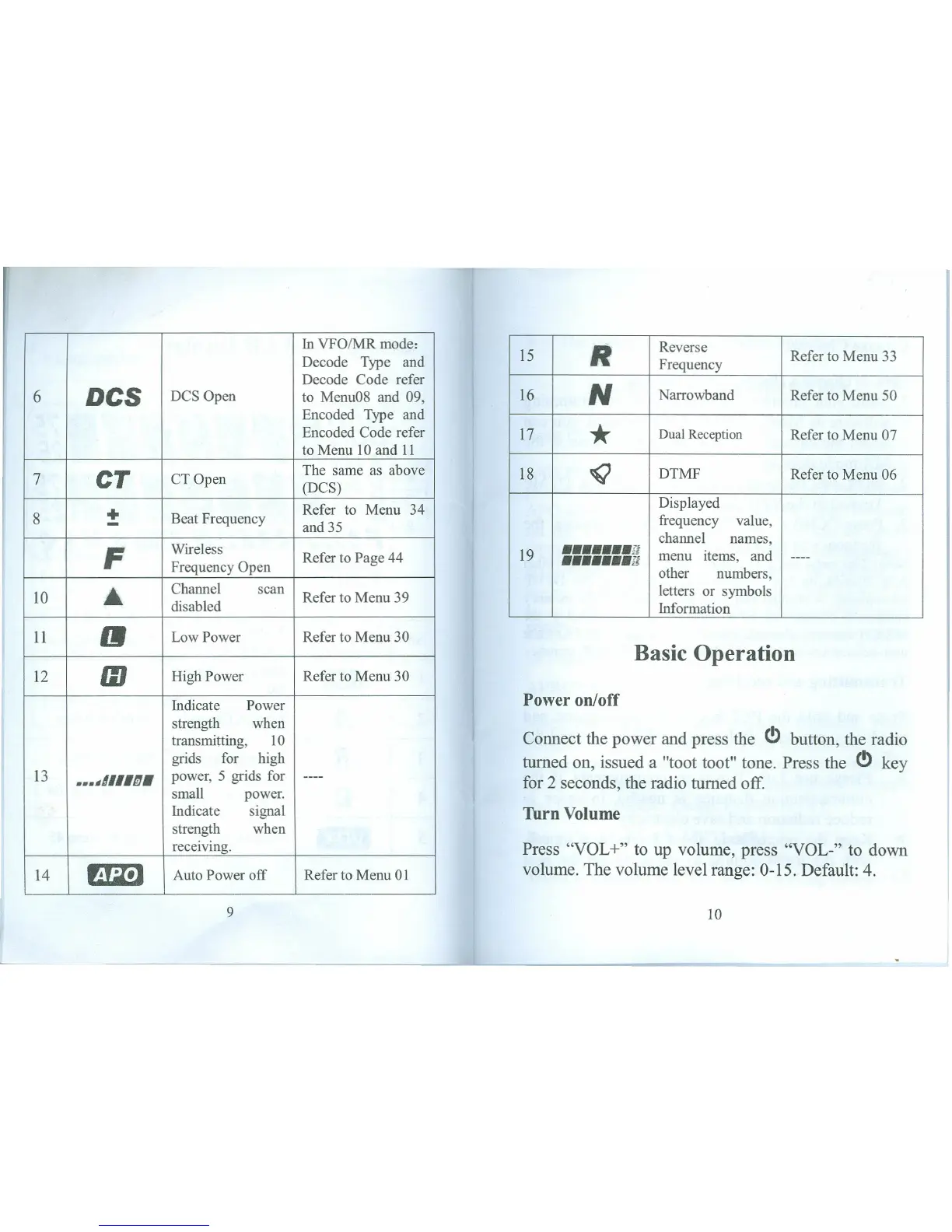
In VFOIMR mode:
Decode
Type
and
Decode Code refer
6
DeS
DCS Open
to ~enu08 and 09,
Encoded Type and
Encoded Code refer
to
Menu
10 and 11
7
eT
CTOpen
The same as above
(DCS)
8
+
Beat Frequency
Refer to
Menu
34
-
and 35
F
Wireless
Refer to Page 44
Frequency Open
10
•••
Channel
scan
Refer to Menu 39
disabled
11
,.
Low Power Refer to Menu 30
12
III
High Power
Refer to
Menu
30
Indicate
Power
strength when
transmitting,
10
grids
for high
l3
•••illlI.lfJ.
power, 5 grids for
----
small
power.
Indicate
signal
strength
when
receiving.
14
rJili]
Auto Power off Refer to
Menu
0
I
9
15
R
Reverse
Refer to Menu 33
Frequency
16
N
Narrowband
Refer to Menu 50
17
*
Dual Reception
Refer to Menu 07
18
~
DT~F
Refer to Menu 06
Displayed
frequency
value,
channel
names,
19
••••••• 11
menu items,
and
----
••••••• 11
other
numbers,
letters or symbols
Information
Basic Operation
Power on/off
Connect the power and press the
e
button, the radio
turned on, issued a "toot toot" tone. Press the
c.!>
key
for 2 seconds, the radio turned off.
Turn Volume
Press
"VOL+"
to up volume, press
"VOL-"
to down
volume. The volume level range: 0-15. Default: 4.
10


 To Next Page