Need help?
Do you have a question about the LEMEGA DR1 and is the answer not in the manual?
Essential safety guidelines for device operation, including warnings against moisture, heat, and unauthorized servicing.
Detailed identification and function of buttons and indicators on the device's control panel.
Using TUNE, MENU, BACK, and PLAY/PAUSE buttons for navigation and playback control.
Operating power, adjusting volume, muting sound, and setting the snooze function.
Selecting audio sources and understanding features like DRC and Source selection.
Performing full scans, manual tuning, and station selection in DAB mode.
Configuring language, alarms, time, backlight, and resetting the device.
Configuring scan settings and adjusting audio quality for FM mode.
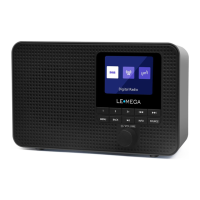
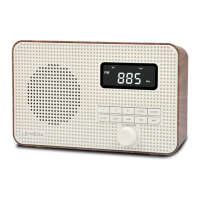
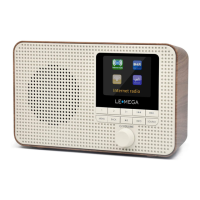
The LE MEGA DR1 is a portable DAB & FM radio designed for ease of use and high-quality audio. It offers a range of features for listening to radio stations, managing settings, and ensuring optimal performance.
The primary function of the LE MEGA DR1 is to provide access to DAB (Digital Audio Broadcasting) and FM (Frequency Modulation) radio stations. It supports both automatic and manual tuning, allowing users to easily find and store their favorite stations. The radio features a clear display that shows station information, time, date, and various settings.
To power on the DR1, users can either connect the provided power cable to a 5V DC input and an outlet, or insert four "AA" batteries into the battery compartment. The rear telescoping antenna should be fully extended for optimal reception. The device is turned on by pressing the Power knob on the front. Upon first power-on in DAB mode, the DR1 will automatically initiate an auto scan to find available stations. The display will indicate the number of stations received.
Users can switch between DAB and FM modes by pressing the SOURCE button.
The volume is adjusted using the SELECT knob, which can be rotated to increase or decrease the audio level.
In DAB mode, the TUNE+/TUNE- buttons allow navigation between different stations. For FM mode, these buttons can be used to manually change the frequency in 0.05MHz increments, provided no sub-menus are active. Pressing and holding the TUNE+/TUNE- buttons for 2 seconds will initiate an auto-scan for stations in both FM and DAB modes. The PLAY & PAUSE button, when pressed and held in DAB/FM mode, will also automatically scan for available radio stations.
The DR1 allows users to store up to 10 DAB stations and 10 FM favorite stations as presets. To store a station, select the desired radio station, then press and hold the PRESET 1/2 button for a second. The display will show "Preset store #:(Empty)" or "#: saved radio station." Users can then select a preset number using the TUNE+/TUNE- buttons or by rotating and pushing the SELECT knob to confirm. To recall a preset station, press the "3+" button once or rotate the SELECT knob to select the desired preset number, then push the SELECT knob to confirm. If a preset has not been allocated a station, "Empty" will be displayed.
The MENU button provides access to mode-specific settings. Pressing it once shows the menu for the current mode, and pressing it again returns to the now playing screen. The BACK button returns to the previous screen. Within menus, the SELECT knob is rotated to scroll through options and pressed to select an option.
The manual emphasizes several safety precautions to ensure the longevity and safe operation of the device:
The telescopic antenna should be fully extended for good reception in both DAB and FM modes. Adjusting its position may be necessary to achieve the best signal.
The DR1 may receive software upgrades from time to time to fix bugs and/or add new features. This feature is intended for service centers.
The device can be powered by four "AA" batteries (not included), offering portability. When using batteries, the SELECT knob is used to switch the device 'on' and 'off'. Unplugging the power adapter turns off the DR1 completely when not using batteries.
Only a dry cloth should be used for cleaning the device.
If no radio stations are found during a scan, users are advised to extend the antenna or perform a full scan again in a different location. For weak FM stations, switching to "Forced mono" in the audio settings can improve sound quality.
The LE MEGA DR1 is designed to be a user-friendly and versatile portable radio, offering a comprehensive set of features for an enjoyable listening experience with clear instructions for safe and effective use.
 Power
Power| power output | 1CH X 2W |
|---|---|
| power supply | 5V DC or 4AA batteries |
 Weight and Dimensions
| weight | 0.45 kg |
|---|---|
| dimensions | 175 x 106 x 54 mm |

 To Next Page