Mode/CD mode; Press and hold the Tune+ button to auto-scan the stations under the
FM mode
1
3 Menu/Back button
BACK: press the BACK to return to the previous screen.
M
ENU: press the MENU to show the MENU for the current mode. Press again to show
now playing screen
1
4 CD stop and eject button, in CD mode, Press to stop CD track. Press again for
CD ejection
1
5 Press to select Play/Pause under internet radio, Spotify, CD and BT mode. In
FM mode, pres
s to do auto scans the stations
2
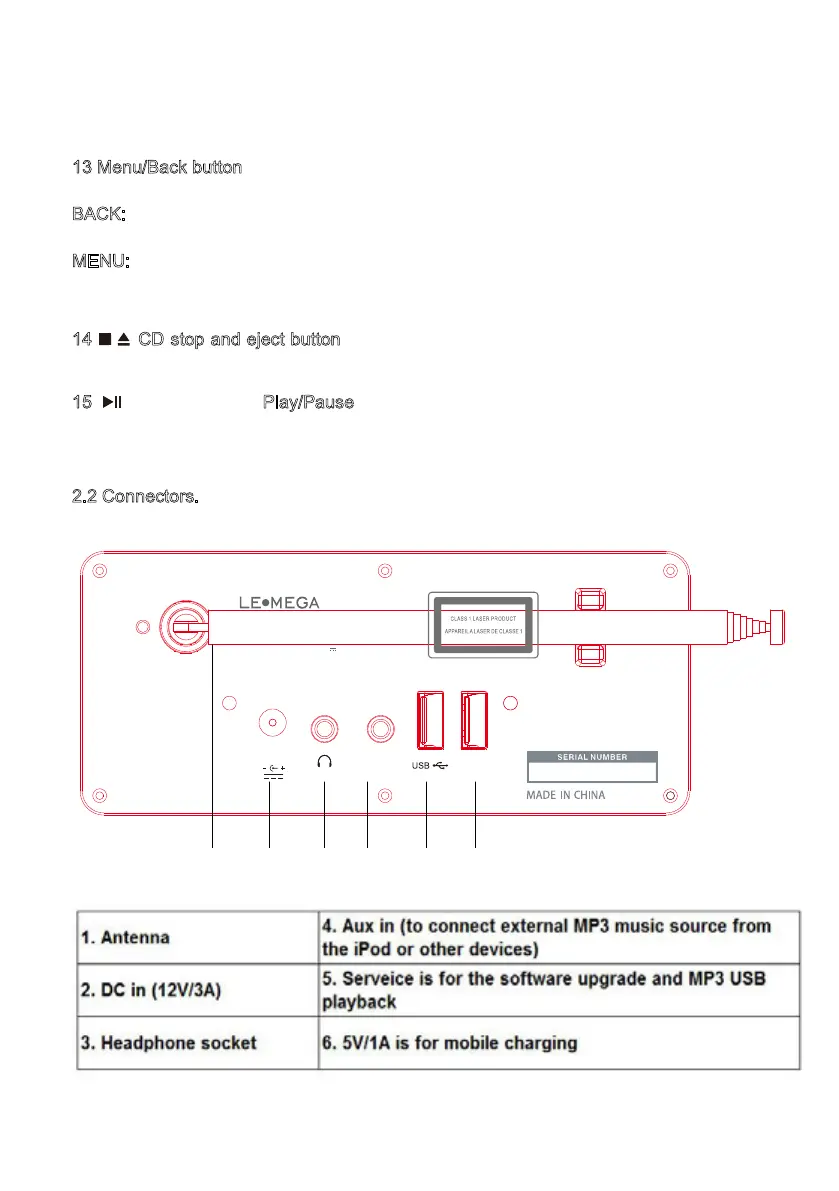
.2 Connectors.
As shown below has connectors (from left to right) for the following:
9
DC 12V/3A
AUX IN 5V 1A
MODEL : MSY5
INPUT : DC 12V 3A
ALL-IN-ONE MUSIC SYSTEM
1 2 3 4 5 6


 To Next Page