Need help?
Do you have a question about the LEMFO C21 pro and is the answer not in the manual?
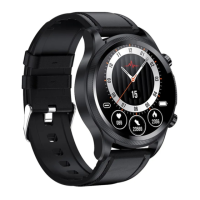
Details the main smart watch device included in the package.
Identifies the magnetic charging cable provided with the watch.
Indicates the user manual itself is part of the box contents.
Instructions to activate the watch by charging it for the first time using the magnetic charger.
Explains the functions of the Power key, Sport key, and the location of the microphone.
Identifies the charging port, heart rate sensor, air pressure hole, and speaker.
Overview of the watch's primary interface showing time and activity data.
Visual introduction to Sleep, Weather, and Messages interfaces on the watch.
Details icons for power saving, brightness, do-not-disturb, Bluetooth call, and other settings.
Two methods to download the 'FitCloudPro' app: scanning QR code or searching in app stores.
Specifies compatible iOS (9.0+) and Android (6.0+) versions, and unsupported PC/Tablet.
Granting Bluetooth and notification permissions to the FitCloudPro app upon first use.
Searching for and selecting the 'C21 Pro' device within the app to initiate pairing.
Accepting the binding request on the watch to complete the connection with the phone.
Granting the app permission to access contacts and call history for full watch functionality.
Enabling app permissions for call alerts, SMS, and other messaging notifications.
Allowing the app to read and manage device notifications for features like call logs and messages.
How to enable/disable Bluetooth calling, receive, and make calls directly from the watch.
Setting watch faces via the watch screen or the app's 'Dial library' feature.
Selecting menu styles and adjusting screen brightness and time settings via the app.
Records calories, steps, and distance data for 24 hours and past seven days.
Instructions for accurate heart rate monitoring, ensuring tight fit and stillness.
Guidelines for blood pressure measurement, requiring a tight fit and still wrist for one minute.
Procedure for blood oxygen measurement, needing a tight fit and still wrist for about one minute.
Tracks daily light and deep sleep data for up to seven days.
Supports 8 built-in sports modes and 100+ modes via the app.
Enabling message notifications from specific apps via the FitCloudPro app settings.
Using the watch as a voice companion for music, alarms, and weather information.
Setting up to 5 alarm clocks via the FitCloudPro app.
Displays real-time weather temperature and conditions when paired with the app.
Controlling mobile music playback, volume, and song switching from the watch.
Using the watch to trigger the phone's camera remotely.
Details on 1ATM waterproof and dustproof design for daily use, not for seawater or hot water.
Accessing FAQs and tech support via the FitCloudPro app's 'Me' section.
Warnings against high temperatures, disassembly, and use in saunas/hot showers.
Clarifies that health data is for reference only and not a medical basis.
Details on model, screen size, battery, voltage, data transmission, weight, temperature, and OS compatibility.
Note that the device is not a medical device and data is for reference only.

 To Next Page
 General