19
3. After connecting, press the button to turn on the projector and the
power indicator light up GREEN.
4. Press the /
SOURCE
button to enter and use the buttons to search the
MEDIAPLAYER mode.
5. After selection, use the buttons to search the MUSIC/PHOTO/MOVIE
icon and press the button to enter, if necessary, use the button to
select Micro SD card or USB and press the button to enter.
6. Use the buttons to search the correct file and press the button to
preview playback file and press the button of unit or button of
remote to start playback.
7. Press button to search forwards and backwards quickly.
8. Press button to search next or previous file.
9. During playback, press the button to pause and press again to resume.
NOTE: Remove USB/Micro SD card device, press the button to turn off
power FIRST.
1.
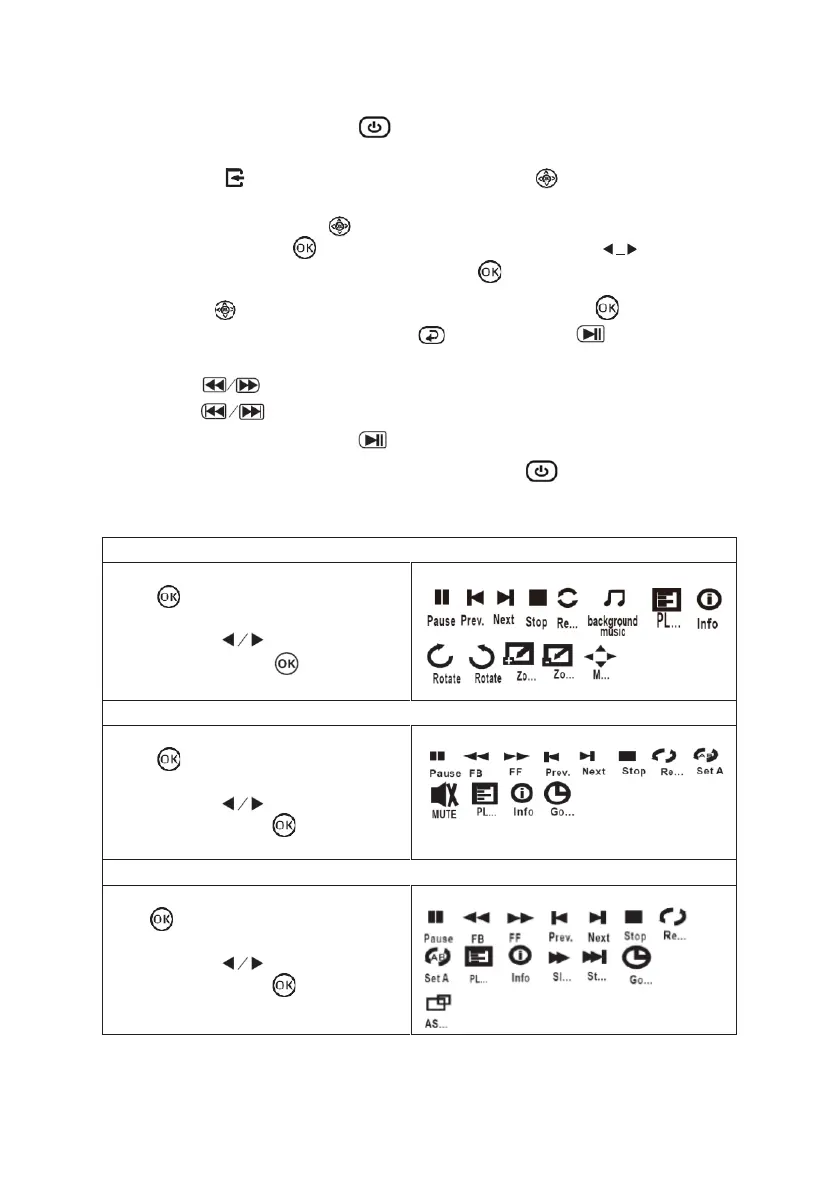
While playing photos, press the
button and more function
are being displayed (figure 1).
2.
Use the button to select
icon and press button to
play special function.
3.
While playing music, press the
button and more function
are being displayed (figure 2).
4.
Use the button to select
icon and press button to
play special function.
5.
While playing a movie, press the
button and more function are
being displayed (figure 3).
6.
Use the button to select
icon and press button to
play special function.


 To Next Page