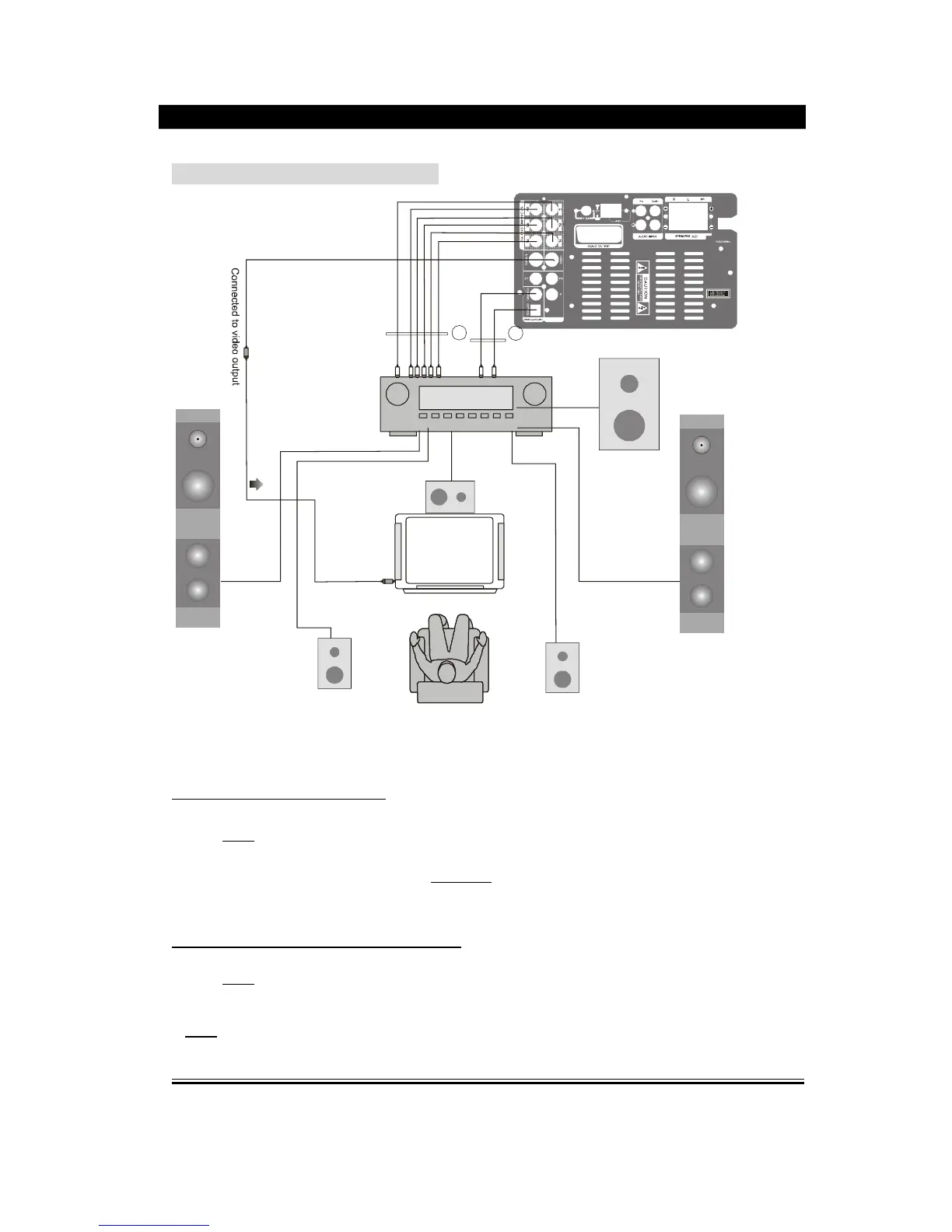
Setup of Digital Audio Output
Connect the optical and coaxial output jack to the amplifier. In the status of play or stop,
press
setup
button on the remote controller to open the system setup page, switch to
audio setup page by pressing the direction buttons, then move the cursor to Audio Out,
select SPDIF/RAW or SPDIF/PCM, press
Play/Enter
button to finish. Press setup button
again to exit this setup.
Setup of 5.1 CH Analog
ue Audio Output
Connect the FL, FR, SL, SR, CEN, SW jack to the amplifier. In the status of play or stop,
press
setup
button on the remote controller to open the system setup page, switch to
loudspeaker setup page, set the Downmix to be 5.1 CH, then set the subwoofer and
Bass Mode to be ON, set the Center Delay and Rear Delay to be optimal status, Press
setup
button to exit.


 To Next Page