8
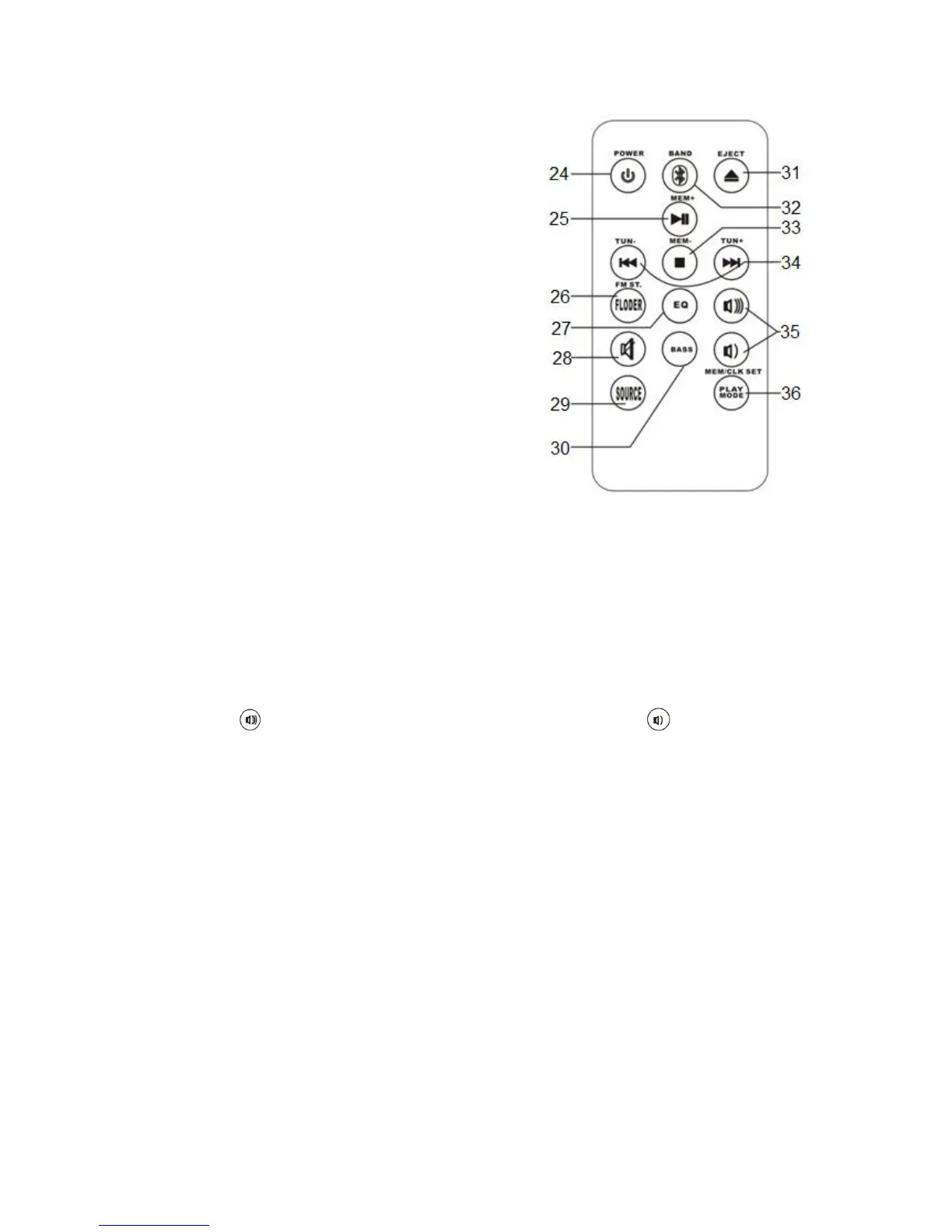
Afstandsbediening
24. Power button, press this button to turn the
device on or off.
25. Play / pause, mem+ button, use this button
to pause a track or to browse through the
preset stations.
26. Folder, FM ST button, use this button to skip
10 tracks or to switch between mono and
stereo radio reception.
27. Equalizer button, press this button to
browse through the different equalizers.
28. Mute, press this button to mute the sound.
29. Source button, press this button to select
the source.
30. Bass button, press this button to turn the
BASS BOOST function on or off. BASS
BOOST provides extra bass.
31. Eject button, press this button to eject the
CD.
32. Bluetooth®, band button, use this button to switch to the pairing mode or to
switch between AM and FM.
33. Stop, mem- button, press this button to stop playback or to browse through the
preset stations.
34. Previous / next, tune- / tune+ buttons, use these buttons to skip to the
previous / next track or to change the radio frequency.
35. Volume buttons, these buttons can be used to control the volume. Press the
volume button to increase the volume, press the volume button to
decrease the volume.
36. Play mode, memory, clock set button, use this button to set the repeat mode,
to save a radio frequency or to set the clock.


 To Next Page