NOTE :
FMstereoLEDindicatorlights
if receive FM stereo broadcast .
AFTER LISTENING
Set the FUNCTION selector to OFF.
POWER SUPPLY
USING HOUSE CURRENT
Beforeuse,checkthattheratedvoltageofyourunit
matchesyourlocalvoltage.
Note:Plugisusedasthedisconnectdevice.
Thedisconnectdeviceshallremainreadily
operable.
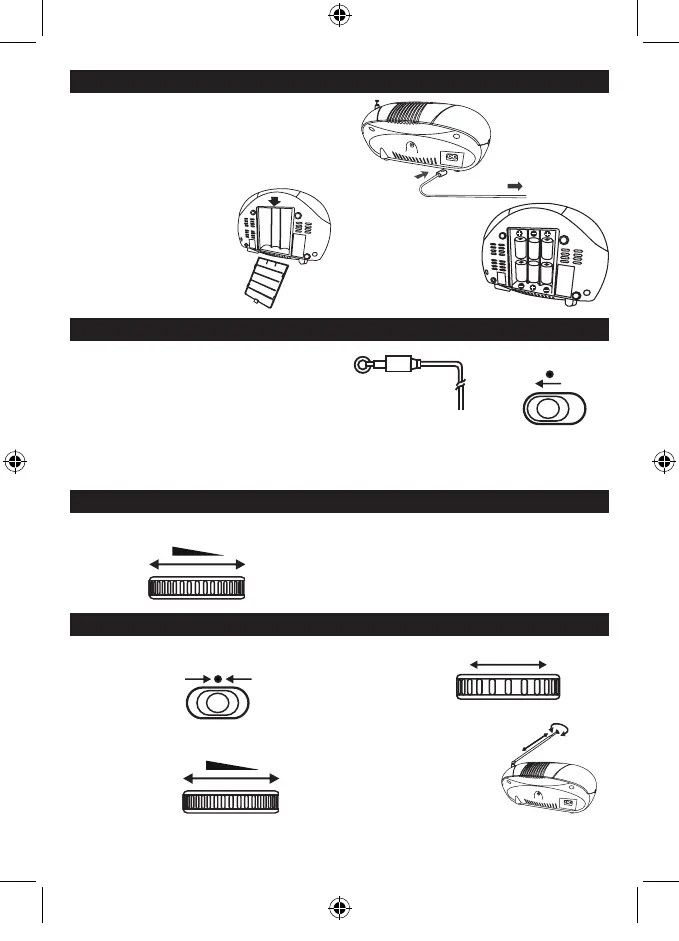
USING BATTERIES
Disconnect the AC power cord from
the AC inlet of the unit.
Batterypoweriscut
automaticallybythecord
while it is connected.
InsertsixUM-2
(sizeC)batteries.
batterydoor
When the volume decrease,
or the sound distorts,
replace all of the batteries
with new ones.
To AC socket
To AC outlet
AUX IN
FUNCTION
AUX. IN
AUX. IN
Anexternal(auxiliary)audiosource(i.e.,personalCDplayer
orMP3player)canbeconnectedtothisunitandheardthrough
the speakers.
1) PlugoneendofcableintotheAUXINsocketontheunit.
2) PlugtheotherendofthecableintotheHeadphoneor
LineOutsocketoftheexternalsource.
3) SetfunctionswitchontheunittoAUXIN.
ContinuetooperateCDorMP3playerasusual.Selectionswillbeheardthroughtheunit'sspeakers.
(Plugotherendintoexternal
sourcesuchasanMP3player.)
ADJUSTING THE SOUND
TO ADJUST THE VOLUME
VOLUME
MAX.
MIN.
LISTENING TO THE RADIO
1 . Set to FM
2. Tuneintoastation.
TUNING
GB2
Unitwillbeautomaticallyoffatabout15minswithoutfurtheroperation.
Afterautooff,slidetheFUNCTIONselectortoOFFpositionandthenslidetoAUXINpositionforlistening.
FUNCTION
FM
3 . Adjust the sound.
FOR BETTER RECEPTION
FM
VOLUME
MAX.
MIN.
SCD37USB -LENCO -FM-ENGLISH IM 230V - RED 2017 + TEMP.indd 4 3/10/2017 12:28:20



 To Next Page