7. Press the " PLAY/PAUSE " buttons to resume
programmedplayback.
8. Open the CD door or turn offthe CD player or press
“ STOP ” button twice to clear the programmed
memory.
Note : Programmingcanonlybemadewhentheplayer
is in stop mode.
NoteonCD-R/RWdiscs
- Becauseofnon-standardizedformatdenition/production
ofCD-R/RW,playbackqualityandperformancearenotguaranteed.
- ManufacturerisnotresponsiblefortheplayabilityofCD-R/RWdueto
recordingconditions,suchasPCperformance,writingsoftware,mediaability,etc.
- DonotattachasealorlabeltoeithersideoftheCD-R/RWdisc.Itmaycauseamalfunction.
- ItisrecommendedtorecordonlyaudiolesonCD-R/RWdiscsforeasyreading.
FOR MP3 / USB PLAYBACK
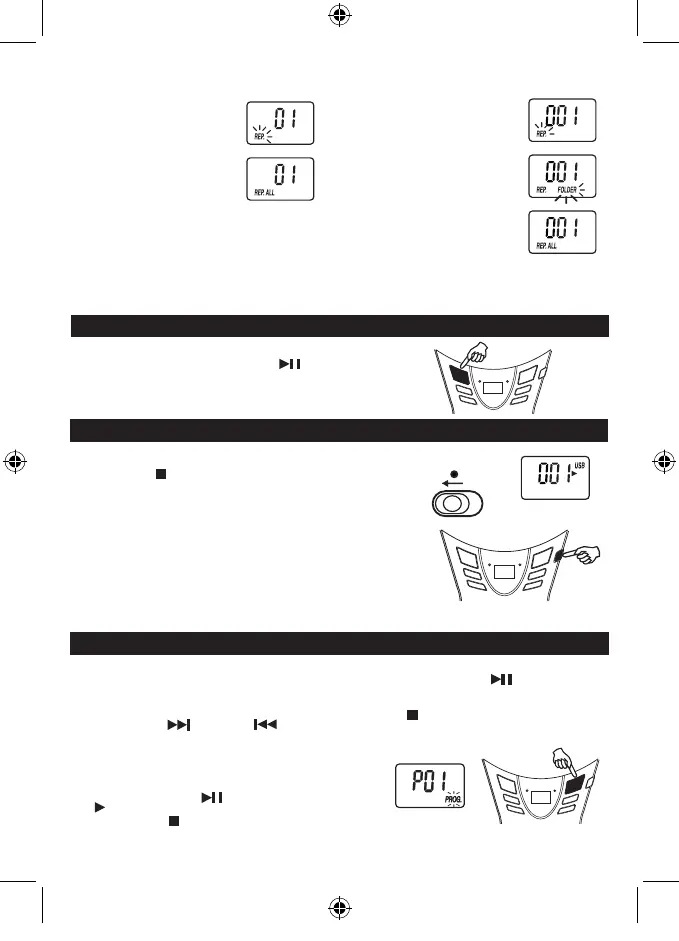
ModesequenceREPEAT>>REPEATFOLDER>>
REPEATALL>>CLEAR.
DuringRepeat1mode,displayshows
DuringRepeat2mode,displayshows
DuringRepeat3mode,displayshows
FOR NORMAL COMPACT DISC PLAYBACK
ModesequenceREPEAT>>REPEATALL>>CLEAR.
DuringRepeat1mode,displayshows
DuringRepeat2mode,displayshows
CDdisplay
MP3/USBdisplay
GB 4
FOLDER UP
ForMP3/USBplayback,whentheunitisatSTOPmode,skipuptonextfolder/
albumatincreasingorder,pressPLAY/PAUSEbuttontostarttheplayback
oftheselectedfolder/album.
WhentheunitisatMP3/USBPLAYBACKmode,skipuptonextfolder/albumat
increasingorder,thenitwillstartplaybackoftheselectedfolder/album.
USB OPERATION
1. Set to USB.
2. ConnectUSBdiskorMP3playerintotheUSBport.
3. PresstheSTOP/CD/USBbuttonandplayautomatically.
note: USBconnectordoesnotsupportconnectionwithUSBextensioncableand
itisnotdesignedforcommunicationwithcomputerdirectly.
ManufacturerisnotresponsiblefortheplayabilityofUSBdiskorMP3player
duetorecordingcondition,capacity,interfacecompatibility,etc.
Duetodifferentformats,someUSBdisksorMP3playersmaytakelonger
time to be read.
USB stick is direct connected or with a cable with max. 0,5 m length.
USBdisplay
USB
FUNCTION
Unitwillbeautomaticallyoffatabout15minswithoutfurtheroperation(instopmode).
Afterautooff,slidetheFUNCTIONselectortoOFFpositionandthenslidetoUSBpositionforlistening.
PROGRAMMED PLAYBACK
CDdisplay
" PROGRAM "
PROGRAMMED PLAYBACK
FOR NORMAL COMPACT DISC PLAYBACK
Programmedplaybackenablestracksonadisctobeplayed
inthedesiredorder.Upto20trackscanbeprogrammed.
1. Press the " PROGRAM " button.
2. Pressthe"NEXT"and"PREV"buttons
to select the desired track number.
3. Press " PROGRAM " button again to memorize the
track.
4. Repeat steps 2 and 3 until all desired tracks are
programmed.
5. Pressthe"PLAY/PAUSE"buttontostart.
""&"PROG."areshownontheCDdisplay.
6. Press the " STOP " button once to stop
programmedplayback.
SCD37USB -LENCO -FM-ENGLISH IM 230V - RED 2017 + TEMP.indd 6 3/10/2017 12:28:21



 To Next Page