GB 5
MP3/USBdisplay
" PROGRAM "
7. Press “ STOP ” button once to stop programmed
playback.
8. Press“PLAY/PAUSE”buttontoresume
programmedplayback.
9. Open the CD door,turn off the CD player or press
“ STOP ” button twice to clear the programmed
memory.
Note :Programmingcanonlybemadewhentheplayer
is in stop mode.
CLEANING THE UNIT
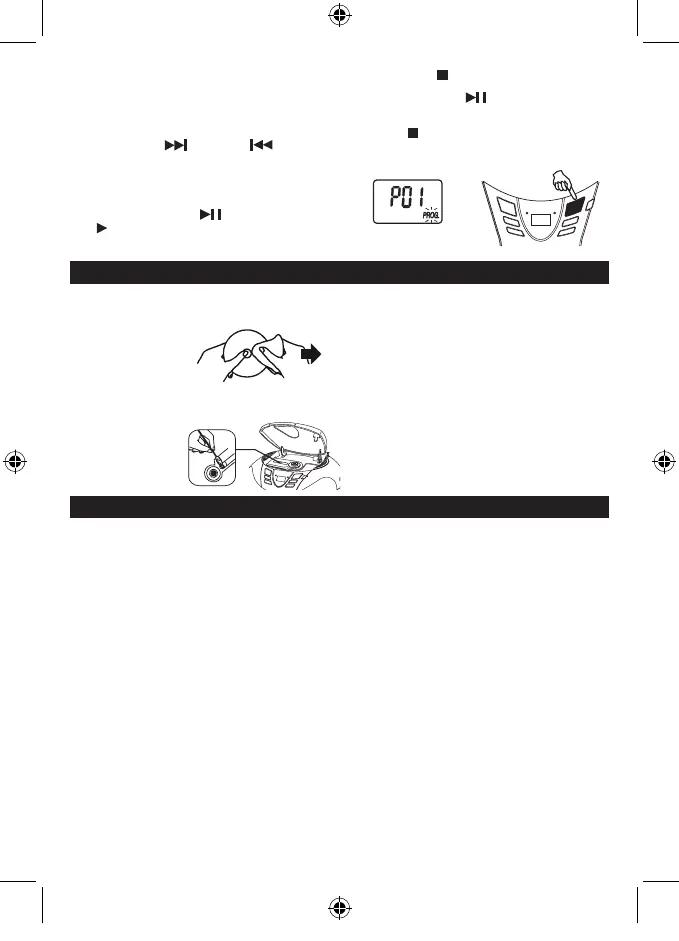
Donotusevolatilechemicalsonthisunit.Cleanbylightly
wipingwithasoftcloth.
IMPORTANT NOTE
Ifanabnormaldisplayindicationoranoperatingproblem
occurs, disconnect the AC power cord and remove the
batteries. Wait at least 5 seconds, then reconnect the AC
power cord or reinstall the batteries.
WARNING
ShouldtheCDdoorbeopenedbeforethereadingoftheCD
iscompleted,ajammingnoisemayoccur.Thisisresolved
byclosingtheCDdoor.
CLEANING CD
IftheCDskipsorwillnotplay,thediscmayneedclean-
ing.Beforeplaying,wipethediscfromthecentreoutwith
acleaningcloth.
Afterplaying,store
the disc in its case.
MAINTENANCE
CLEANING THE CD LENS
IftheCDlensisdusty,cleanitwithabrush-blower.Blow
several times on the lens and remove the dust with the
brush.Fingerprintsmay
be removed with a cotton
swab moistened with
alcohol.
FOR MP3 / USB PLAYBACK
Programmedplaybackenablestracksonadisctobeplayed
inthedesiredorder.Upto20trackscanbeprogrammed.
1. Pressthe“PROGRAM”button.
2. Press the “FOLDER UP” buttons to select the desired
folder.
3.Pressthe“NEXT”and“PREV”buttons
to select the desired track number.
4. Press ‘PROGRAM” button again tomemorize the
selected track.
5. Repeatsteps2to4untilalldesiredtracksare
programmed.
6. Pressthe“PLAY/PAUSE”buttontostart.
““,“PROG.”and“MP3”/“USB"areshownon
theCDdisplay.
SPECIFICATIONS
CD SECTION
Channels: 2channels
S/Nratio: 60dB
Wow&Flutter: undetectable
Samplingfrequency: 44.1kHz8xoversampling
Quantization: 1bitDAconverter
Pickuplightsource: Semi-conductorlaser
Pickupwavelength 790nm
RADIO SECTION
Tuningranges: FM87.5-108MHz
Antennas: FM Rod antenna
GENERAL
Outputpower: 1.2W+1.2W(RMS)
Power consumption: 11.5 W
Speaker: 3 " 8 OHM
Powersource: AC:230V~50Hz
DC:9V( 6x1.5VLR14/"C"/UM2notincluded)
Operatingtemperaturerange: 0°Cto40°C
Dimensions: 259(L)x223(D)x125(H)mm
Weight 1.28KGS
Duetocontinuingimprovement,thefeaturesandthedesignaresubjecttochangewithoutnotice.
SCD37USB -LENCO -FM-ENGLISH IM 230V - RED 2017 + TEMP.indd 7 3/10/2017 12:28:22



 To Next Page