GB 3
COMPACT DISC PLAYBACK
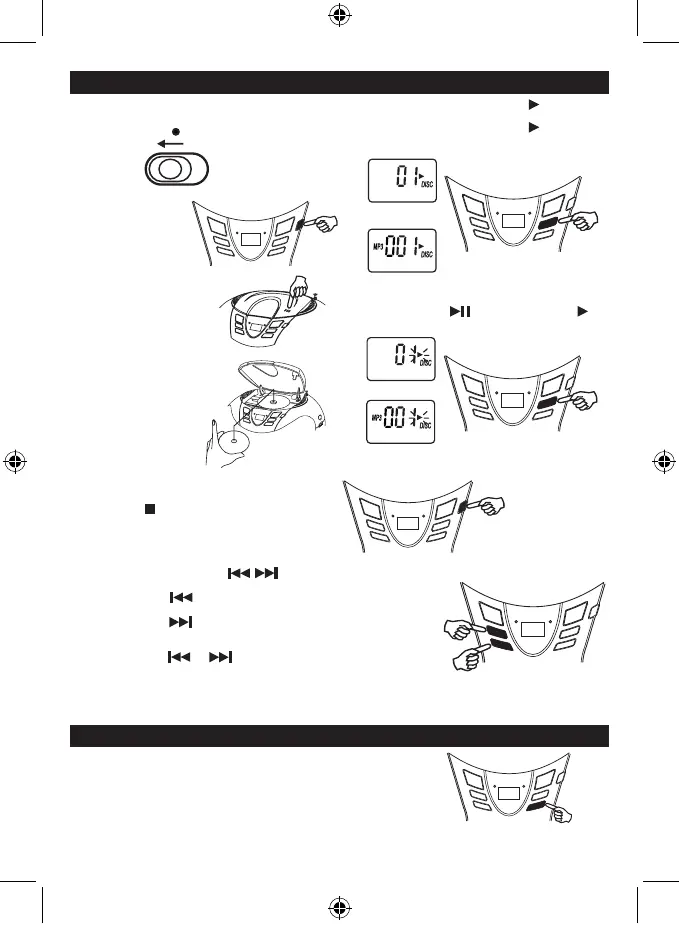
1 . Set to CD
CD
FUNCTION
6. Tracknumber"01"&thesymbol""&"DISC"
willbeshownduringnormalcompactdiscplayback.
Tracknumber"001",thesymbol""&"DISC&
MP3"willbeshownduringMP3playback.
TO INTERRUPT PLAYBACK
PressthePlay/Pausebuttonandthesymbol""will
beashed.Pressthebuttonagaintoresumeplayback.
CDdisplay
MP3display
TO STOP PLAYBACK
PresstheSTOP/CD/USBbuttonandthedisplayshows
the total tracks of the disc.
TO SKIP TO THE BEGINNING OF A TRACK
• PresseitheroneofthePREVNEXTbuttonsaccordingtothedesiredskipdirection.
• Play/backresumesfromtheselectedtrack.
• WhenthePREVbuttonispressedonceduringplay,thecurrenttrack
startsagain.
• WhentheNEXTbuttonispressedonceduringplay,thenexttrackplays.
SEARCHING FOR A PASSAGE WITHIN A TRACK
• KeepthePREVorNEXTbuttonpressedduringplayback,
andreleasethebuttonassoonasyourecognisethedesired
Unitwillbeautomaticallyoffatabout15minswithoutfurtheroperation(instopmode/CDdooropen).
Afterautooff,slidetheFUNCTIONselectortoOFFpositionandthenslidetoRADIO/CDpositionforlistening.
REPEAT , REPEAT FOLDER AND REPEAT ALL PLAYBACK
PressREPEATbuttonduringCDplayback.CDplayswithasingletrackrepeat,
all tracks repeat.
CDdisplay
MP3display
2. PresstheSTOPbutton
repeatedlyuntil“Cd”
isshownondisplay.
3. OpentheCDdoorbypushing
Open/CloseCDbutton.
4. Insert a disc with the label
sidefacingup.
5 . Close the CD door.
The disc will rotate and
1sttrackwillbeplayed
automatically.
SCD37USB -LENCO -FM-ENGLISH IM 230V - RED 2017 + TEMP.indd 5 3/10/2017 12:28:21



 To Next Page