Selecting a power source
You can use the AC power outlet or batteries as a power source.
Note: Batteries are not included.
Connecting via the AC power cord
Insert one end of the supplied AC power cord into the AC IN socket located at
the rear view of the player, and the other end to the wall outlet.
Note: If the plug of the AC power cord does not match your outlet, do not force it.
Reverse it and try again. The plug is polarized and only fits one way into the wall
outlet and rear of the set.
Using the device on batteries
Important: Remove the AC power cord while operating the unit on batteries.
Notes:
-Lenco recommends the use of A-Brand batteries.
-Replace the batteries when the POWER LED dims or when the player
stops operating.
-If the CD does not play, this means that the batteries are almost empty.
Loading the batteries:
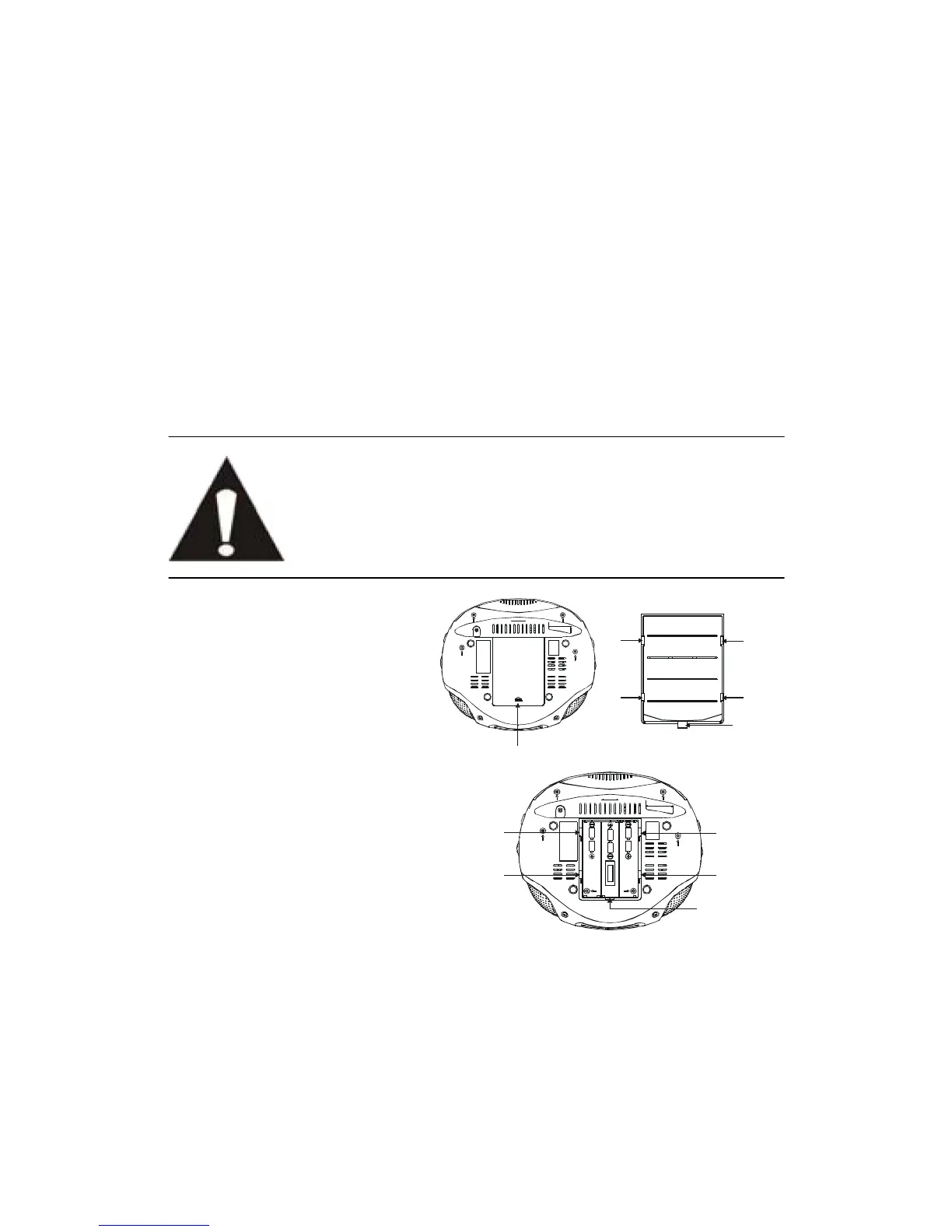
1. Roll over the unit so that the
battery compartment
becomes accessible.
2. Use one finger to press the
sagging block towards the
arrow on the battery cover
and then push the cover to
the arrow until hearing a click,
now hold the front edge of the
cover and turn up to remove it.
3. Place 6 size "C" batteries into
the battery compartment
according to the direction of
“+” and “-“electrode marked
inside of the battery
compartment.
4. Place the buckle of the cover
towards the buckle groove and place the 4 legs of the cover face to the leg
grooves to wedge the cover onto the player and then push it into previous
position to close it.
leg groove
leg groove



 To Next Page