GB 4
Note on CD-R/RW discs
- Becauseofnon-standardizedformatdenition/productionofCD-R/RW,playbackqualityandperformancearenot
guaranteed.
- ManufacturerisnotresponsiblefortheplayabilityofCD-R/RWduetorecordingconditions,suchasPCperformance,
writingsoftware,mediaability,etc.
- Do not attach a seal or label to either side of the CD-R/RW disc. It may cause a malfunction.
- ItisrecommendedtorecordonlyaudiolesonCD-R/RWdiscsforeasyreading.
FOLDER UP
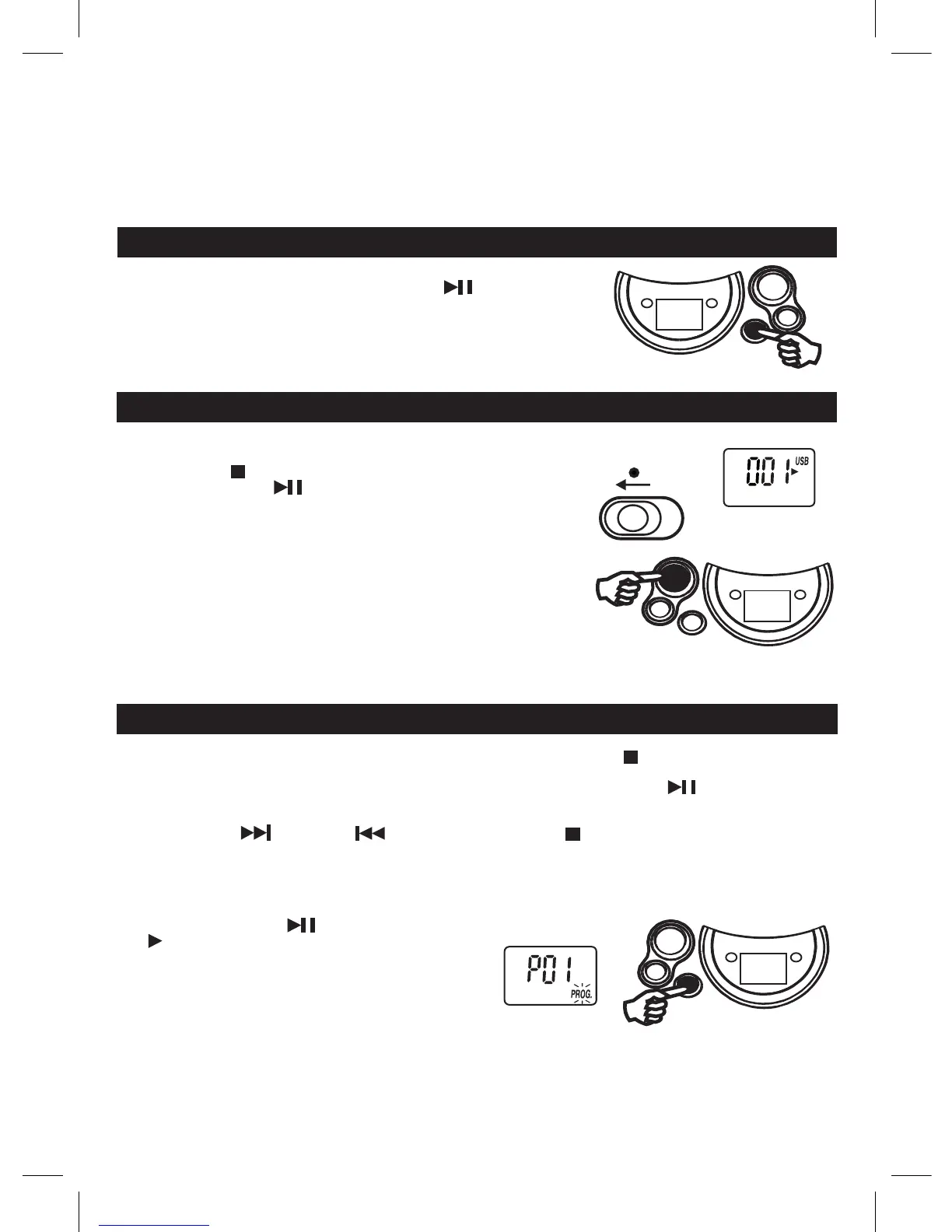
For MP3/WMA/USB playback, when the unit is at STOP mode, skip up to next
folder/album at increasing order, press PLAY/PAUSE button to start the
playback of the selected folder/album.
When the unit is at MP3/WMA/USB PLAYBACK mode, skip up to next folder/album
atincreasingorder,thenitwillstartplaybackoftheselectedfolder/album.
USB OPERATION
1. Set to USB.
2. Connect USB disk or MP3 player into the USB port.
3. Press the STOP / CD / USB button and display will show total track & "USB".
4. Press the PLAY/PAUSE button to start playback.
note: USB connector does not support connection with USB extension cable and
itisnotdesignedforcommunicationwithcomputerdirectly.
Manufacturer is not responsible for the playability of USB disk or MP3 player
duetorecordingcondition,capacity,interfacecompatibility,etc.
Duetodifferentformats,someUSBdisksorMP3playersmaytakelonger
time to be read.
USB stick is direct connected or with a cable with max. 0,5 m length.
USB display
USB
FUNCTION
Unit will be automatically off within 15 mins without further operation (in stop mode).
Afterautooff,slidetheFUNCTIONselectortoOFFpositionandthenslidetoUSBpositionforlistening.
PROGRAMMED PLAYBACK
CD display
" PROGRAM "
PROGRAMMED PLAYBACK
FOR NORMAL COMPACT DISC PLAYBACK
Programmedplaybackenablestracksonadisctobeplayedin
thedesiredorder.Upto20trackscanbeprogrammed.
1. Press the " PROGRAM " button.
2. Press the " NEXT " and " PREV " buttons
to select the desired track number.
3. Press"PROGRAM"buttonagaintomemorizethe
track.
4. Repeat steps 2 and 3 until all desired tracks are
programmed.
5. Press the " PLAY/PAUSE " button to start.
" " & " PROG. " are shown on the CD display.
6. Press the " STOP " button once to stop
programmedplayback.
7. Press the " PLAY/PAUSE " buttons to resume
programmedplayback.
8. Open the CD door or turn off the CD player or press
“STOP”buttontwicetocleartheprogrammed
memory.
Note : Programmingcanonlybemadewhentheplayer
is in stop mode.



 To Next Page