GB 3
FM
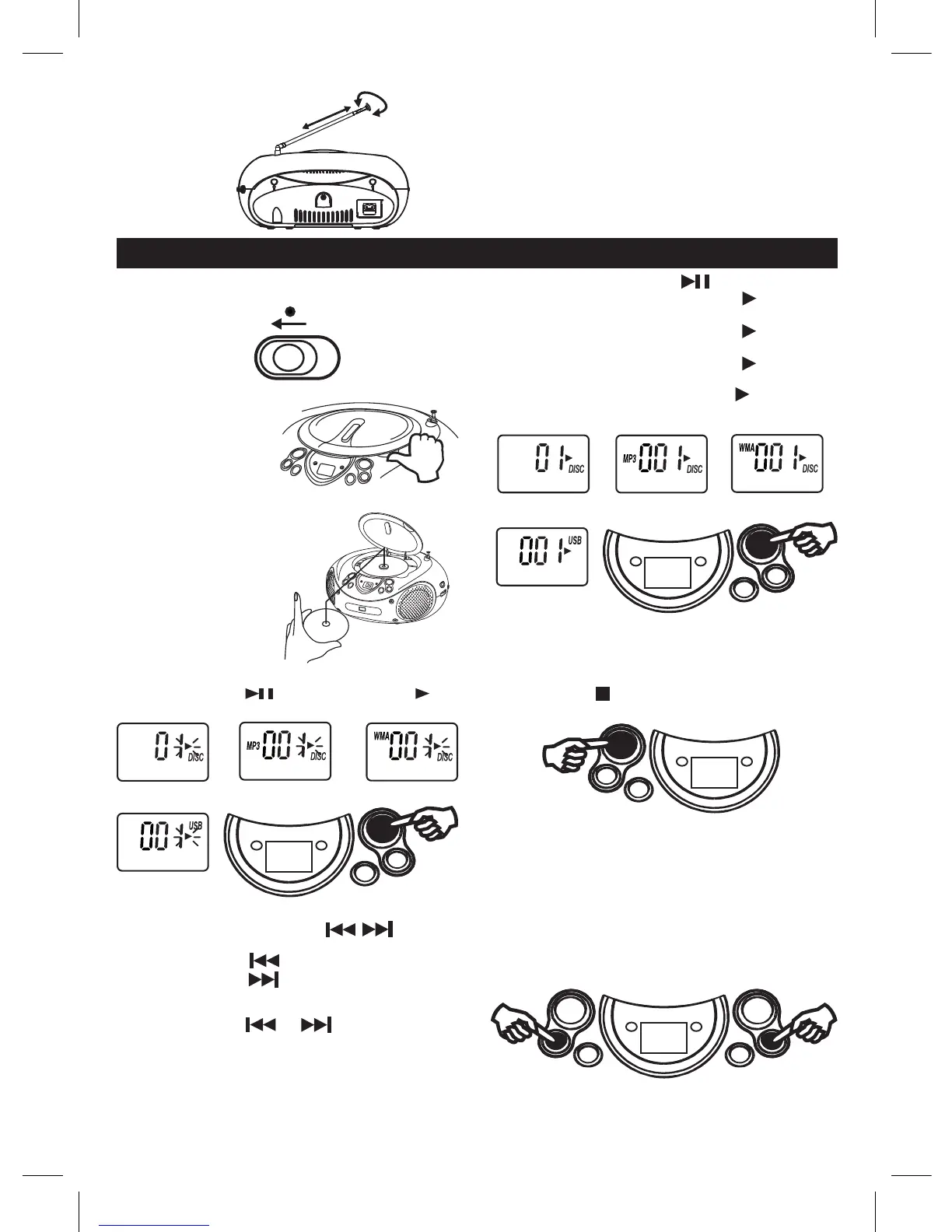
COMPACT DISC PLAYBACK
NOTE :
FMstereoLEDindicatorlightsifreceiveFMstereobroadcast.
AFTER LISTENING
Set the FUNCTION selector to OFF.
1 . Set to CD
2. OpentheCDdoorbypushing
Open / Close CD button.
3. Insertadiscwiththelabelsidefacingup.
4 . Close the CD door.
The disc will rotate and
the total tracks of the disc
will show on the display.
CD
FUNCTION
5. Press the PLAY/PAUSE button.
Track number "01" & the symbol " " & "DISC"
willbeshownduringnormalcompactdiscplayback.
Track number "001", the symbol " " & "DISC &
MP3"willbeshownduringMP3playback.
Track number "001", the symbol " " & "DISC &
WMA"willbeshownduringWMAplayback.
Track number "001", the symbol " " & "USB"
willbeshownduringUSBplayback.
CD display
MP3 display WMA display
USB display
TO INTERRUPT PLAYBACK
Press the Play/Pause button and the symbol " " will
beashed.Pressthebuttonagaintoresumeplayback.
CD display
MP3 display WMA display
USB display
FOR BETTER RECEPTION
TO STOP PLAYBACK
Press the STOP /CD/USB button and the display
shows the total tracks of the disc.
TO SKIP TO THE BEGINNING OF A TRACK
• PresseitheroneofthePREVNEXTbuttonsaccordingtothedesiredskipdirection.
• Play/back resumes from the selected track.
• WhenthePREVbuttonispressedonceduringplay,theprevioustrackstartsagain.
• WhentheNEXTbuttonispressedonceduringplay,thenexttrackplays.
SEARCHING FOR A PASSAGE WITHIN A TRACK
• Keep the PREV or NEXT button
pressedduringplayback,andreleasethebutton
assoonasyourecognisethedesiredpassage.
Then normal CD playback will resume from this point.
Unit will be automatically off within 15 mins without further operation (in stop mode / CD door open).
Afterautooff,slidetheFUNCTIONselectortoOFFpositionandthenslidetoRADIO/CDpositionforlistening.



 To Next Page