The clock is displayed on LCD display at standby mode.
1. Press and hold the PROG / CLOCK-ADJ./PLAY MODE button,
2. Press the NEXT or BACK to select 12 hours or 24 hours display.
3. Press the PROG / CLOCK-ADJ./PLAY MODE button, the hour digit ash.
4. Press the NEXT or BACK to adjust hour digit.
5. Press the PROG / CLOCK-ADJ./PLAY MODE button,
the minute digit ash.
6. Press the NEXT or BACK to adjust minute digit.
7. Press the PROG / CLOCK-ADJ./PLAY MODE button again,
the correct time is shown on display.
GB 2
ADJUSTING THE SOUND
FOR PRIVATE LISTENING
Plug in headphones (ø3.5 mm stereo mini-plug) to the
PHONES jack.
When headphones are plugged in, the speakers are
automatically disconnected.
TO ADJUST THE VOLUME
MIN. MAX.
VOLUME
TURN ON / OFF THE SYSTEM
STANDBY
CLOCK ADJUSTMENT
CLOCK-ADJ.
LCD display
LISTENING TO THE RADIO
2 . Set to RADIO
FUNCTION
RADIO
1 . Turn on the unit by
pressing the STANDBY button.
STANDBY
LCD display
3 . Tune in to a station.
4 . Adjust the sound.
VOLUME
MIN. MAX.
TUNING
Press the STANDBY button to turn the audio on.
To change the audio mode between CD, RADIO AND TAPE ,
set the FUNCTION switch while the power is on.
The audio mode is displayed.
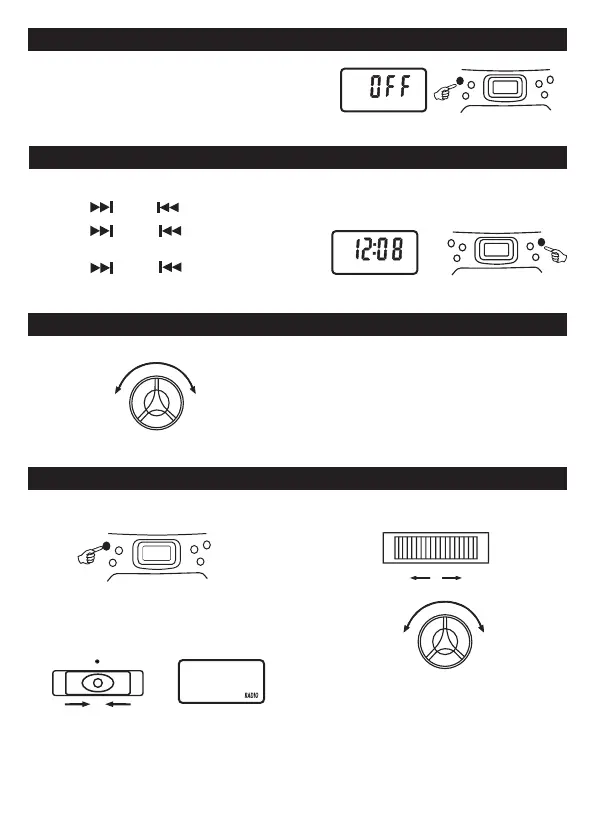
Turn o the unit by pressing the STANDBY button.
" OFF " word will be shown on the display and then resume the current time.



 To Next Page