GB 5
TO STOP PLAYBACK
Press the STOP / EJECT button.
TO INTERRUPT PLAYBACK
Press the PAUSE button.
To resume play, press the PAUSE button again.
TO FAST WIND
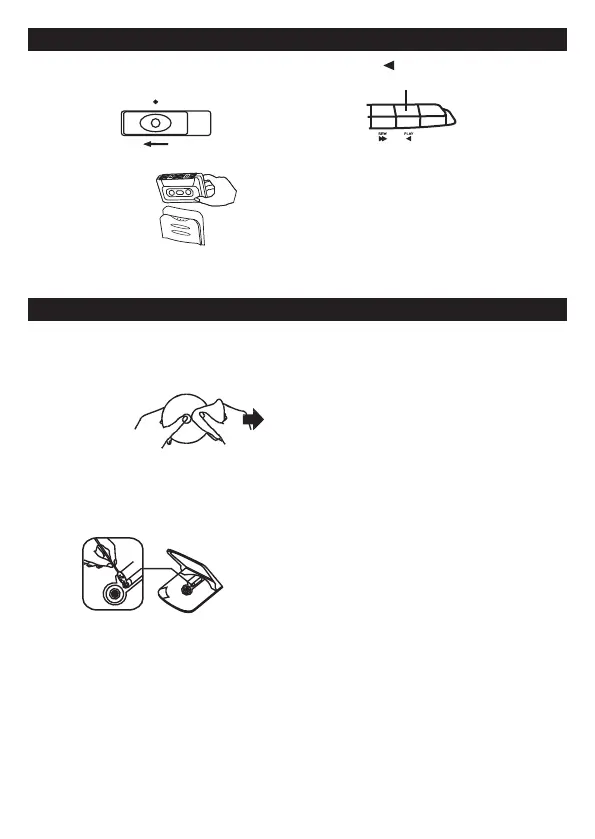
Press the REWIND or F.FWD button. Press the STOP/EJECT
button to stop winding at the desired position.
PLAY
3 . Press the PLAY button.
TAPE PLAYBACK
1 . Set to TAPE
FUNCTION
TAPE
2 . Insert the cassette.
MAINTENANCE
CLEANING THE UNIT
Do not use volatile chemicals on this unit. Clean by lightly wiping
with a soft cloth.
IMPORTANT NOTE
If an abnormal display indication or an operating problem occurs,
disconnect the AC power cord and remove the batteries. Wait at least 5
seconds, then reconnect the AC power cord or reinstall the batteries.
WARNING
Should the CD door be opened before the reading of the CD completed, a
jamming noise may occur. This is resolved by closing the CD door.
CLEANING CD
If the CD skips or will not play , the disc may need
cleaning. Before playing, wipe the disc
from the centre out with a
cleaning cloth. After playing,
store the disc in its case.
CLEANING THE CD LENS
If the CD lens is dusty, clean it with a brush-blower.
Blow several times on the lens and remove the dust
with the brush. Finger prints may be removed with
a cotton swab moistened with alcohol.
Unit will be automatically o at about 250 mins.



 To Next Page