Notes:
1.VGA/YPBPR/ use a common PC Audio in.
2.SCART to SCART from a VCR.
3.YPBPR from a DVD.
4.HDMI signal is from a DVD
S-Video
7.Connecting to external devices
RCA terminal is used to connect the output device of DVD
The rear of TV
YPBPR
DVD
HDMI
8
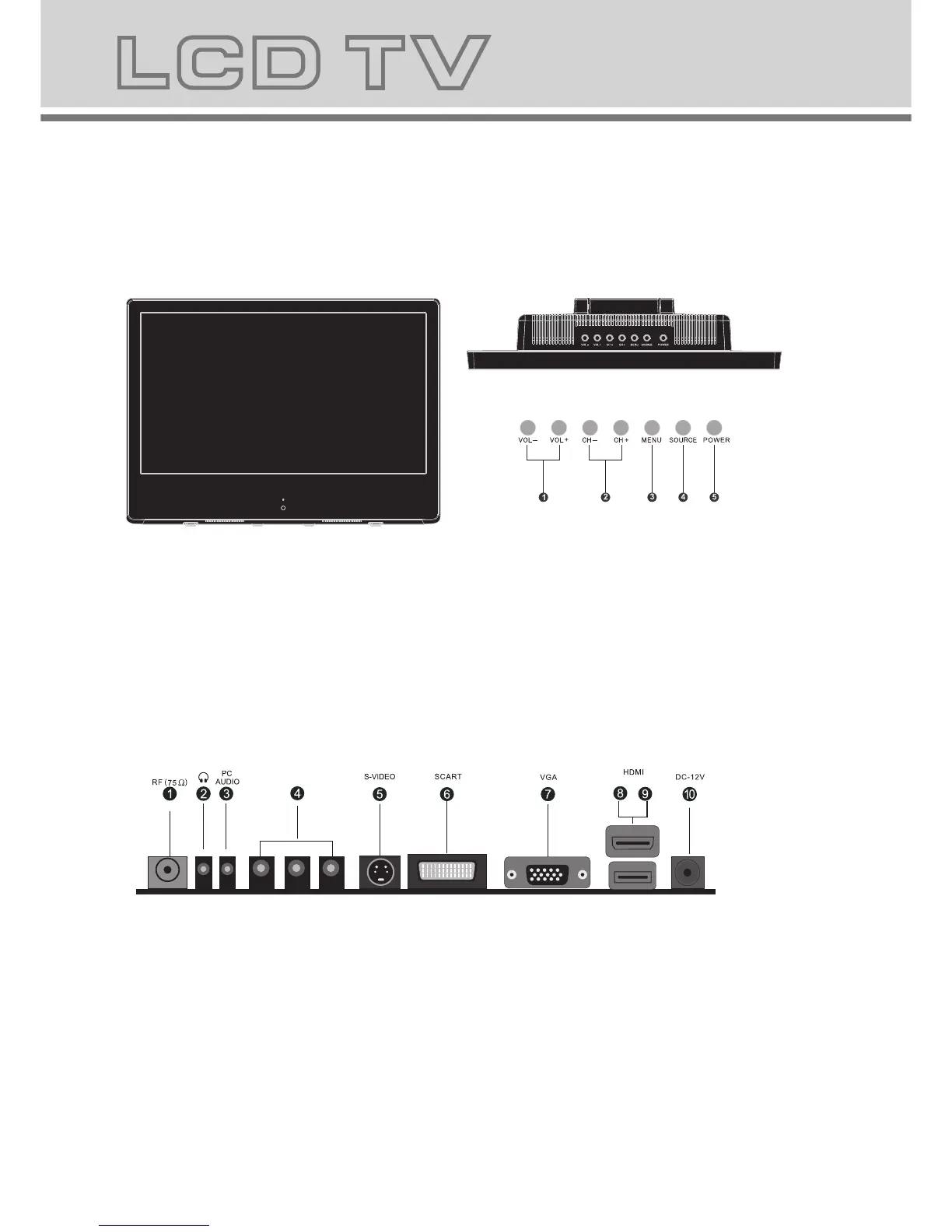
6.LCD TV panel overview
TV Terminal connections
7
S Video
TV Control Panel
USB
YPBPR
USB
YPBPR
1. Antenna input (75 Ohm VHF/UHF).
2. Headphone output.
3. PC audio input.
4.
Component input terminal.
5. S-VIDEO input.
6. SCART input terminal ,suitable for a European export machine.
7. VGA input.
8. HDMI input.
9. USB input.
10. DC 12V power input.
VCR
1.Volume adjusting.
2.Channel selecting.
3.Main menu display and confirm.
4.Selecting exterior signal input.
5.On/off button.



 To Next Page