The Lenire Tinnitus Treatment System is a medical device designed to alleviate the symptoms of chronic, subjective tinnitus. It comprises a handheld Controller, a tonguetip, Headphones, a Charger, and a Carry case.
Function Description
The Lenire system delivers bimodal neuromodulation, combining auditory stimulation through headphones with electrical stimulation to the tongue via a tonguetip. This dual stimulation aims to reduce tinnitus symptoms. The device is intended for use by tinnitus sufferers aged 18 years or more, and it is designed for home use after consultation and fitting by a suitably qualified clinician. Lenire is for prescription use only and should not be used by individuals with a pacemaker, defibrillator, or any other active implantable device, pregnant individuals, those suffering from epilepsy or any other condition that may result in loss of consciousness, or those with any condition that causes impaired sensitivity of the tongue. It is also contraindicated for individuals with lesions, sores, or inflammation of the oral cavity.
Important Technical Specifications
- Controller (Model Number CR-201): This is the central unit that controls the treatment session, adjusting sound volume and tonguetip stimulation. It features a rechargeable 3.7V Lithium Ion battery.
- Tonguetip (Model Number TP-101): This device provides gentle electrical stimulation to the tongue. It is designed for 360 treatment sessions (180 hours) before expiring.
- Headphones (AKG K845BT): These Bluetooth headphones deliver auditory stimulation. They are powered by a 3.7V Lithium Ion battery and are charged using the supplied charger. The headphones are designed to work wirelessly with the Controller.
- Charger (XP Power model VEP08US05-XE0767): Used to charge both the Controller and the Headphones.
- Ingress Protection (IP) Rating: IP22, meaning it is protected from objects greater than 12mm in diameter being inserted (e.g., fingers) and against small amounts of vertically dripping water.
- Non-ionizing radiation: The device emits non-ionizing radiation.
- Bluetooth Wireless Radio Module: The Controller contains a Bluetooth wireless radio module.
- Frequency Band: 2.4 GHz to 2.4835 GHz
- Modulation: 8 DPSK, PI/4 DQPSK, GFSK
- Operating Range: 20m to 30m
- RF Sensitivity: 0.1% BER at -88dBm
- Effective Radiated Power (ERP): <4dBm (2.5 mW) Bluetooth Class 2
- Electromagnetic Compatibility: The Lenire system has been tested for electromagnetic performance according to IEC61000-4-3 (radiated electromagnetic fields: 80 MHz to 2.7 GHz at 10V/m, 2.7 GHz to 6 GHz at 3V/m, Spot frequencies per EN 60601-1-2:2015 Table 9 at up to 28 V/m), IEC 61000-4-2 (Electrostatic Discharge: +/- 8kV Contact Discharge, +/- 15kV Air Discharge), and IEC 61000-4-8 (50Hz/60Hz magnetic fields at 30 A/m).
- Materials in Direct Contact with Human Tissue: The Lenire system does not contain phthalates, latex, human blood derivatives, or cells or tissues of human or animal origin. The electrodes of the tonguetip contain nickel.
- Environmental Operating Conditions: Lenire should only be used in environments between 5 and 40 degrees Celsius, relative humidity between 15% and 93%, and atmospheric pressure of between 700 and 1060 hPa. The device can be used at altitudes above 3000m, unless traveling in an airplane that has the cabin pressurized.
Usage Features
- Treatment Session: A typical treatment session lasts approximately 30 minutes. The sound volume gradually fades out over a period of 2 minutes to a lower volume level towards the end of the session.
- Controls: The Controller has three main buttons: Play, Power, and Pause.
- Power Button: Hold for 2 seconds to switch the device on or off.
- Play Button: Press to start or resume a treatment session.
- Pause Button: Press to pause a treatment session.
- Indicators: The Controller features several indicators:
- Battery Indicator: Green (battery is ok), Orange (less than 1 hour of power remaining, charge before next use), Red (battery exhausted, device will shut off automatically, charge before next use), Orange (Pulsing, Charger connected and battery is charging), Green (Pulsing, Charger connected and battery is fully charged).
- Headphones Indicator: Blue (Pulsing, Controller trying to establish wireless connection), Green (Controller connected wirelessly), Blue (Pulsing Rapidly, Controller attempting to pair with Headphones, see page 44 for details).
- Tonguetip Indicator: Blue (Pulsing, tonguetip connected), Green (Pulsing, tonguetip connected but not in contact with tongue), Green (tonguetip connected and in contact with tongue), Orange or Orange (Pulsing, tonguetip has less than 10 hours of use remaining before expiry, purchase a new tonguetip to avoid disruption), Red (tonguetip has expired, purchase a new tonguetip).
- Treatment Indicator: White (Pulsing, treatment session is paused), White (Animated, treatment session is active), Green (Pulsing, treatment session has completed).
- Volume and Stimulation Controls: The Controller has separate controls for adjusting the Headphones volume and tonguetip stimulation intensity. These are adjusted by pressing '+' or '-' buttons located on the sides of the Controller. The optimum levels are calibrated during device fitting by the clinician.
- Charging:
- Controller: Plug the Charger into the Controller port and a mains electrical socket. The Battery Indicator will pulse orange while charging and green when fully charged. An empty battery takes no more than 3 hours to fully recharge.
- Headphones: Plug the Charger into the USB port of the Headphones and a mains electrical socket. The light on the Headphones will illuminate red while charging and extinguish when fully charged. An empty battery takes no more than 3 hours to fully recharge.
- Device Setup:
- Headphones: Should be worn so they cover both ears and adjusted to maximize comfort. The left and right earphones are marked L and R respectively.
- Connecting Headphones: Turn on the Headphones by pressing the power button (small circular button). After one second, the blue light beside this button should start to flash blue, or blue and red if the headphones battery is low. Turn on the Controller by pressing the Power Button for two seconds. The Controller will attempt to connect to the Headphones, and the Headphones Indicator will pulse blue. Once connected, the Headphones Indicator on the Controller will illuminate green.
- Tonguetip: Supplied in a protective pouch. Connect the tonguetip to the Controller port. The tonguetip should be placed in the mouth, just behind the upper front teeth, with the electrodes facing down. Close the mouth so the electrodes make contact with the tip of the tongue.
- Bluetooth Pairing: The Controller sends audio to the Headphones wirelessly. To pair, turn on the Headphones and the Controller. The Controller will search for and attempt to pair with the Headphones. The Headphones Indicator on the Controller will pulse rapidly during this procedure. If no discoverable Headphones are found within 20 minutes, the Controller will shut down. Otherwise, the Controller will connect to the Headphones and the Headphones Indicator on the Controller will illuminate green.
- Treatment Guidelines: The treatment is intended for use 30 to 60 minutes per day, and it is recommended to complete at least a full 30 minutes each daily treatment. It is important to keep the tongue stimulation level and the Headphones volume level at the default settings, as these are the optimum levels calibrated to individual characteristics. Complete each treatment session in a place that is quiet, relaxing, and comfortable, focusing attention away from distractions. Keep a routine for treatment sessions, where treatment is delivered at the same time(s) each day. It is not unusual for tinnitus symptoms to disimprove or fluctuate. If this occurs, continue treatment even during periods where symptoms disimprove, for the 10 weeks minimum recommended treatment duration. Seek advice from your clinician if significant disimprovement occurs.
Maintenance Features
- Cleaning:
- Controller, Headphones, Carry Case: Before cleaning, ensure they are switched off and not connected to the Charger. The exterior surfaces should be cleaned using a soft cloth to remove debris.
- Tonguetip: Before cleaning, ensure it is disconnected from the Controller. Do not expose the Plug end of the tonguetip to liquids. The tonguetip should be rinsed thoroughly with water or distilled water. It may be used immediately after rinsing. Do not use the tonguetip immediately after cleaning, place on a clean, dry surface and allow it to air-dry. In addition, the tonguetip may be cleaned by gently rubbing the tonguetip surfaces, including the electrodes and the plug using 70% IPA (Isopropyl alcohol) wipes. Do not use any cleaning agent other than IPA or water. Do not scrub or wipe the surfaces forcefully. Do not immerse the Controller, the Charger, or the tonguetip plug in water. To avoid damaging the devices, do not force dry, for example by using a hairdryer, or leaving on top of a heater.
- Storage and Transport:
- It is recommended to store the Controller and the tonguetip in the Carry Case. The tonguetip plug should not be disconnected from the Controller port before placing them into the Carry case.
- Controller and Tonguetip: Should be stored in a location that is not too hot, nor too cold (between -20 and 45 degrees Celsius), and that is not excessively humid (relative humidity less than 85%).
- Controller Shelf Life: Has a shelf life of two years, meaning that it should be used for the first time within two years of it being manufactured, otherwise the battery life may deteriorate.
- Storage and Transport Temperature Limits: The lower limit is -20°C, as indicated near the lower horizontal line, and the upper limit is 45°C, as indicated near the upper line.
- Storage and Transport Humidity Limits: The lower limit is 5%, as indicated near the lower horizontal line, and the upper limit is 85%, as indicated near the upper line.
- Fragile: Handle with care.
- Keep dry.
- Inspections:
- Carry out a weekly visual inspection to ensure that the Controller has not been damaged.
- Carry out a weekly visual inspection to ensure there is no evidence of discolouration or damage to the tonguetip.
- If you have any concerns following these inspections, cease using the device and request assistance by contacting Customer Support.
- Controller Service Life: Has an expected service life of three years. Beyond three years, the device will still perform as intended except that the battery capacity may start to deteriorate. The Controller should be charged every 6 months if not in use. Not charging the battery for extended periods may reduce the capacity of the battery and shorten the service life of the device.
- Tonguetip Service Life: Has an expected service life of three years. It is recommended not to use the tonguetip after this time period as the electrodes may not function as effectively. The tonguetip will expire after 180 cumulative hours of actual use. If an expired tonguetip is connected to the Controller, the tonguetip Indicator will flash red and treatment sessions will not commence until a non-expired tonguetip is connected. A new tonguetip (Model TP-101) can be purchased from Customer Support.
- Disposal: No part of the Lenire system should be disposed of as domestic waste. Please consider your personal safety and the environment when disposing of the Lenire system. When the device, or any of its components, have reached the end of their service life, they should be disposed of in accordance with local regulations, or returned to the manufacturer.

 Need help?
 General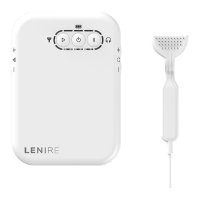

 To Next Page
