IFU-0002 Lenire User Manual Version 1.0Page 44
Chapter 20 - Bluetooth Pairing / Un-Pairing
The Controller sends audio to the Headphones wirelessly using Bluetooth,
and for this to work, the Controller and the Headphones need to be
‘paired’, allowing the two devices to connect automatically henceforth.
20.1 - Pairing Headphones to the Controller
The first time you try to use the Controller and Headphones together you
may need to pair the devices as follows:
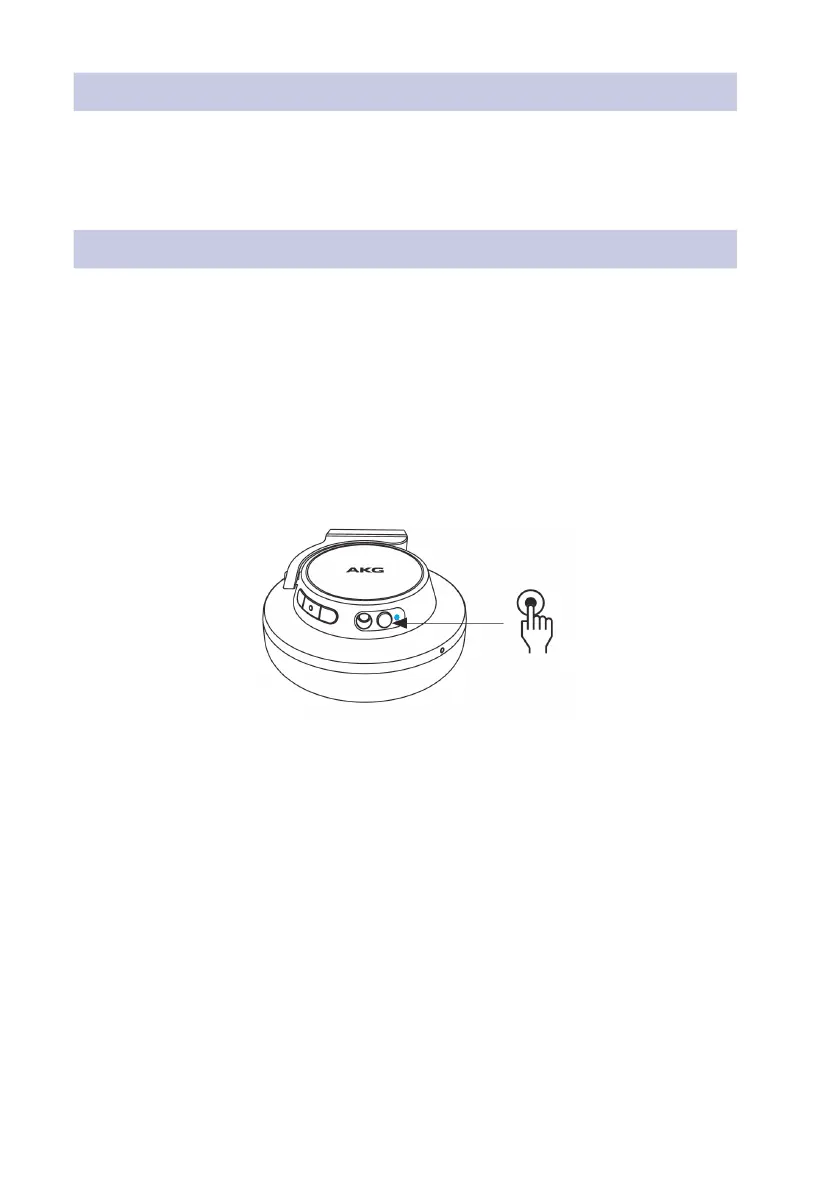
• Put the Headphones into Pairing Mode by first ensuring they are
powered o, and then powering them on by briefly pressing the
Headphones power button as indicated below. The light adjacent to
the Headphones power button will flash blue rapidly to indicate that
the Headphones are in pairing mode.
• Switch on the Controller by pressing the Power Button for 2 seconds.
• Place the Controller into Pairing Mode by pressing the Play, Pause and
Volume + Buttons at the same time. All indicator lights will flash blue
for 2 seconds.


 To Next Page