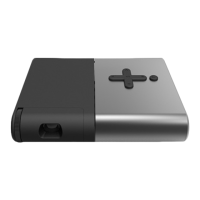
7. Whenpoweredbythecomputer,theprojectordoesnotstartupwhenyoupressthe
power button on the projector.
• Ensurethatyourcomputerisworkingproperly.
• Ensurethatthereisnocondensationonthepogopins.
8. Whenpoweredbyanelectricaloutlet,theprojectordoesnotstartupwhenyoupress
the power button on the projector.
• Ensurethatthepoweradapterisworkingproperly.
• Ensurethatthereisnocondensationontheplug.
9. The projector shuts down after working for a while.
• Iftheprojectorispoweredbyanelectricaloutlet,ensurethatthereareno
miscellaneous items next to the outlet.
• Ensurethattheelectricalcircuitisnotoverloadedandthereisgoodaircirculation
around the projector so that it is not overheated. The optimal operating
temperature of the projector is from 10°C (50°F) to 35°C (95°F).
10
. If there are two or more sets of ideacentre 610S computers placed in close proximity,
• theLenovominiprojectormaybedetectedbyanotherideacentre610Scomputer
and pairing has to be carried out again.
Press the wireless reset button on the projector and hold it for approximately one
second. Then, the projector will start to pair with the next available ideacentre
610S computer.
• theideacentre610ScomputermaybedetectedbyanotherLenovominiprojector
and pairing has to be carried out again.
Press the wireless reset button on the computer and hold it for approximately one
second. Then, the computer will start to pair with the next available Lenovo mini
projector.



 To Next Page