14
Chapter 1. Getting to know your computer
Front view - - - - - - - - - - - - - - - - - - - - - - - - - - - - - - - - - - - - - - - - - - - - - - - - - - - - - - - - - - - - - - - - - - - - - - - - - - - - - - - - - - - - - - - - - - - - - - -
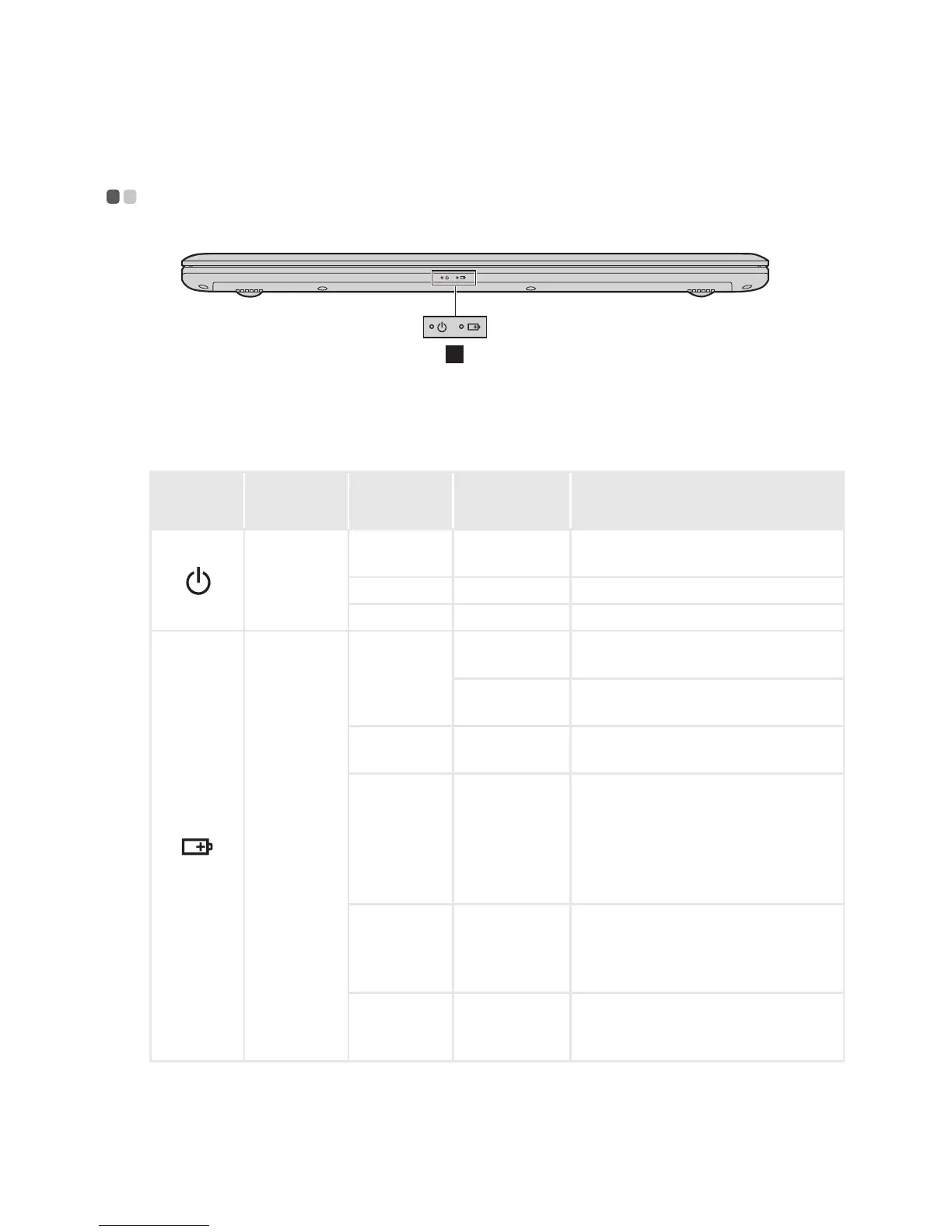
System status
indicators
Symbol Indicator
Indicator
status
Charge
status
Meaning
Power
On (solid
white)
--- The computer is powered on.
Blinking --- The computer is in sleep mode.
Off --- The computer is powered off.
Battery
On (solid
white)
Charging
The battery has more than 80%
charge.
Discharging
The battery has more than 20%
charge.
On (solid
amber)
Discharging
The battery has between 5% and
20% charge.
Blinking
slowly
(white)
Charging
The battery has between 20% and
80% charge. When the battery
reaches 80% charge, the light will
stop blink
ing. However, charging
will continue until the battery is
fully charged.
Blinking
slowly
(amber)
Charging
The battery has less than 20%
charge. When the battery charge
reaches 20%, the blinking color will
change to white.
Blinking
quickly
(amber)
Charging/
Discharging
The battery has less than 5% charge.


 To Next Page