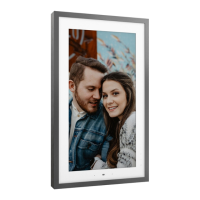
Need help?
Do you have a question about the Lenovo Smart Frame and is the answer not in the manual?
Explains single tap and long press functions for navigating content and adjusting volume.
Controls the frame by swiping left to navigate to the next photo or artwork.
Controls the frame by swiping right to navigate to the previous photo or artwork.
Controls the frame by swiping up to change to the next content channel.
Details the optimal distance and conditions for effective gesture recognition.
 General
| Display Size | 21.5 inches |
|---|---|
| Aspect Ratio | 16:9 |
| Connectivity | Wi-Fi, Bluetooth |
| Touchscreen | No |
| Power Source | AC adapter |
| Resolution | 1920 x 1080 |
| Storage | 8GB |
| Orientation | Landscape and Portrait |
| Supported Formats | JPEG, PNG |
| Mounting | Wall-mountable (includes mounting kit) |

 To Next Page