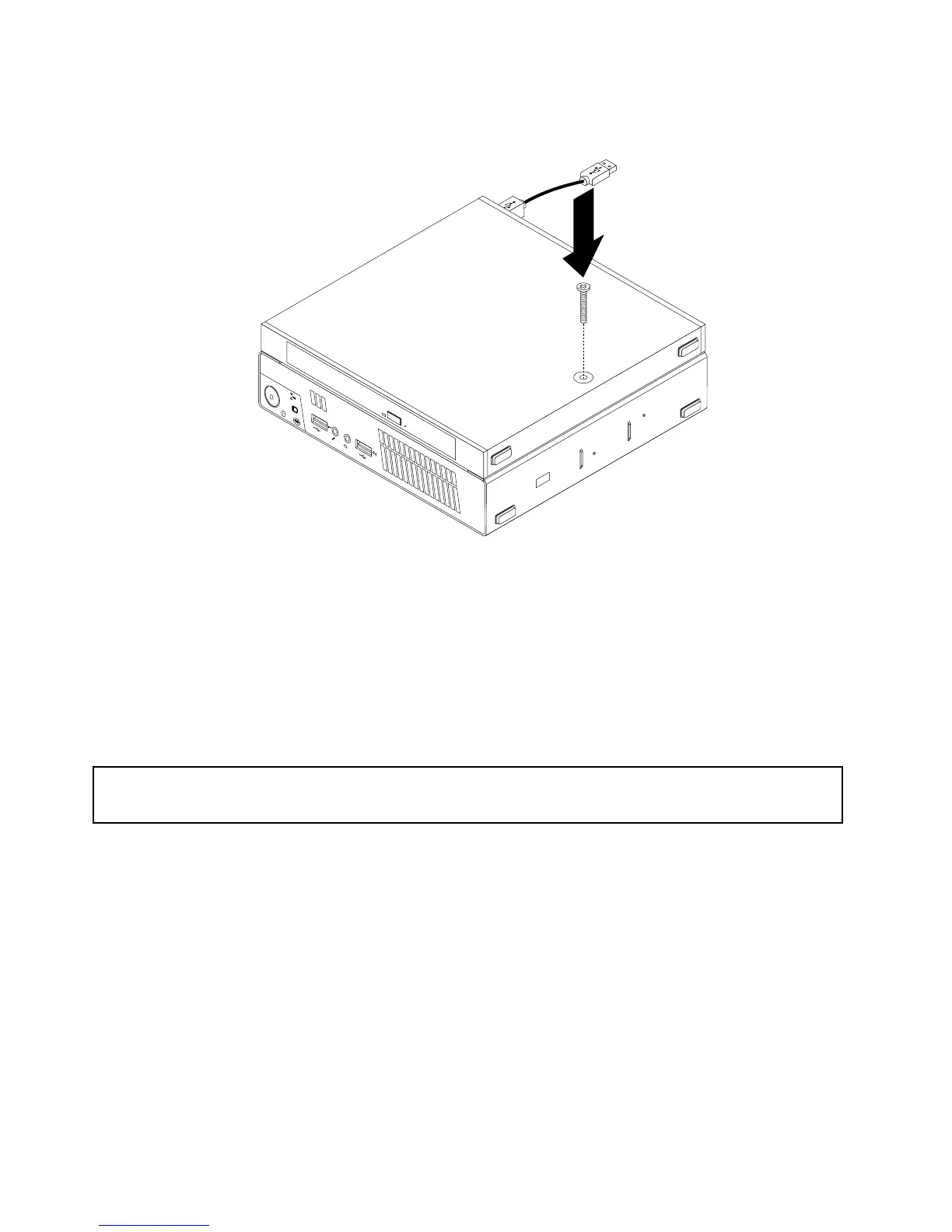
10.InstallthescrewthatsecurestheopticaldriveboxontheVESAmountbracket.
Figure24.Installingthescrewthatsecurestheopticaldrivebox
11.ConnecttheopticaldrivecabletoaUSBconnectoronthecomputer.See“Locatingconnectorsonthe
rearofyourcomputer”onpage10.
Whattodonext:
•Toworkwithanotherpieceofhardware,gototheappropriatesection.
•Tocompletetheinstallationorreplacement,goto“Completingthepartsreplacement”onpage75.
Replacingthesecondaryharddiskdrive
Attention:
Donotopenyourcomputerorattemptanyrepairbeforereadingandunderstandingthe“Importantsafetyinformation”
onpagev.
Thissectionprovidesinstructionsonhowtoreplacethesecondaryharddiskdrive.
Note:Thesecondaryharddiskdriveisonlyavailableonsomemodels.
Toreplacethesecondaryharddiskdrive,dothefollowing:
1.Turnoffthecomputeranddisconnectallpowercordsfromelectricaloutlets.
2.DisconnectthesecondaryharddiskdrivecablefromtheUSBconnectoronthecomputer.
42ThinkCentreUserGuide




 To Next Page