Whattodonext:
•Toworkwithanotherpieceofhardware,gototheappropriatesection.
•Tocompletetheinstallationorreplacement,goto“Completingthepartsreplacement”onpage75.
Replacingthemicroprocessor
Attention:
Donotopenyourcomputerorattemptanyrepairbeforereadingandunderstandingthe“Importantsafetyinformation”
onpagev.
Thissectionprovidesinstructionsonhowtoreplacethemicroprocessor.
CAUTION:
Theheatsinkandmicroprocessormightbeveryhot.Turnoffthecomputerandwaitthreetove
minutestoletthecomputercoolbeforeremovingthecomputercover.
Toreplacethemicroprocessor,dothefollowing:
1.Turnoffthecomputeranddisconnectallpowercordsfromelectricaloutlets.
2.Removethecomputercover.See“Removingthecomputercover”onpage33.
3.Removetheheatsink.See“Replacingtheheatsink”onpage55.
Note:Placetheheatsinkonitssidesothatthethermalgreaseonthebottomofitdoesnotgetin
contactwithanything.
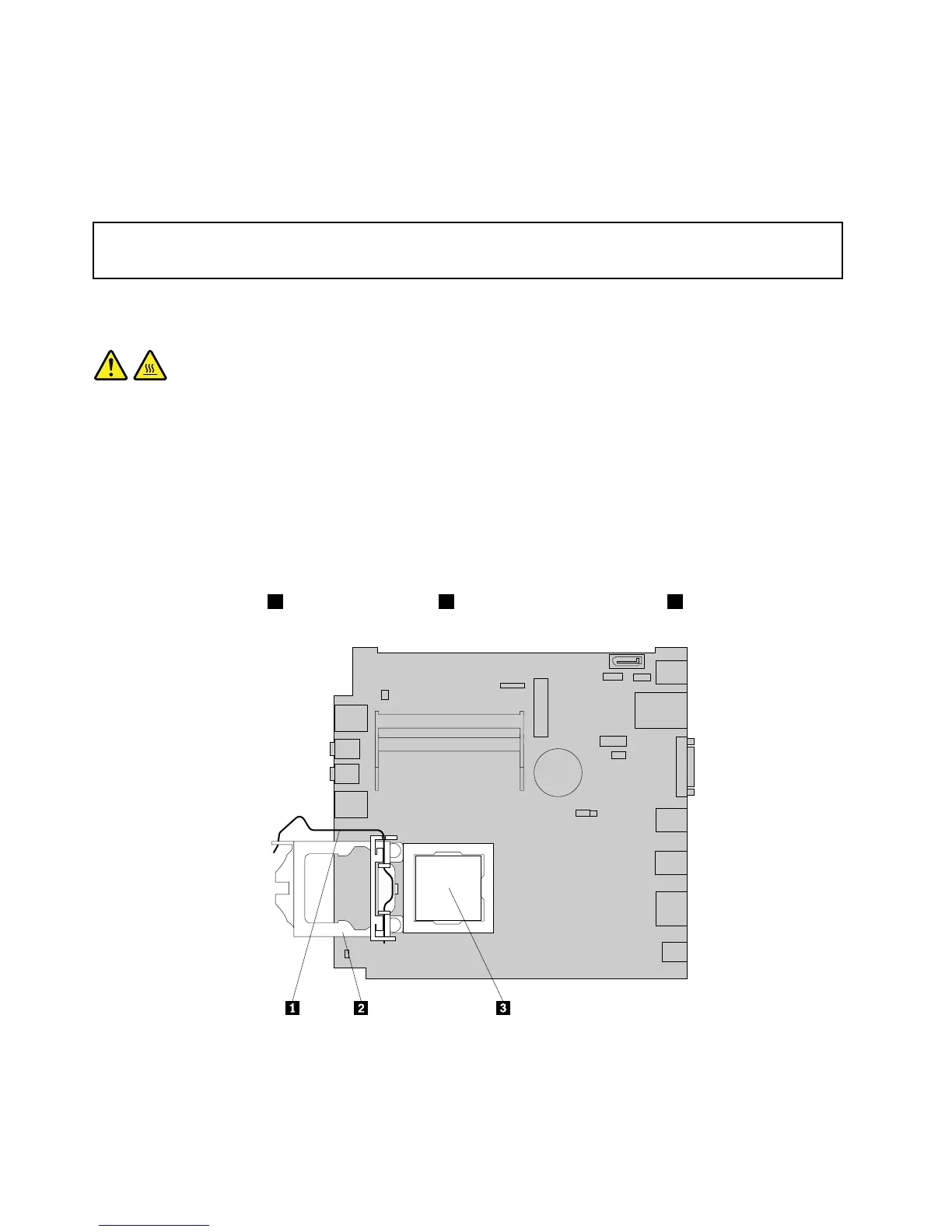
4.Liftthesmallhandle1andopentheretainer2toaccessthemicroprocessor3.
Figure48.Accessingthemicroprocessor
58ThinkCentreUserGuide




 To Next Page