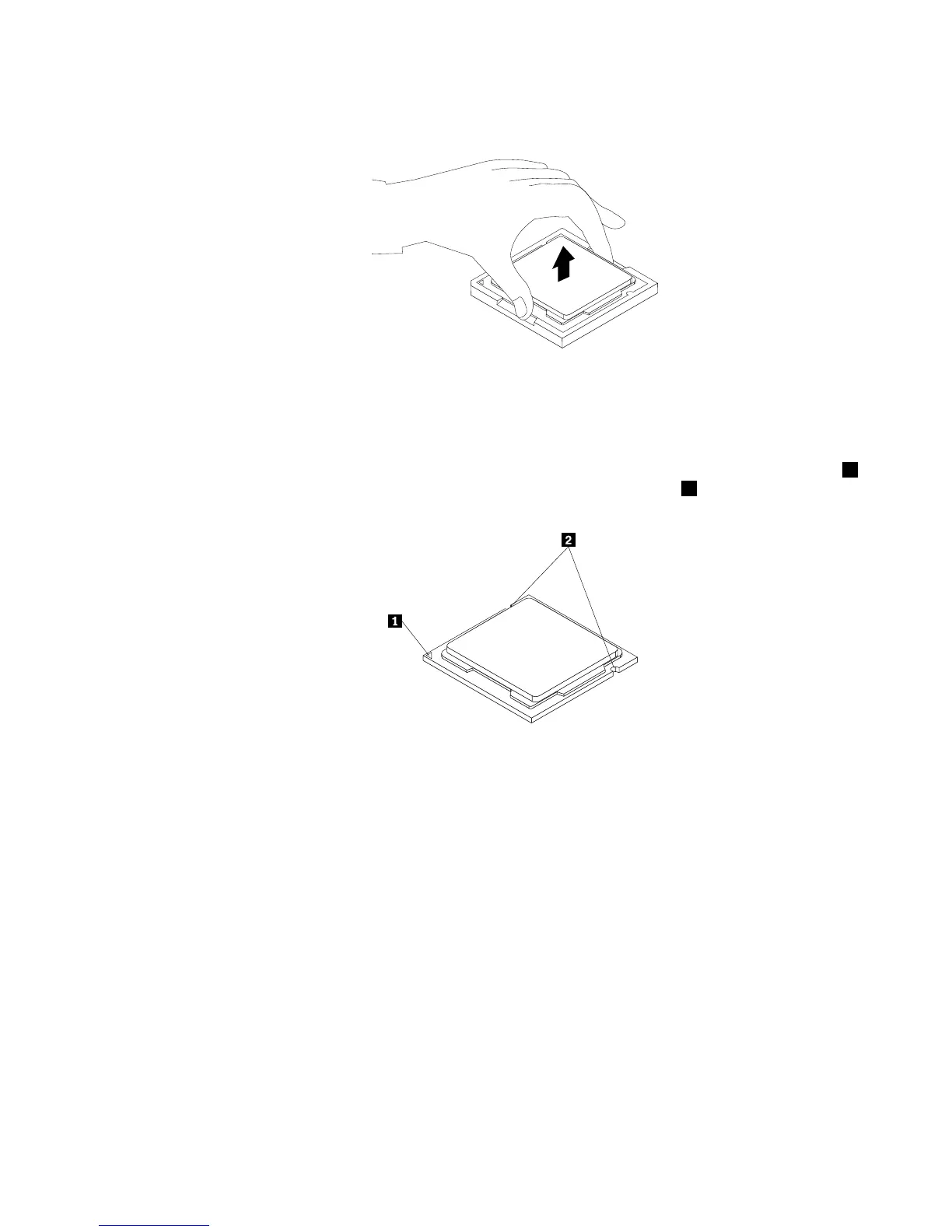
5.Liftthemicroprocessorstraightupandoutofthemicroprocessorsocket.
Figure49.Removingthemicroprocessor
Notes:
a.Yourmicroprocessorandsocketmightlookdifferentfromtheoneillustrated.
b.Notetheorientationofthemicroprocessorinthesocket.Youcaneitherlookforthesmalltriangle1
ononecornerofthemicroprocessorornotetheorientationofthenotches2onthemicroprocessor.
Thisisimportantwheninstallingthenewmicroprocessoronthesystemboard.
c.Touchonlytheedgesofthemicroprocessor.Donottouchthegoldcontactsonthebottom.
d.Donotdropanythingontothemicroprocessorsocketwhileitisexposed.Thesocketpinsmustbe
keptascleanaspossible.
6.Makesurethatthesmallhandleisintheraisedpositionandthemicroprocessorretainerisfullyopen.
7.Removetheprotectivecoverthatprotectsthegoldcontactsofthenewmicroprocessor.
8.Holdthenewmicroprocessorbyitssidesandalignthesmalltriangleononecornerofthenew
microprocessorwiththecorrespondingsmalltriangleononecornerofthemicroprocessorsocket.
Chapter5.Installingorreplacinghardware59





 To Next Page