a.Youmighthavetogentlytwisttheheatsinkandfanassemblytofreeitfromthemicroprocessor.
b.Donottouchthethermalgreasewhilehandlingtheheatsinkandfanassembly.
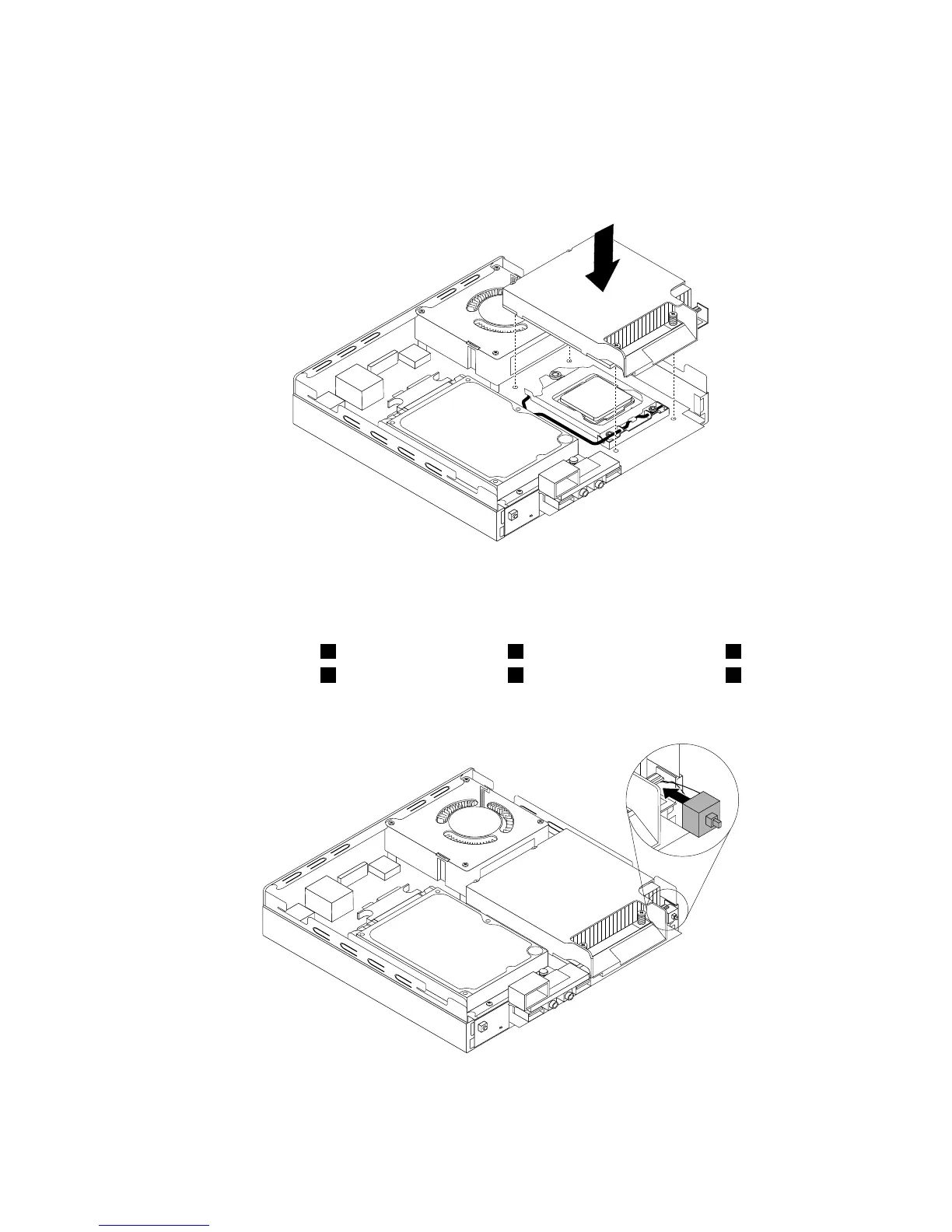
7.Positionthenewheatsinkandfanassemblyonthesystemboardsothatthefourscrewsarealigned
withtheholesinthesystemboard.
Figure46.Installingtheheatsink
8.Followthissequencetoinstallthefourscrewstosecurethenewheatsinkandfanassembly.Do
notover-tightenthescrews.
a.Partiallytightenscrew1,thenfullytightenscrew2,andthenfullytightenscrew1.
b.Partiallytightenscrew3,thenfullytightenscrew4,andthenfullytightenscrew3.
9.Attachtheintrusionswitchtotheheatsinkbracket.
Figure47.Installingtheintrusionswitch
Chapter5.Installingorreplacinghardware57










 To Next Page