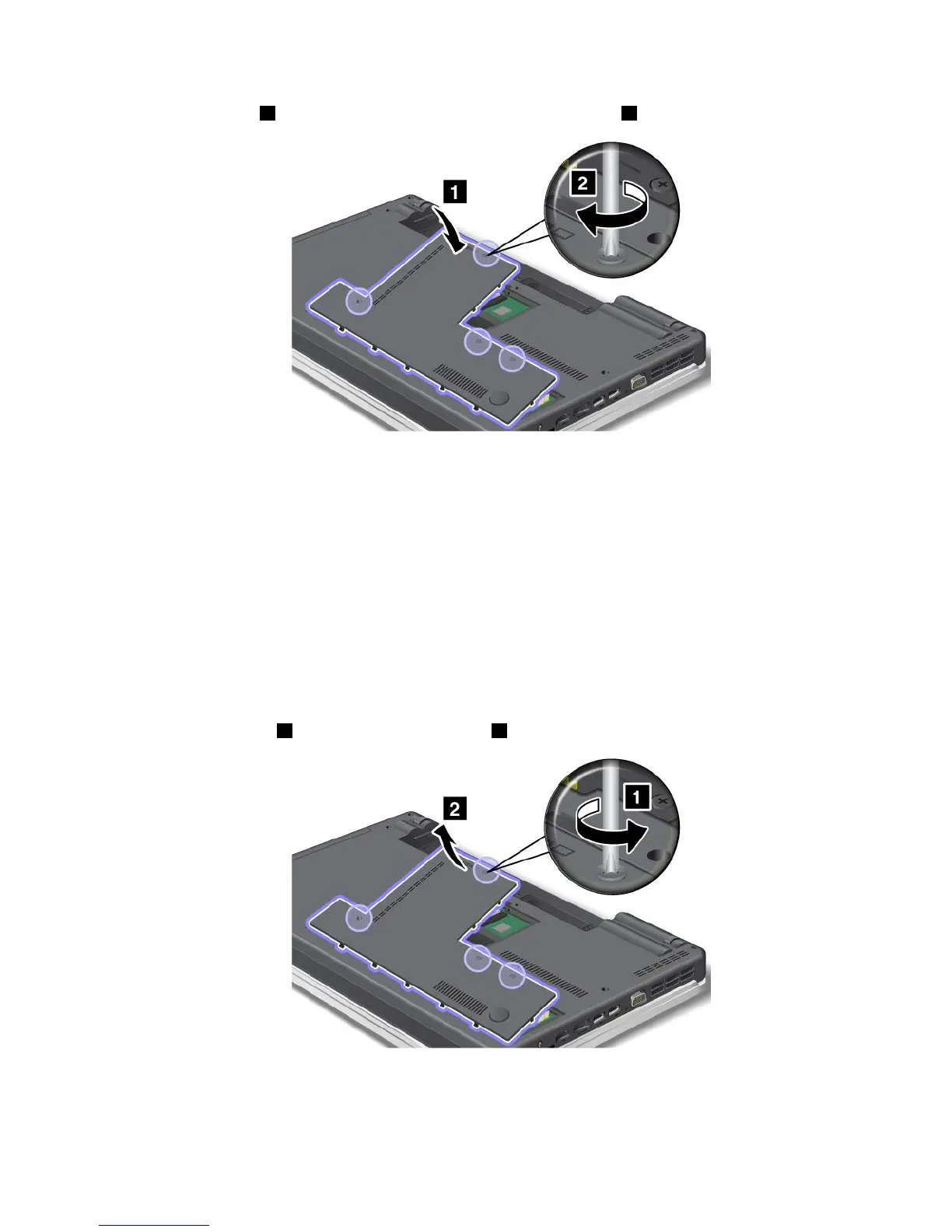
5.Attachthecover1,pivotitdownwards,andthentightenthescrews2.
6.Reinstallthebattery.Formoreinformationabouthowtoreinstallthebattery,referto“Replacingthe
battery”onpage77
.
7.Turnthecomputeroveragain.Connecttheacpoweradapterandcablestothecomputer;thenturniton.
ThinkPadEdgeE520
Removingthekeyboard
Toremovethekeyboard,dothefollowing:
1.Turnoffthecomputer;thendisconnecttheacpoweradapterandallcablesfromthecomputer.Waitfor
afewminutes,tilltheinsideofthecomputercools,beforeyoustartthefollowingprocedures.
2.Closethecomputerdisplay,andturnthecomputerover.
3.Removethebattery.Formoreinformation,referto“Replacingthebattery”onpage77.
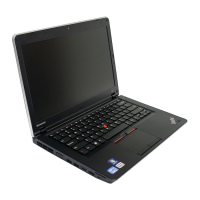
4.Loosenthescrews1,andthenremovethecover2.
Chapter6.Replacingdevices99






 To Next Page