2Opticaldrive
Yourcomputerhasaslotforanopticaldrive.
3Powerjack
Theacpoweradaptercableconnectstothecomputerpowerjacktoprovidepowertothecomputerand
chargethebattery.
4Securitykeyhole
Yourcomputercomeswithasecuritykeyhole.Youcanpurchaseasecuritycableandlocktotthiskeyhole.
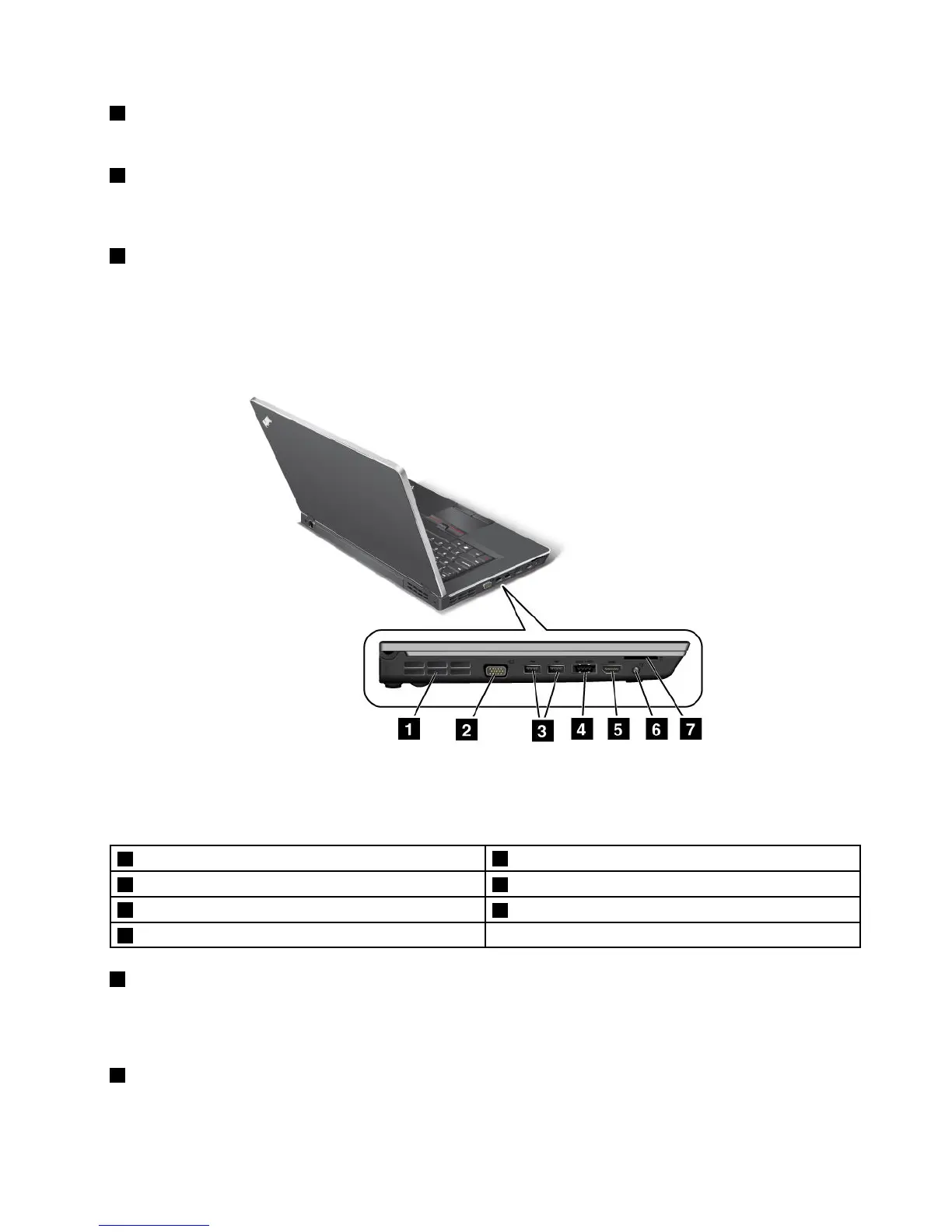
Left-sideview
Figure4.ThinkPadEdgeE420andE520left-sideview
Note:Yourcomputerkeyboardmightlookdifferentfromtheillustrationabove.
1Fanlouvers(left)
2Monitorconnector
3USBconnectors4eSATA/USBcomboconnector
5HDMIport
6Comboaudiojack
7Mediacardreaderslot
1Fanlouvers(left)
Theinternalfanandlouversenableairtocirculateinthecomputerandcoolthecentralprocessor.
Note:Toavoidimpedingairow,donotplaceanyobstacleinfrontofthefan.
2Monitorconnector
Youcanattachanexternalmonitororaprojectortoyourcomputertodisplaycomputerinformation.
Chapter1.ProductOverview7











 To Next Page