EasyManua.ls Logo

Lenovo ThinkPad Edge E531 - If a Tool for Removing Connectors Is Included in the Package with the New Card, Use It to Disconnect the; With Your Fingers and Gently Unplugging Them; Remove the Screw. the Card Pops Up. Remove the Card

Lenovo ThinkPad Edge E531
182 pages
Print Icon
To Next Page IconTo Next Page
To Previous Page IconTo Previous Page
Loading...
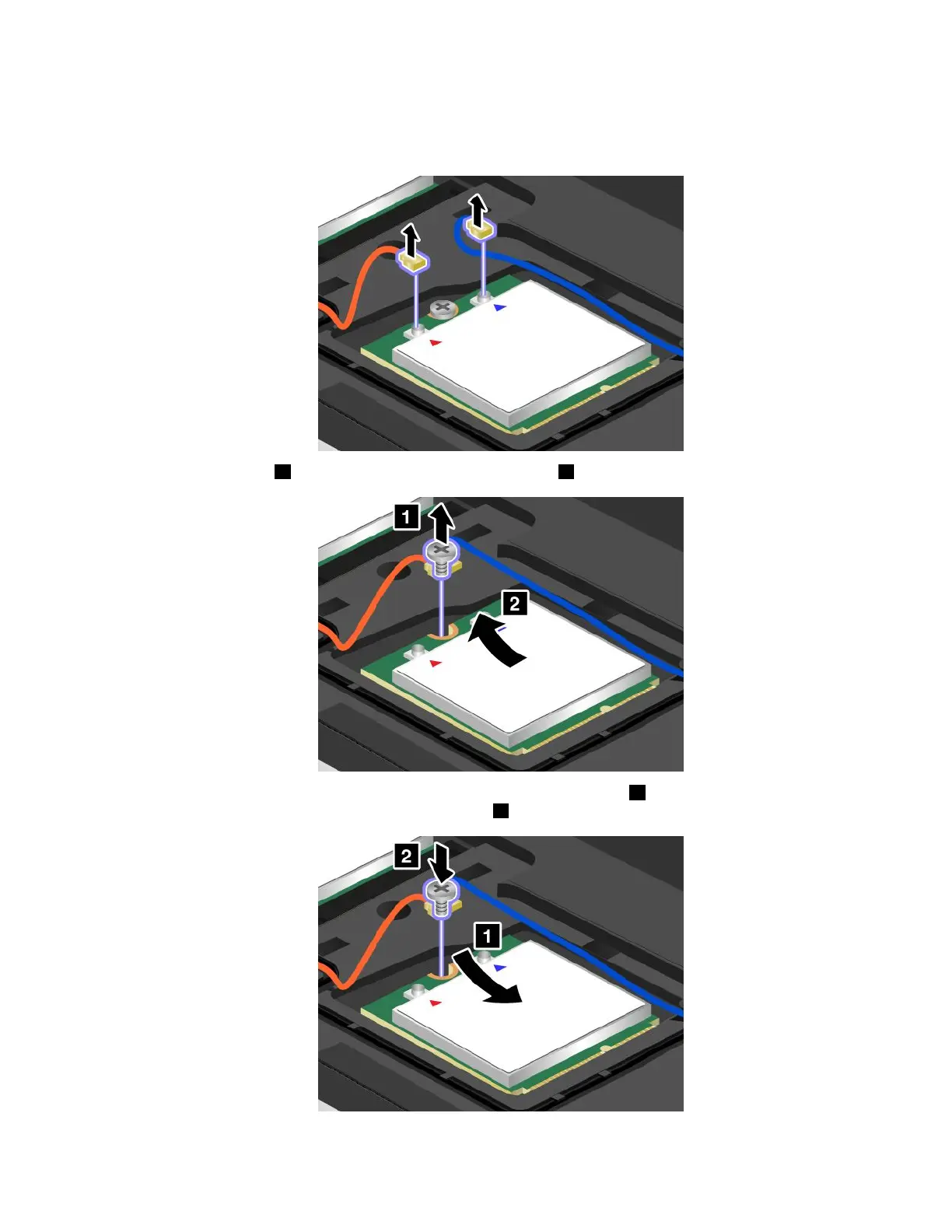
5.Ifatoolforremovingconnectorsisincludedinthepackagewiththenewcard,useittodisconnectthe
cablesfromthecard.Ifnosuchtoolisincluded,disconnectthecablesbypickinguptheconnectors
withyourngersandgentlyunpluggingthem.
6.Removethescrew1.Thecardpopsup.Removethecard2.
7.Alignthecontactedgeofthenewcardwiththecorrespondingsocket1.Pivotthecarduntilyoucan
snapitintoplace.Securethecardwiththescrew2.
Chapter6.Replacingdevices93


Table of Contents

Other manuals for Lenovo ThinkPad Edge E531

Related product manuals