2. Select Config ➙ Power. The Power submenu is displayed.
3. Select Disable Built-in Battery and press Enter.
4. Select Yes in the Setup Confirmation window. The built-in battery is disabled and the computer turns off
automatically. Wait three to five minutes to let the computer cool.
Replace a CRU
Follow the replacement procedure to replace a CRU.
Base cover assembly
Prerequisite
Before you start, read
Generic Safety and Compliance Notices and print the following instructions.
Note: Do not remove the base cover assembly when your computer is connected to ac power. Otherwise,
there might be a risk of short circuits.
For access, do the following:
1. Disable the built-in battery. See “Disable the built-in battery” on page 31.
2. Turn off the computer and disconnect the computer from ac power and all connected cables.
3. Close the computer display and turn over the computer.
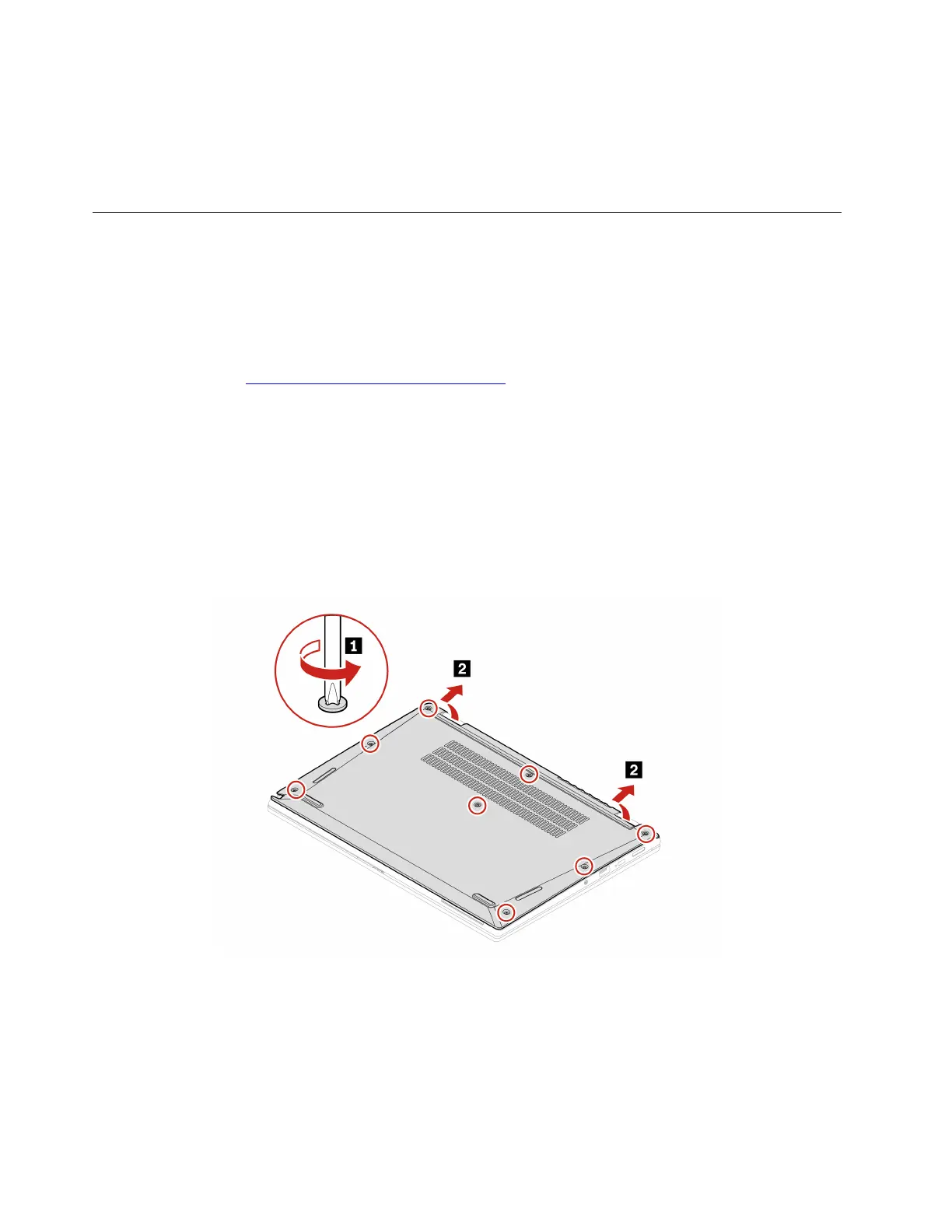
Removal procedure
32 ThinkPad L13 Gen 4, ThinkPad L13 Yoga Gen 4, ThinkPad S2 Gen 8, and ThinkPad S2 Yoga Gen 8 User Guide












 To Next Page