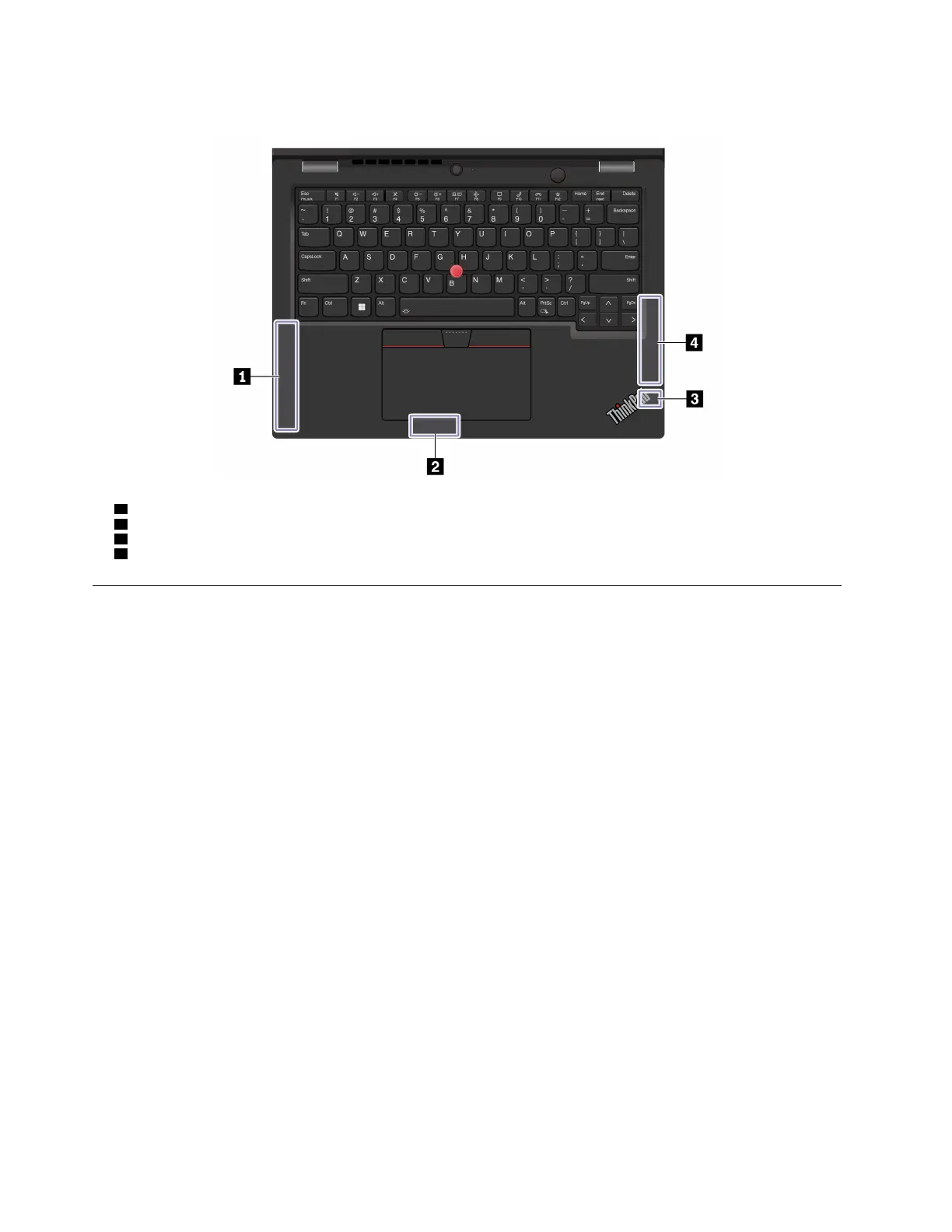
The following illustration shows the antenna locations on your computer:
1 Wireless WAN antenna (main, for selected models)
2 Wireless LAN antenna (auxiliary)
3 Wireless LAN antenna (main)
4 Wireless WAN antenna (auxiliary, for selected models)
Operating environment
Maximum altitude (without pressurization)
3048 m (10 000 ft)
Temperature
• Operating: 5°C to 35°C (41°F to 95°F)
• Storage and transportation in original shipping packaging: -20°C to 60°C (-4°F to 140°F)
• Storage without packaging: 5°C to 43°C (41°F to 109°F)
Note: When you charge the battery, its temperature must be no lower than 10°C (50°F).
Relative humidity
• Operating: 8% to 95% at wet-bulb temperature 23°C (73°F)
• Storage and transportation: 5% to 95% at wet-bulb temperature 27°C (81°F)
52
ThinkPad L13 Gen 4, ThinkPad L13 Yoga Gen 4, ThinkPad S2 Gen 8, and ThinkPad S2 Yoga Gen 8 User Guide






 To Next Page