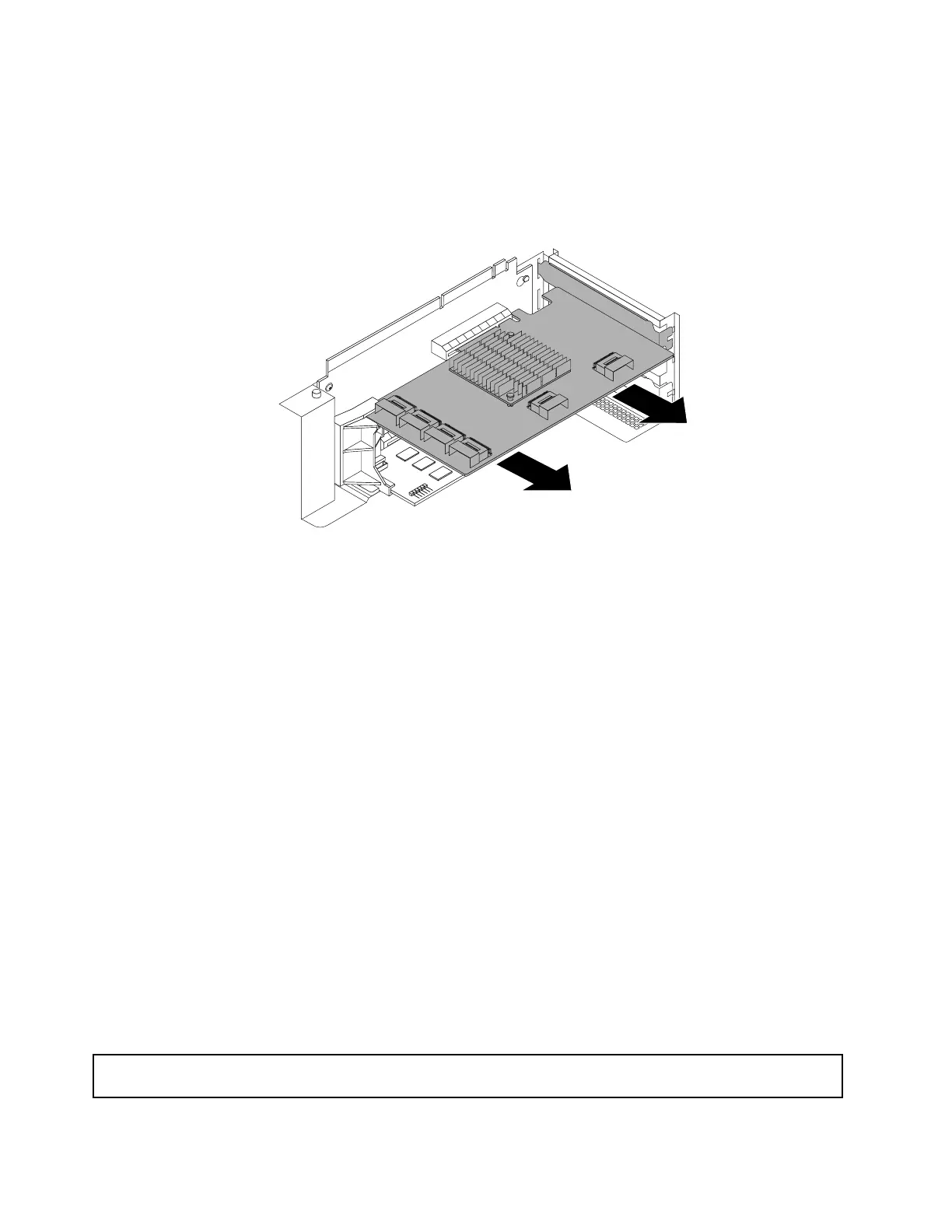
6.TherearetwoPCIExpresscardslotsontherisercardassembly1andtheexpandercardisinstalledin
theshorterslot.Disconnectcablesfromtheexpandercard.Then,grasptheexpandercardbyitsedges
andcarefullypullitoutofthePCIExpresscardslot.
Note:TheexpandercardmightfittightlyintothePCIExpresscardslot.Ifnecessary,alternatemoving
eachsideoftheexpandercardasmallandequalamountuntilitiscompletelyremovedfromtheslot.
Figure72.Removingtheexpandercard
7.Dependingonyourneeds,dooneofthefollowing:
•Installanewexpandercardtoreplacetheoldoneandreconnectcables.See“Installingthe
expandercard”onpage111
.
•InstallaPCIExpresscardslotbrackettocovertheplaceandreconnectcables.See“Mini-SASto
mini-SASsignalcableconnections”onpage43.
8.Reinstalltherisercardassembly1.See“Replacingtherisercardassembly1”onpage159.
9.Ifyouareinstructedtoreturntheoldexpandercard,followallpackaginginstructionsanduseany
packagingmaterialsthataresuppliedtoyouforshipping.
Whattodonext:
•Toworkwithanotherpieceofhardware,gototheappropriatesection.
•Tocompletetheremovalprocedure,goto“Completingthepartsreplacement”onpage182.Then,you
mightneedtoreconfigureRAIDforyourserver.See“ConfiguringRAID”onpage70.
InstallingorremovinganEthernetcard
ThistopicprovidesinstructionsonhowtoinstallorremoveanEthernetcard.Ifyouareinstallingorremoving
anyothertypesofsupportedPCIExpresscards,theprocedureissimilar.
Note:TheEthernetcardisextremelysensitivetoESD.Ensurethatyoureadandunderstand“Handling
static-sensitivedevices”onpage82
firstandcarefullyperformtheoperation.
InstallinganEthernetcard
Attention:Donotopenyourserverorattemptanyrepairbeforereadingandunderstanding“Safetyinformation”
onpageiiiand“Guidelines”onpage81.
114ThinkServerRD430HardwareMaintenanceManual











 To Next Page