Replacingtheprimaryharddiskdrive
Attention:
Donotopenyourcomputerorattemptanyrepairbeforereadingandunderstandingthe“Importantsafetyinformation”
onpageiii
.
Thissectionprovidesinstructionsonhowtoreplacetheprimaryharddiskdrive.
Toreplacetheprimaryharddiskdrive,dothefollowing:
1.Turnoffthecomputeranddisconnectallpowercordsfromelectricaloutlets.
2.Removethecomputercover.See“Removingthecomputercover”onpage26.
3.Locatetheprimaryharddiskdrive.See“Locatinginternaldrives”onpage12.
4.Disconnectthesignalcableandthepowercablefromtheharddiskdrive.
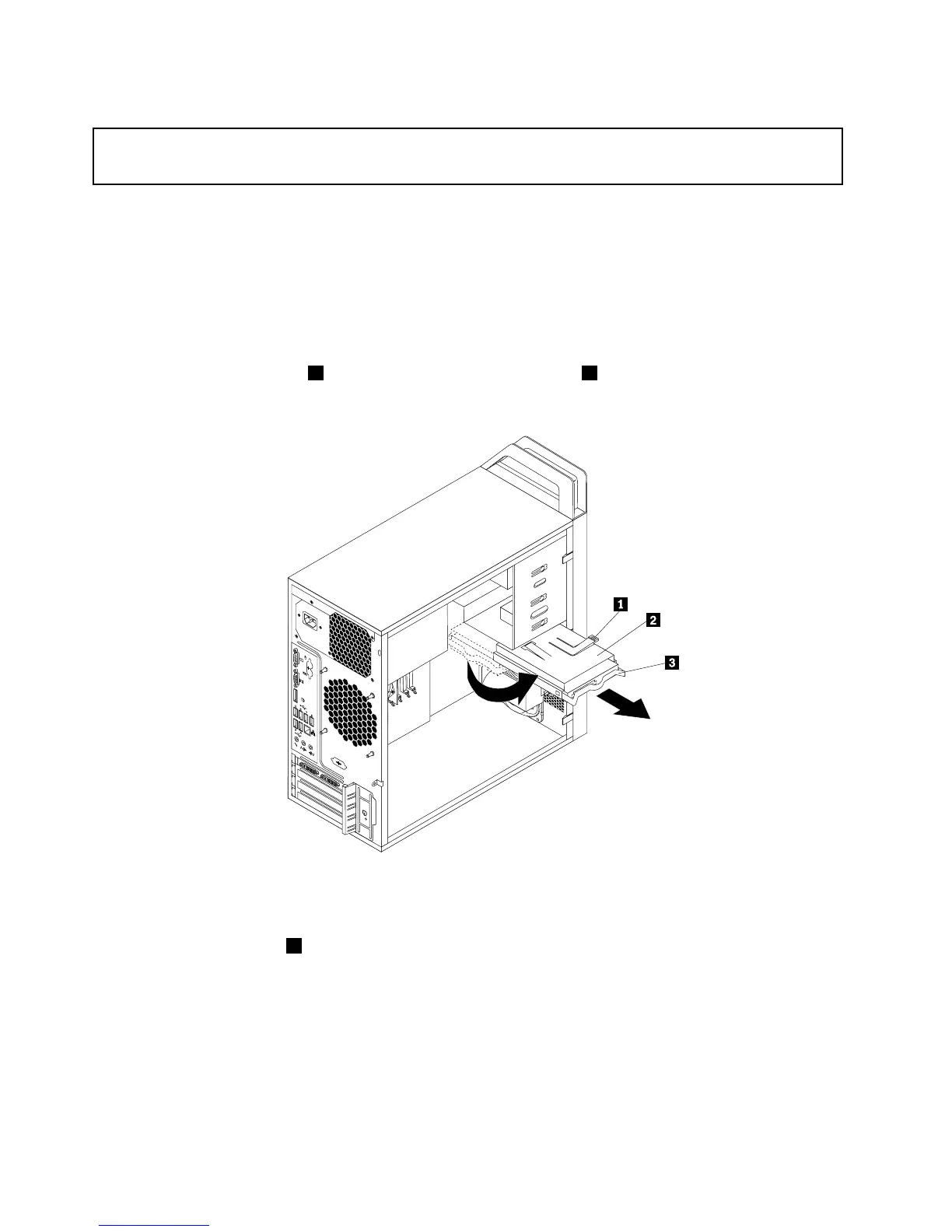
5.Pressthebluereleasetab1down,slidetheharddiskdrivecage2totherearofthecomputer,and
thenpivotitoutward.
Figure26.Removingtheprimaryharddiskdrive
6.Removetheharddiskdrivecagefromthechassisbyslidingitoutward.
7.Pullonthebluehandle3toreleaseandremovetheharddiskdrivefromthedrivecage.
8.Flexthesidesofthebluebrackettoremovetheharddiskdrivefromthebracket.
40ThinkStationUserGuide














 To Next Page