Caring for your monitor
Be sure to turn off the power before you perform any maintenance on the monitor.
Do not:
• Apply water or liquid directly to your monitor.
• Use solvents or abrasives.
• Use ammable cleaning materials to clean your monitor or any other electrical
equipment.
• Touch the screen area of your monitor with sharp or abrasive items. This type of
contact may cause permanent damage to your screen.
• Use any cleaner which contains an anti-static solution or similar additives. This may
harm the coating of the screen area.
Do:
• Lightly dampen a soft cloth with water and use this to gently wipe the covers and the
screen.
• Remove grease or nger marks with a damp cloth and a little mild.
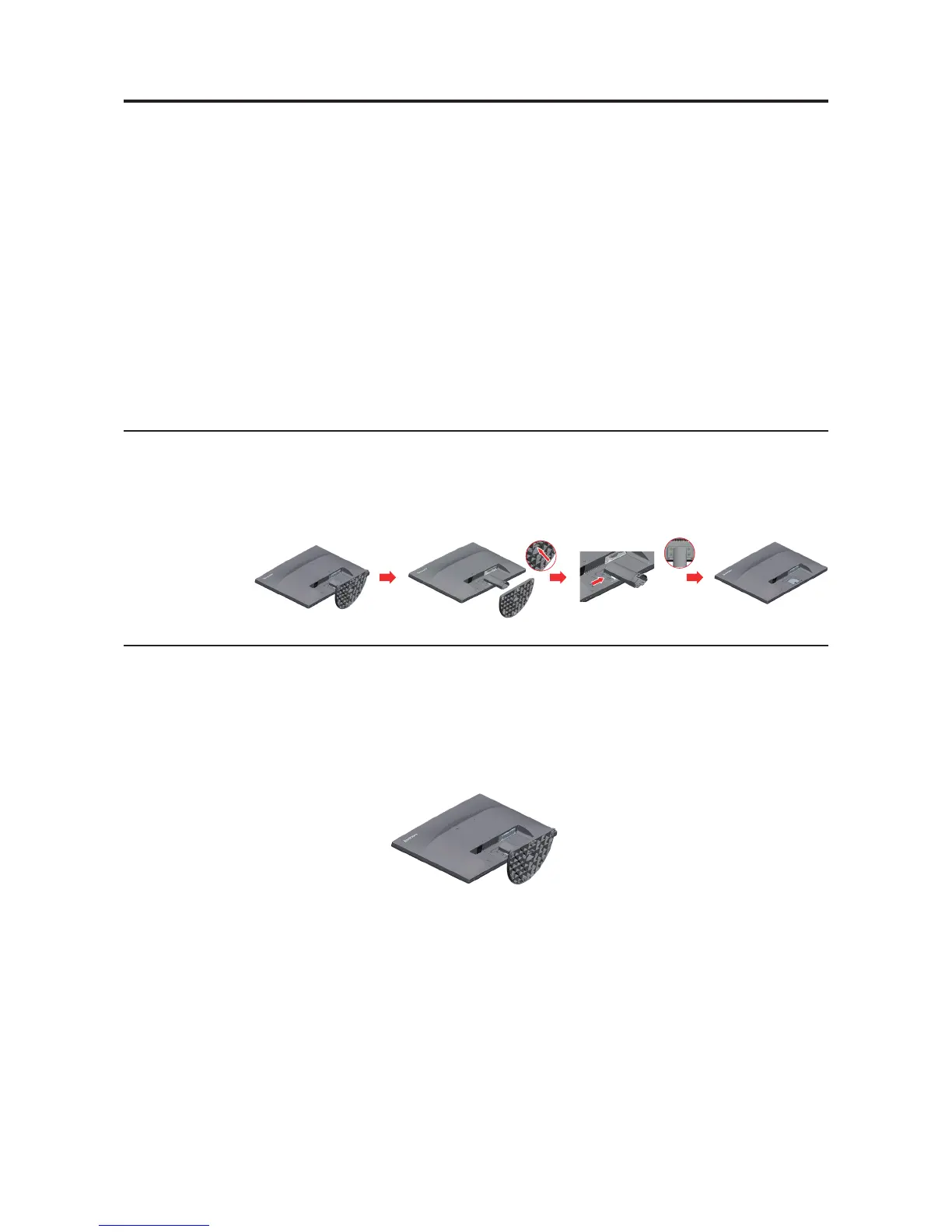
Detaching the monitor stand
Step 1: Place the monitor on a soft and at surface.
Step 2: Remove the base and stand from the monitor, then remove the four screws.
Wall Mounting (Optional)
Refer to the instructions that come with the base mounting kit. To convert your LCD display
from a desk-mounted to a wall-mounted display, do the following:
Step 1: Verify that the Power button is turned Off, then disconnect the power cord.
Step 2: Lay the LCD display face down on a towel or blanket.
Chapter 2. 2-8



 To Next Page