12
Chapter 1. Getting to know your computer
Right-side view - - - - - - - - - - - - - - - - - - - - - - - - - - - - - - - - - - - - - - - - - - - - - - - - - - - - - - - - - - - - - - - - - - - - - - - - - - - - -
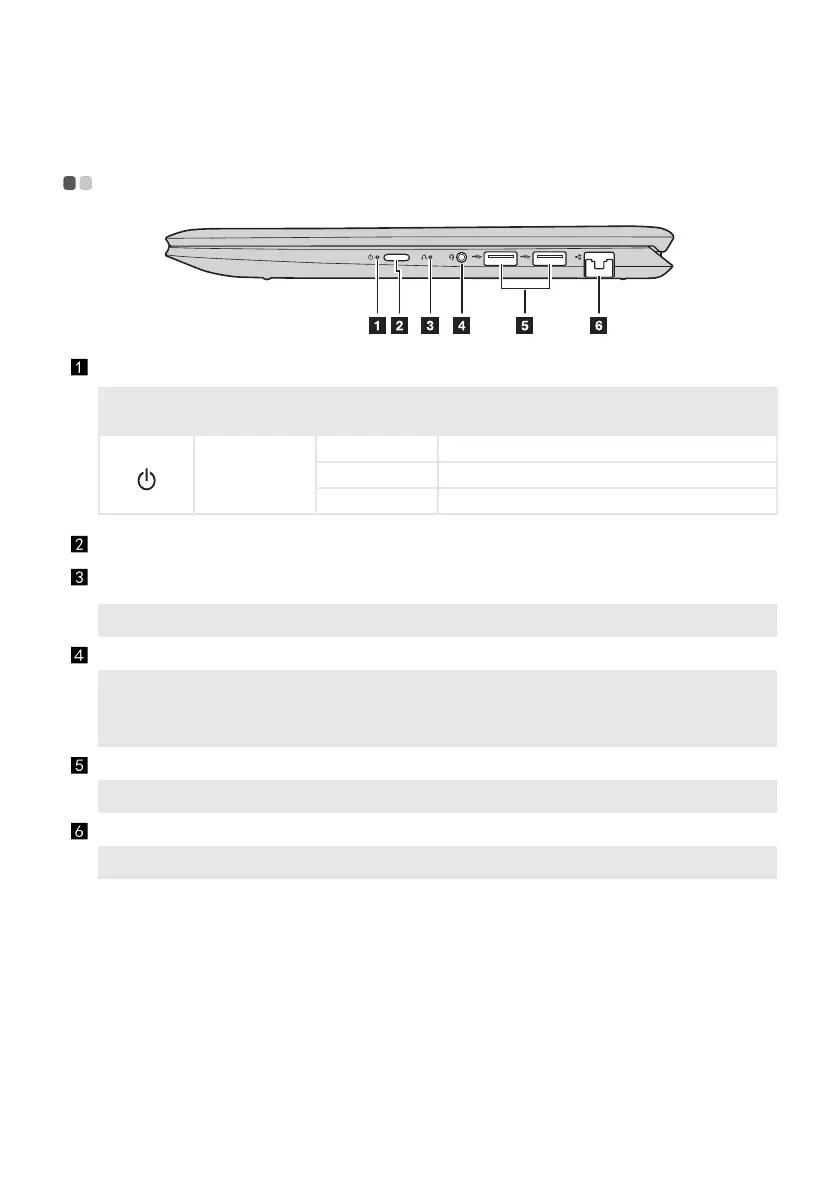
Power status indicator
Symbol Indicator
Indicator
status
Meaning
Power status
indicator
On (solid white) The computer is powered on.
Blinking The computer is in sleep mode.
Off The computer is powered off.
Power button
Press this button to turn on the computer.
Novo button
When the computer is off, press this button to start the Lenovo OneKey
Recovery System or the BIOS setup utility, or to enter the boot menu.
Note: For details, see “Lenovo OneKey Recovery System” on page 24.
Combo audio jack
Connects to headsets.
Notes:
• The combo audio jack does not support conventional microphones.
• The recording function might not be supported if third-party h
eadphones or headsets are connected,
due to different industry standards.
USB ports
Connect to USB devices.
Note: For details, see “Connecting USB device” on page 10.
RJ-45 port
Connects the computer to an Ethernet network.
Note: For details, see “Connecting network cables” on page 13.




 To Next Page