26 Information SET-02
A
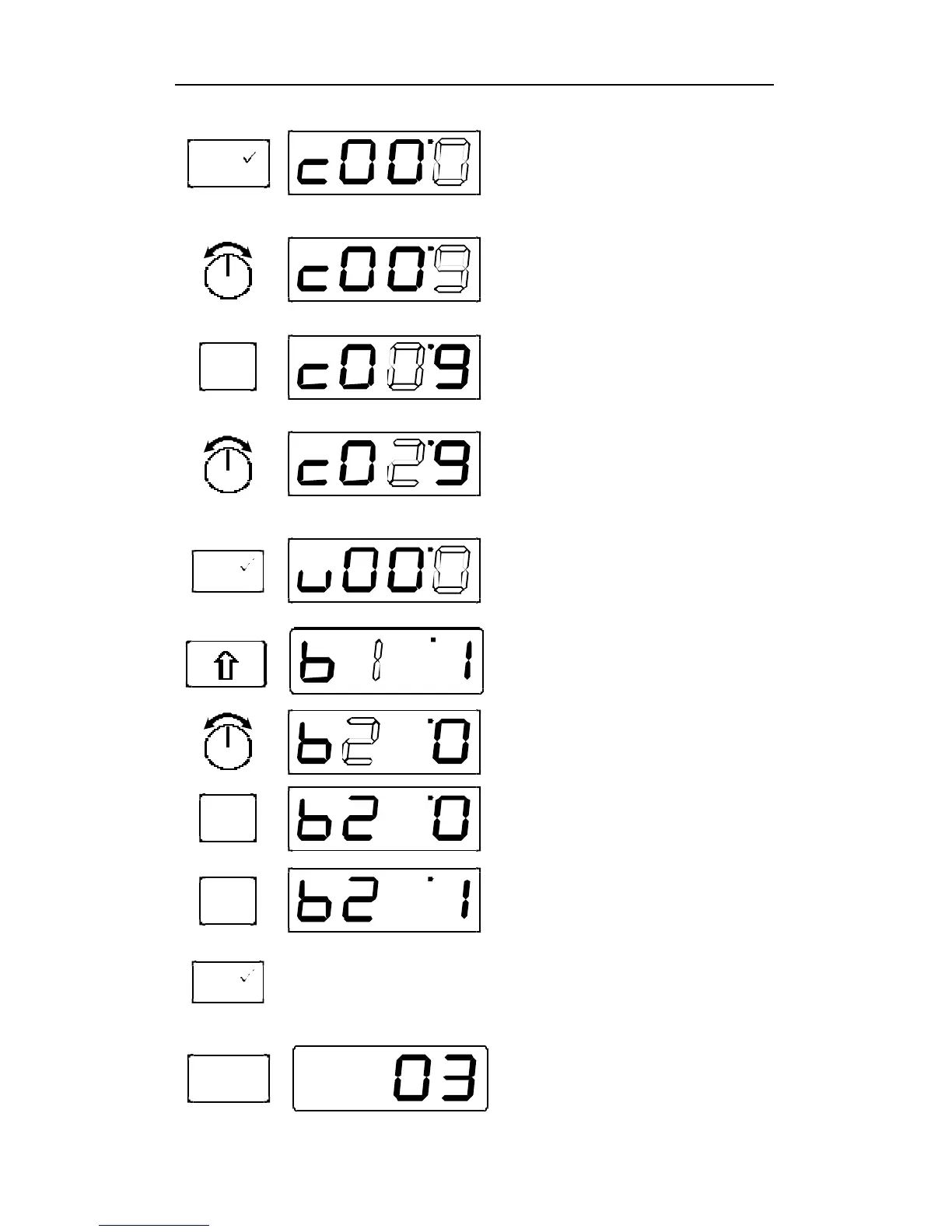
On the very left a "C" is displayed. Now
enter the number of the CV that you want
to alter. The entire right-hand digit of the
address display now flashes.
Alter the value of this digit by turning the
rotary control-knob to the right (value
increases) or to the left (value
decreases). In this example the value is
being altered to 9.
3
7
Select the second digit from the right.
Alter the value of this digit by turning the
rotary control-knob to the right or to the
left. In this example the value is being
altered to 2. (You nor are ready to alter
CV29.)
A
You have identified the CV that you want
to alter and now you are asked to enter
the desired value, the right-hand digit
flashes.
+
The flashing '0' indicates that you have to
select the bit you want to alter.
Turn the rotary control-knob until the
number 2 is shown.
4
8
With key 4 you can now switch back and
forth between "Bit is deleted" (display on
the very right shows '0') ...
4
8
...or "Bit is set" (display on the very right
is '1').
Set the desired condition.
A
By striking "A" key the programming is executed. In this example bit
2 of CV29 was set to have a value of '1'. The selected CV is again
shown on the display.
0
M
If you don’t want to alter further CVs,
press the "0
M
" key repeatedly until the
locomotive address is displayed again.
This will end your programming
sequence.



 To Next Page