Setup and Connection
You can use our lepow stand ST01 to hold the D14S Monitor.
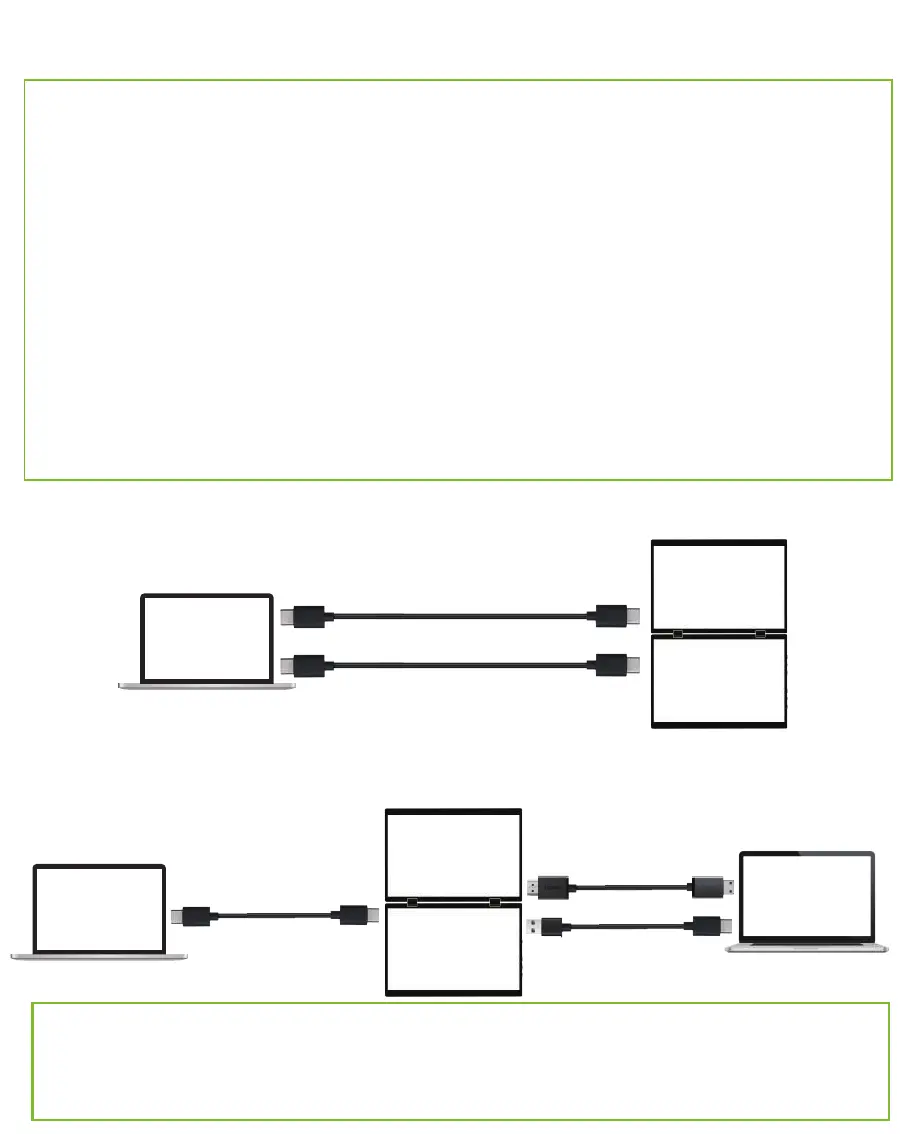
Connect the Laptop/PC with a Type-C to Type-C & HDMI to
Mini HDMI Cable
Note:
·
D14S has two separate monitors, you have to connect them one by one with
power supply and signal transmission.
· Not all laptops/PCs with a Type-C port can work with lepow monitor. Please check
the Type-C port of your laptop if it supports audio and video signal transmission.
· This monitor does not have a built-in battery. Before connecting the monitor,
please make sure it has enough power (5V/2A or above) coming in first.
· If you need to increase the D14S brightness, please plug in the 5V/2A USB A
to Type-C cable to supply external power.
· Please use the wall charger to power on the monitor to avoid black or flashing
screen when power supply is not enough.
Note: For HDMI cable, it cannot supply enough power for the monitor, so you
need to use the 5V/2A external power supply If you use the HDMI to Type-C
cable for connection.
Type-C to Type-C
HDMI to Mini HDMI
USB A to Type-C
Laptop
4
Connect the Laptop/PC with 2 Type-C to Type-C Cable
Type-C to Type-C
Type-C to Type-C
Laptop
Monitor
Monitor
Monitor
Laptop
Monitor


 To Next Page