Network Video Recorder Administrator’s Manual
76
Backup / Restore Settings
Making regular system backups is always recommended in case of unexpected disasters or
accidents that may damage NVR server.
NVR server can create a backup file of the whole system settings as
Backup_[yyyymmdd].nvr file and save it to a connected USB disk within one click. The
backed up settings include the following properties: (1) System Settings including System
Name, Date & Time, Network, Email, Mouse and Keyboard, (2) Camera Settings, (3)
Schedule Settings, and (4) Event Management.
The recordings will be kept on hard disks, please refer to NVR User’s Manual to export a
system log file and to export video files for a complete backup.
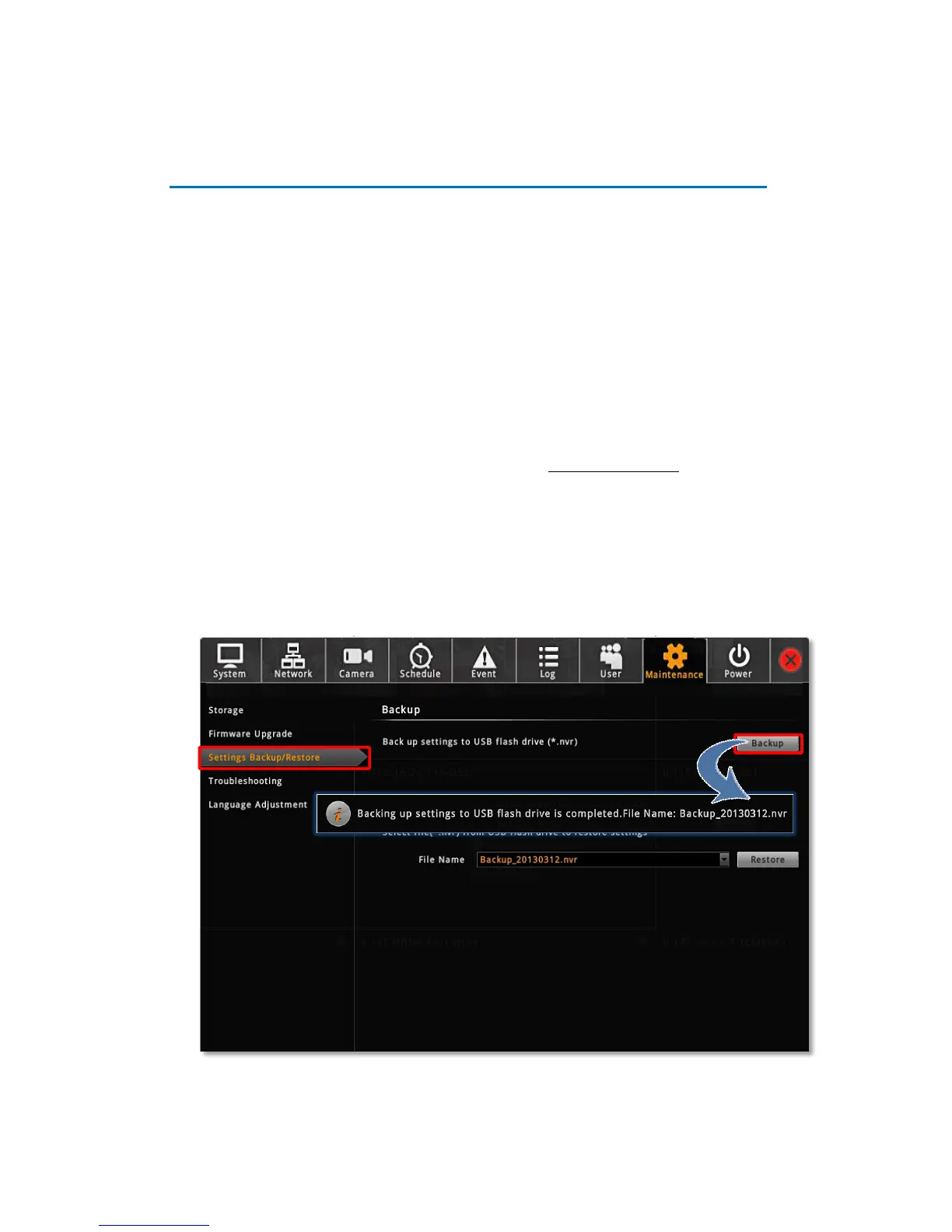
Backup
To start backing up system setting, please insert a USB disk into NVR first.
1. On Live screen, click Setup” click Maintenance tab click “Settings Backup /
Restore”.
2. Click “Backup”, the backup file will be saved to your USB disk as .nvr file.



 To Next Page