Home
Lexmark
Printer
C4342
Page 39
Lexmark C4342 - Page 39
235 pages
Manual
Save Page as PDF
To Next Page
To Next Page
To Previous Page
To Previous Page
Loading...
3
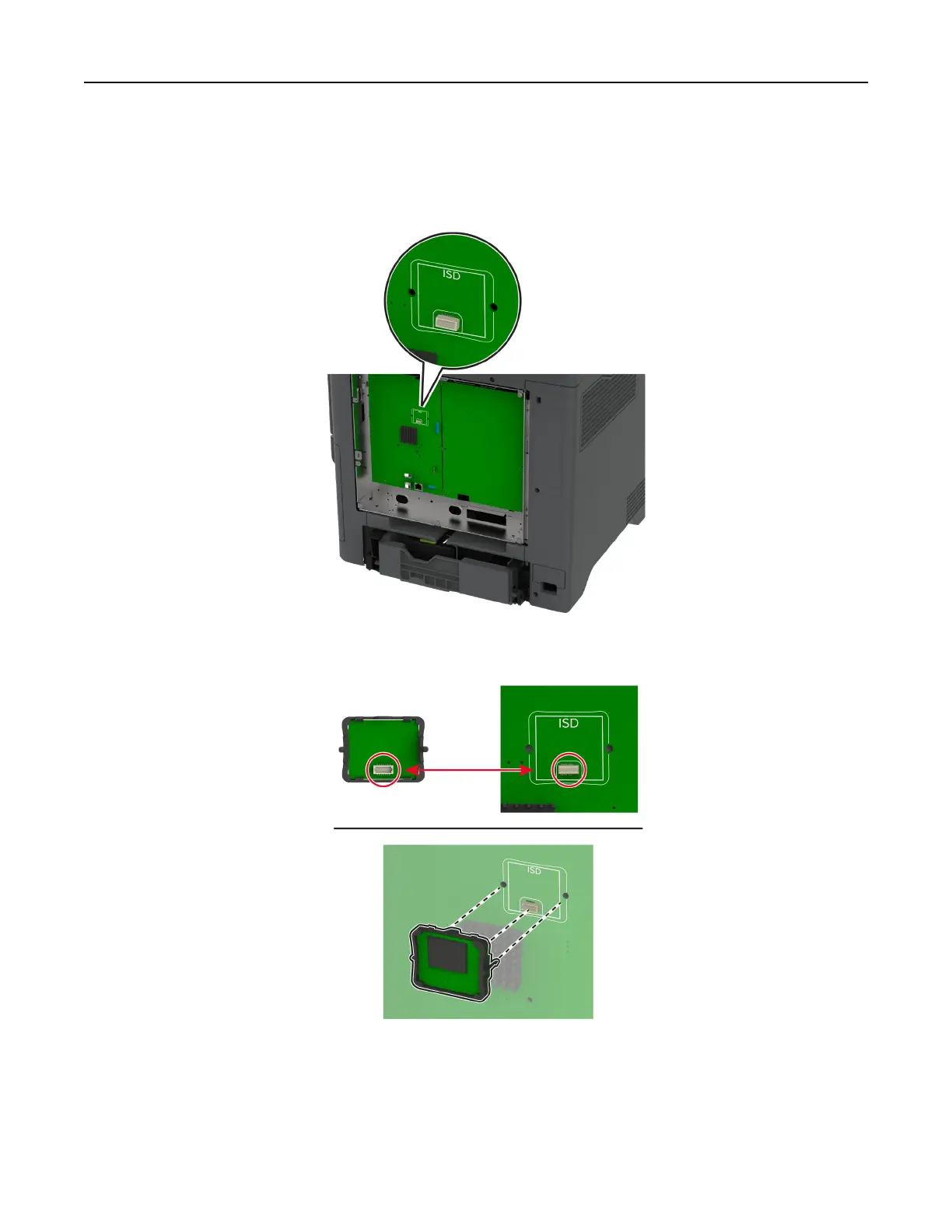
Unpack the intelligent storage drive (ISD).
W
arning—Potential Damage:
Avoid touching the conn
ection points along
the edge of the card.
4
Lo
cate the ISD connector
.
5
Insert the card to the ISD connector
.
Set up, install, and configure
39
38
40
Table of Contents
Main Page
Table of Contents
2
Safety Information
5
Conventions
5
Product Statements
5
Learn about the Printer
8
Finding Information about the Printer
8
Finding the Printer Serial Number
9
Printer Configurations
9
Using the Control Panel
10
Understanding the Status of the Indicator Light
11
Selecting Paper
11
Set Up, Install, and Configure
19
Selecting a Location for the Printer
19
Attaching Cables
20
Setting up and Using the Home Screen Applications
20
Managing Contacts
24
Setting up and Using the Accessibility Features
25
Loading Paper and Specialty Media
27
Installing and Updating Software, Drivers, and Firmware
32
Installing Hardware Options
35
Networking
61
Setting up Serial Printing (Windows Only)
64
Secure the Printer
66
Locating the Security Slot
66
Erasing Printer Memory
66
Erasing Printer Storage Drive
66
Restoring Factory Default Settings
67
Statement of Volatility
67
Print
68
Printing from a Computer
68
Printing from a Mobile Device
68
Printing from a Flash Drive
70
Supported Flash Drives and File Types
71
Configuring Confidential Jobs
71
Printing Confidential and Other Held Jobs
72
Printing a Font Sample List
73
Printing a Directory List
73
Placing Separator Sheets between Copies
73
Canceling a Print Job
73
Adjusting Toner Darkness
73
Use Printer Menus
74
Menu Map
74
Device
75
Print
85
Paper
93
USB Drive
95
Network/Ports
96
Cloud Services
109
Security
109
Reports
116
Troubleshooting
117
Printing the Menu Settings Page
117
Maintain the Printer
118
Checking the Status of Parts and Supplies
118
Configuring Supply Notifications
118
Setting up E-Mail Alerts
118
Viewing Reports
119
Ordering Parts and Supplies
119
Replacing Parts and Supplies
122
Cleaning Printer Parts
155
Saving Energy and Paper
160
Moving the Printer to Another Location
161
Shipping the Printer
162
Troubleshoot a Problem
163
Print Quality Problems
163
Printer Error Codes
164
Printing Problems
171
The Printer Is Not Responding
196
Unable to Read Flash Drive
197
Enabling the USB Port
198
Clearing Jams
198
Network Connection Problems
208
Hardware Options Problems
210
Issues with Supplies
212
Paper Feed Problems
213
Color Quality Problems
216
Contacting Customer Support
218
Recycle and Dispose
219
Recycling Lexmark Products
219
Recycling Lexmark Packaging
219
Notices
220
Index
231
Related product manuals
Lexmark C4150
493 pages
Lexmark C950
12 pages
Lexmark C540
236 pages
Lexmark C746
274 pages
Lexmark C925
221 pages
Lexmark C910
323 pages
Lexmark C544
6 pages
Lexmark C792
82 pages
Lexmark C748
79 pages
Lexmark C522
302 pages
Lexmark C920
370 pages
Lexmark C760
466 pages


 To Next Page