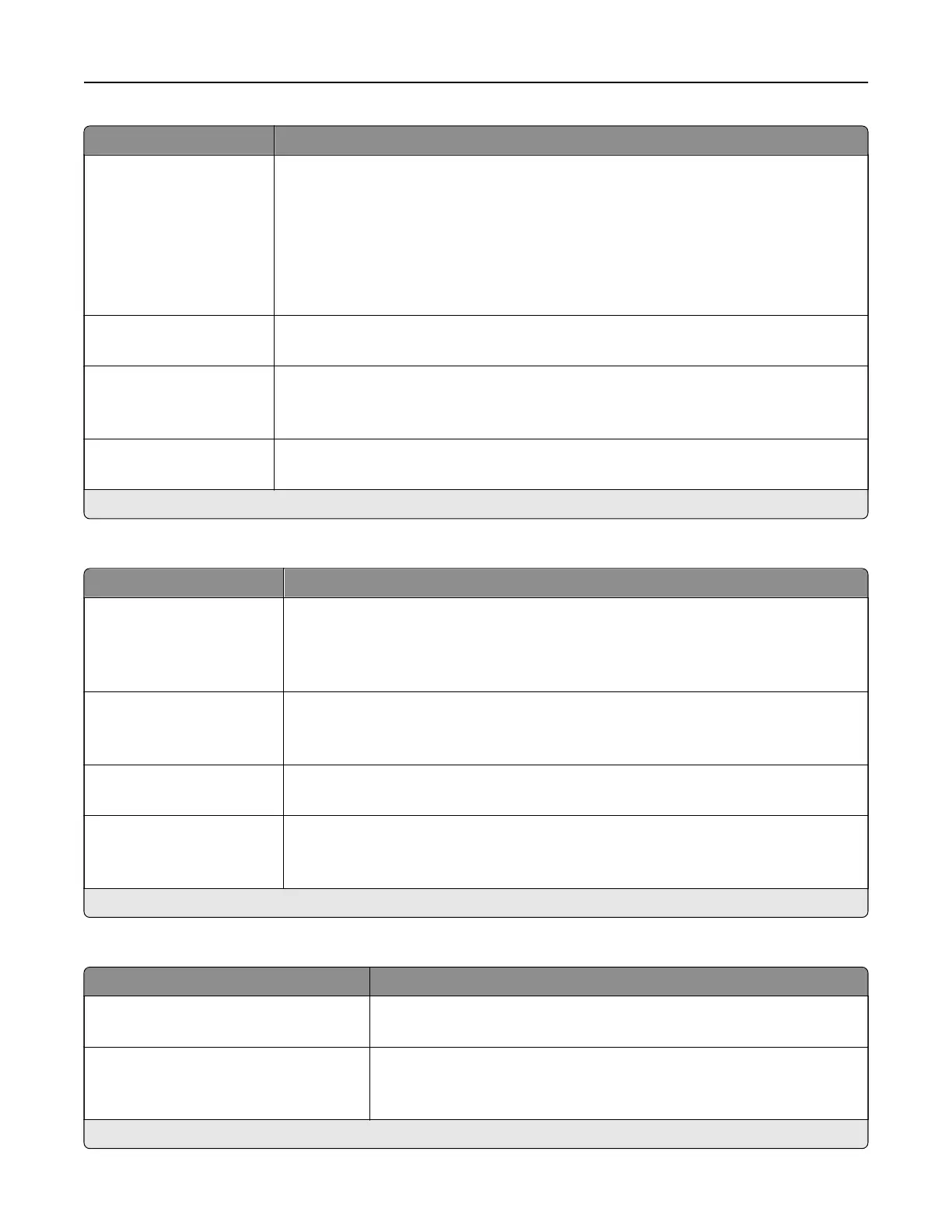
Menu item Description
Resolution
75 dpi
150 dpi*
200 dpi
300 dpi
400 dpi
600 dpi
Set the resolution of the scanned image.
Darkness
1–9 (5*)
Adjust the darkness of the scanned image.
Orientation
Portrait*
Landscape
Specify the orientation of the original document.
Original Size
Mixed Sizes*
Set the paper size of the original document.
Note: An asterisk (*) next to a value indicates the factory default setting.
Advanced Imaging
Menu item Description
Color Balance
Cyan ‑ Red (0*)
Magenta ‑ Green (0*)
Ye l l o w ‑ Blue (0*)
Adjust the color intensity for cyan, magenta, and yellow.
Contrast
Best for content*
0–5
Specify the contrast for the scanned image.
Background Removal
Level (0*)
Remove the background color or image noise from the original document.
Scan Edge to Edge
On
O*
Scan the original document from edge to edge.
Note: An asterisk (*) next to a value indicates the factory default setting.
Admin Controls
Menu item Description
Max E‑mail Size
0–65535 (0*)
Set the allowable file size for each e‑mail.
Size Error Message Specify an error message that the printer sends when an e‑mail exceeds
its allowable file size.
Note: You can type up to 1024 characters.
Note: An asterisk (*) next to a value indicates the factory default setting.
Use printer menus 104



 To Next Page