Home
Lexmark
All in One Printer
MX71 Series
Page 253
Lexmark MX71 Series - Page 253
510 pages
Manual
Save Page as PDF
To Next Page
To Next Page
To Previous Page
To Previous Page
Loading...
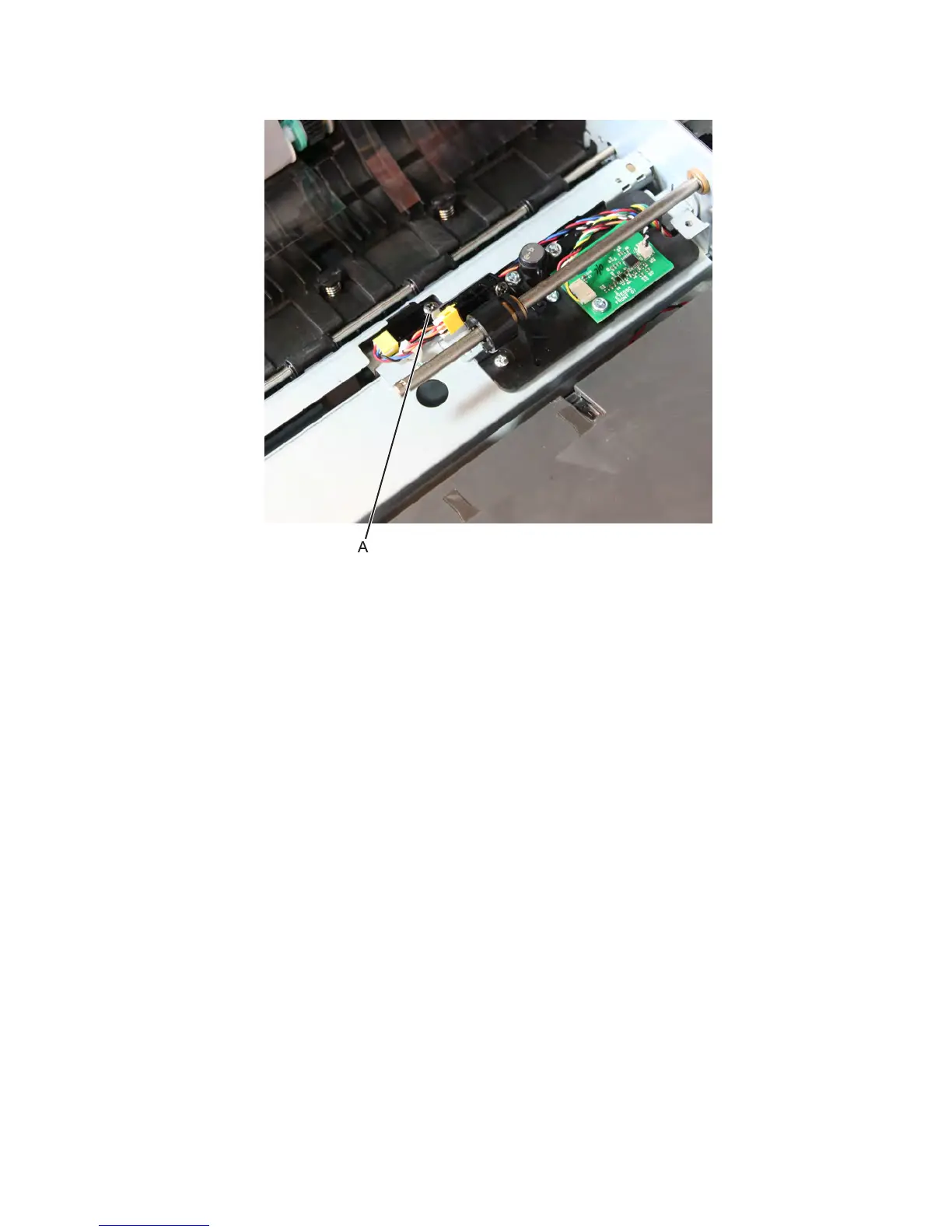
5
Remove the screw (A)
from the sensor.
Sensor (ADF skew detect) removal
1
Open th
e ADF
top cover
.
2
Remove the sep
aration
guide.
3
Remove the ADF
separato
r roll.
4
Disconnect the cabl
e from the se
nsor.
7463
Rep
air
inf
orma
tio
n
623
252
254
Related product manuals
Lexmark MX721
315 pages
Lexmark MX710
364 pages
Lexmark MX722
315 pages
Lexmark MX717
360 pages
Lexmark MX711de
5 pages
Lexmark MX710de
111 pages
Lexmark MX711de 3
834 pages
Lexmark MX711de 4
834 pages
Lexmark MX710 Series
360 pages
Lexmark MX310
260 pages
Lexmark MX331
238 pages
Lexmark MX610
349 pages



 To Next Page