26
Touch Screen (with navigation system)
By touching the screen with your finger, you can control the audio system and air condition-
ing system, and adjust the screen display etc. For details, refer to the “Navigation System
Owner's Manual”.
The button positions, shapes and screen may slightly vary depending on the type of the
touch screen.
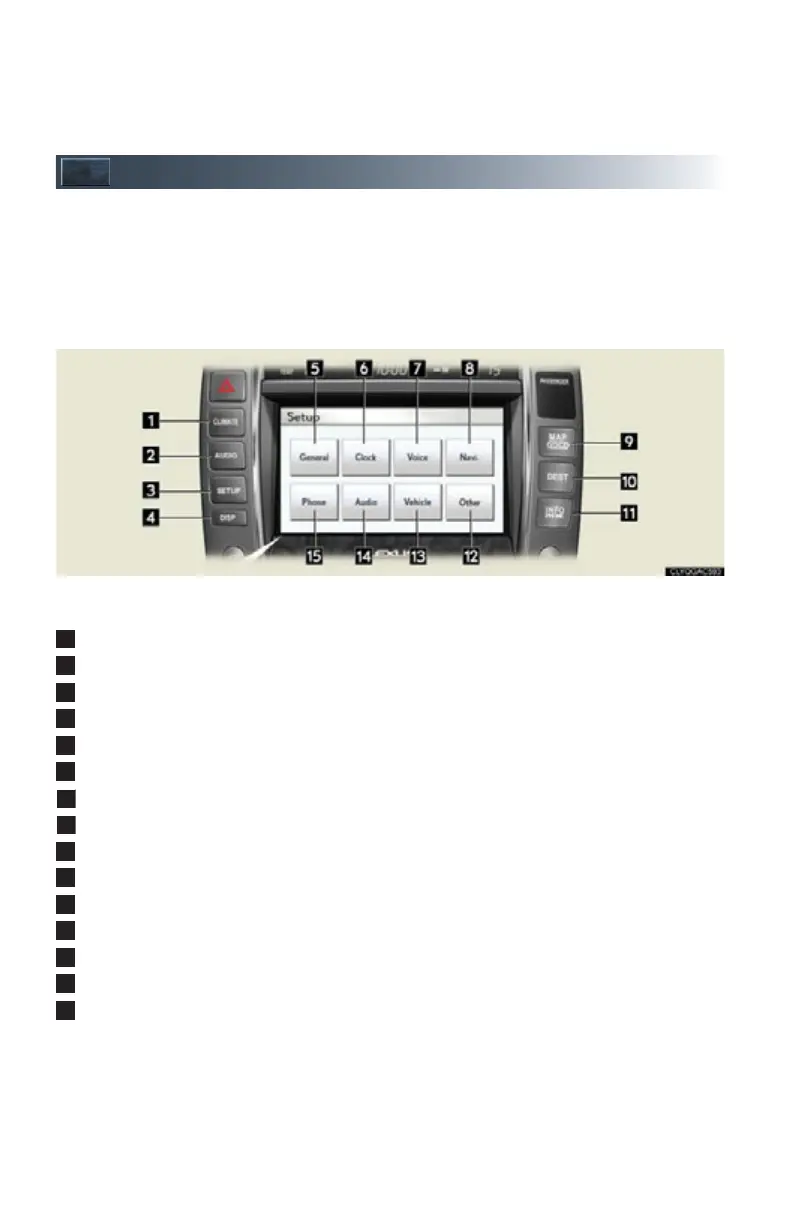
Press the button to display the screen. The “Setup” screen shown in the above illustration is
displayed when the “SET UP” button is pressed.
“CLIMATE”: Air conditioning operation screen
“A U D I O ” : A u d i o c o n t r o l s c r e e n
“SET UP”: Setup screen
“DISP”: Adjust picture quality
“General”: General settings screen
“Clock”: Clock settings screen
“Voice”: Voice settings screen
“Navi.”: Navigation settings screen
“MAP VOICE”: Vehicle's current position
“DEST”: Destination screen
“INFO PHONE”: Information screen
“Other”: Other settings screen
“Vehicle”: Vehicle settings screen
“Audio”: Audio settings screen
“Phone”: Phone settings screen



 To Next Page