PW680-10100-NE-1 imp Sig 7 Front PW680-10100-NE-1 imp Sig 7 Front PW680-10100-NE-1 imp Sig 7 Front PW680-10100-NE-1 imp Sig 7 Front
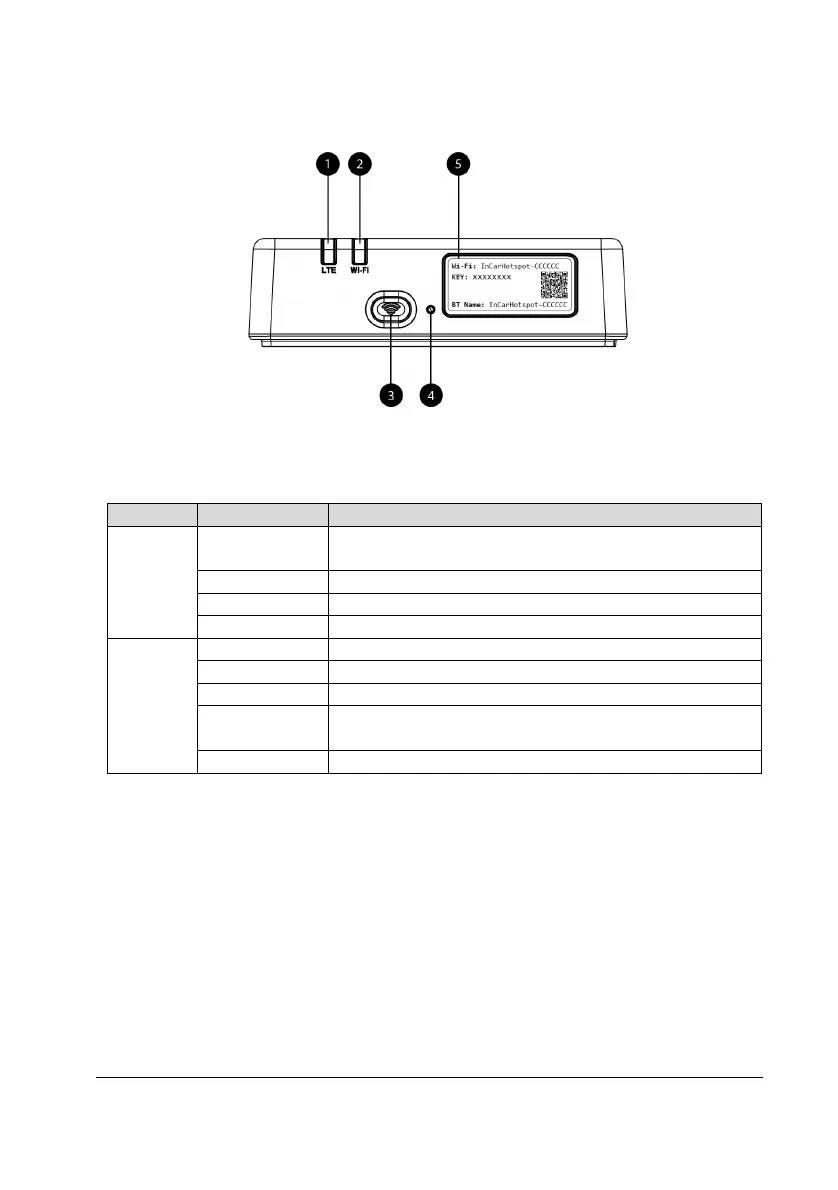
Figure 1: Lexus Link 4G box front panel
LED Indicators
Wi-Fi switched Off by pressing the On/Off hard button or by
selecting Wi-Fi Off setting in the main settings page
Wi-Fi initialization phase or in case of Wi-Fi failure
Ready for client access and connection
Wi-Fi client(s) connected
No signal (or failed registration/connection to the network)
Successfully registered and connected to the network
Successfully registered and connected to the network in
roaming*
Transmitting data when roaming*
*Roaming indication depends on the settings of the embedded SIM, established with the Mobile
Network Operator
Note:
After switching off your engine, the Lexus Link 4G box will remain active up to 30 seconds. This
is a normal behavior.
Note:
This feature could not be available in your vehicle, for more information, please, consult an
authorized retailer.
Lexus Link 4G box startup
Lexus Link 4G box startup procedure follows these steps:
Turn ignition ON


 To Next Page
 Loading...