CAUTION: GAUGE MALFUNCTION
Risk of damage to equipment. Do not make connections to the gauge identication
pin (pin 4). Failure to do so can cause the gauge to malfunction.
CAUTION: GAUGE CONNECTION
Risk of damage to equipment. Do not connect a gauge input and analogue input
signal at the same time. This will result in the wrong speed demand.
Figure 4.
Gauge connection
1. Electrical supply positive 2. Electrical supply ground
3. Pressure measurement input signal 4. Not connected
5. Signal ground 6. Not connected
7. Not connected 8. Not connected
1. Electrical supply positive 2. Electrical supply ground
3. Pressure measurement input signal 4. Not connected
5. Signal ground 6. Not connected
7. Not connected 8. Not connected
2.6 Auto-run
The auto‑run setting congures the pump to start automatically when the
power is switched on, without any customer intervention.
You can congure the auto‑run through serial communications, or with the
start or stop button. Push and hold the start or stop button for more than
eight seconds to enable or disable the auto-run setting. The auto-run LED
displays the auto-run setting.
The pump can be stopped by either manual, parallel or serial control modes
when in auto‑run mode.
Note:
Refer to Operation safety on page 25 for guidelines on how to congure
different operational modes and any associated warnings to consider.
2.7 Pump controller conguration
The integral pump controller monitors the power and temperature of the
pump. The pump controller protects the user and the pump when the pump
is operated under sustained high load or in fault conditions.
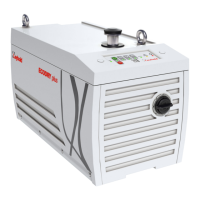
The pump controller is connected to the interface control panel and the
pump can be operated:
▪ manually, with the buttons on the user interface control panel. Refer to
Figure: Interface control panel.
▪ remotely, with serial or parallel communications through the SUB-D 9-
pin connector located on the rear of the pump. Refer to Connection for
remote control and monitoring on page 23.
13
300902516_002 - 10/2020 - © Leybold
General description



 To Next Page