EasyManua.ls Logo

LG-Ericsson iPECS LDP-9224DF - User Manual

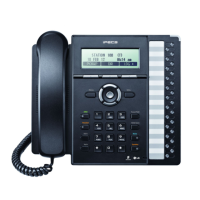
LG-Ericsson iPECS LDP-9224DF
86 pages
Print Icon
To Next Page IconTo Next Page
Loading...
LDP-9208D/9224DF/9240D
Full Length User Guide
Please read this manual carefully before
operating Phone. Retain it for future reference.

Table of Contents

Question and Answer IconNeed help?

Do you have a question about the LG-Ericsson iPECS LDP-9224DF and is the answer not in the manual?

Summary

Important Safety Information

Warning

Provides critical warnings for safe phone operation and installation.

Caution

Lists precautions to prevent damage and ensure proper usage of the phone.

1. INTRODUCTION

1.1 General

Provides an overview of the telephone system's capabilities and design.

1.2 Feature Information

Explains how the user guide is structured and general usage notes.

1.3 Feature Groupings

Describes how features are organized within the manual for easy location.

1.4 LDP-9200 series Phone Description

1.5 LDP-9200 series phone Description

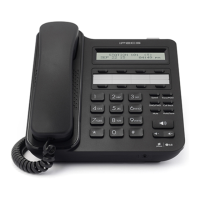
Figure LDP-9208 D Button name and layout

Illustrates and labels the buttons on the LDP-9208D phone model.

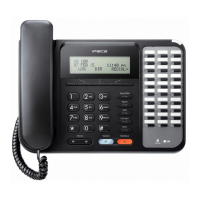
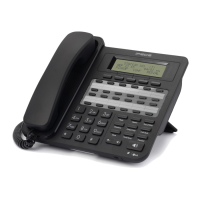
Figure LDP-9224 D Button name and layout. NA Aus.

Illustrates and labels the buttons on the LDP-9224D phone model for Australia.

The functions of button

1. Ring;Message Indicator

Explains the function of the indicator light for calls and messages.

2. LCD Display

Describes the information displayed on the phone's screen.

8. Flexible buttons

Describes the assignment and types of flexible buttons on the phones.

9. Soft keys

Explains the interactive soft keys and their varying functions.

11. Fixed buttons

Flash button

Use to seize a new line without on-hook to make a call.

Speed button

Use to assign speed dial numbers or delete characters in menu mode.

DND (Do Not Disturb);FWD button

Use to activate DND or forward all calls to another number.

Hold;Save button

Use to place a call on hold or save inputs in menu mode.

1.6 DSS Console

1.6.1 DSS(Direct Station Select) Console Installation

1.7 LDP-9200 Series Phone Installation

1.7.1 Phone Connections

Details how to connect the handset, headset, and line cable to the phone.

1.7.2 Information about compatibility headset

Provides guidance on headset compatibility and where to find lists.

1.7.3 Wall Mount

1.8 Registering Station Name

1.9 Entering Character by using Entry chart

1.10 Assigning Features to Flex Buttons

2. LCD, SPEAKERPHONE & RELATED FEATURES

2.1 Using the Display Menu

Explains how to navigate and use the phone's display menu options.

2.2 Using the Speakerphone

3. RECEIVING CALLS

3.1 Answering a Call While Idle

Describes how to answer incoming calls when the phone is not in use.

3.2 Responding to a Call While Busy

3.3 Using Answering Machine Emulation (AME)

3.4 Differential Ring Signals

3.5 Answering Calls at Night

3.6 Answering Calls to Other Stations

3.7 Using Do-Not-Disturb (DND) to Block Incoming Calls

3.8 Forwarding Calls

3.8.1 Forwarding calls to another Station or Voice Mail

Explains how to redirect calls to other stations or voicemail systems.

3.8.2 Forwarding calls to an external number

3.8.3 Forwarding callers to a Text Message

4. PLACING A CALL

4.1 Internal Calls

Details how to make calls to other extensions within the system.

4.1.1 Using Camp-On when calling a busy station

Explains how to wait for a busy extension to become available.

4.1.2 Leaving a Message Wait

4.2 External Calls

4.2.1 Placing External CO;VoIP calls

Provides instructions for making calls using external lines.

4.2.2 Waiting for the next available CO;IP line

4.2.3 Account Codes: Tracking External calls for billing

4.2.4 Disable dialing from your phone

4.2.5 Temporarily override dialing restrictions at a phone

4.3 Using Directory

4.3.1 Using Last Number Redial (LNR)

4.3.2 Using and Entering Saved Number Dial

4.3.3 Using System Speed Dial Numbers

4.3.4 Using and Entering Station Speed Dial Numbers

4.3.5 Using Automatic Called Number Redial (ACNR)

5. TRANSFER, CONFERENCE & OTHER CALL HANDLING

5.1 Call Transfer: Sendinga call to a different destination

Explains how to transfer an active call to another party.

5.2 Call Hold: Placing a call in a waiting state

5.3 Broker Call: Switching between two calls

5.4 Joining Multiple People in a Conference

5.4.1 Setting up a Conference Room

Explains how to create and manage dedicated conference rooms.

5.5 Call Park: Placing a call on Hold to Page

5.6 Two-Way Record: Recording a call

6. SEND & RETRIEVE MESSAGES

6.1 Responding to a Station Message Waiting Indication

Explains how to check for and respond to message waiting notifications.

6.2 Getting Voice Mail Messages

6.3 Sending and Receiving Short Text Messages

7. REMOTE SYSTEM ACCESS

7.1 Direct Inward System Access (DISA)

Explains how remote users can access system resources.

7.2 Mobile Phone Extension

Details how to use a mobile phone as an extension.

8. MISC. FEATURES

8.1 Call Log

Describes how to view call history (received, dialed, lost).

8.2 Background Music and Music on Hold

Explains the system's audio features for music and announcements.

8.3 Using Internal, External and Meet-Me Paging

8.4 Push-To-Talk (PTT) Page

8.5 Wake-Up Alarm

8.6 Alarm;Door Bell

8.7 Power Fail Transfer (PFT)

8.8 System Voice Memo

9. PBX, CENTREX & ISDN FEATURES

9.1 Access PBX or Centrex features

Explains how to connect to and use PBX or Centrex services.

9.2 Access the ISDN Network

Provides information on accessing and utilizing ISDN network services.

9.2.1 Using the Keypad facility to access ISDN features

9.2.2 Using ISDN Supplementary Services

9.2.3 Activating ISDN Caller ID Restriction

10. FEATURES & FLEX BUTTONS

10.1 Entering Station Program Data

Explains how to assign station attributes and user program codes.

10.2 Assigning Features to Flex Buttons

Details how to assign specific features to flexible buttons for quick access.

APPENDIX A USER PROGRAM CODE

APPENDIX B FLEXIBLE NUMBERING PLAN

Summary

Important Safety Information

Warning

Provides critical warnings for safe phone operation and installation.

Caution

Lists precautions to prevent damage and ensure proper usage of the phone.

1. INTRODUCTION

1.1 General

Provides an overview of the telephone system's capabilities and design.

1.2 Feature Information

Explains how the user guide is structured and general usage notes.

1.3 Feature Groupings

Describes how features are organized within the manual for easy location.

1.4 LDP-9200 series Phone Description

1.5 LDP-9200 series phone Description

Figure LDP-9208 D Button name and layout

Illustrates and labels the buttons on the LDP-9208D phone model.

Figure LDP-9224 D Button name and layout. NA Aus.

Illustrates and labels the buttons on the LDP-9224D phone model for Australia.

The functions of button

1. Ring;Message Indicator

Explains the function of the indicator light for calls and messages.

2. LCD Display

Describes the information displayed on the phone's screen.

8. Flexible buttons

Describes the assignment and types of flexible buttons on the phones.

9. Soft keys

Explains the interactive soft keys and their varying functions.

11. Fixed buttons

Flash button

Use to seize a new line without on-hook to make a call.

Speed button

Use to assign speed dial numbers or delete characters in menu mode.

DND (Do Not Disturb);FWD button

Use to activate DND or forward all calls to another number.

Hold;Save button

Use to place a call on hold or save inputs in menu mode.

1.6 DSS Console

1.6.1 DSS(Direct Station Select) Console Installation

1.7 LDP-9200 Series Phone Installation

1.7.1 Phone Connections

Details how to connect the handset, headset, and line cable to the phone.

1.7.2 Information about compatibility headset

Provides guidance on headset compatibility and where to find lists.

1.7.3 Wall Mount

1.8 Registering Station Name

1.9 Entering Character by using Entry chart

1.10 Assigning Features to Flex Buttons

2. LCD, SPEAKERPHONE & RELATED FEATURES

2.1 Using the Display Menu

Explains how to navigate and use the phone's display menu options.

2.2 Using the Speakerphone

3. RECEIVING CALLS

3.1 Answering a Call While Idle

Describes how to answer incoming calls when the phone is not in use.

3.2 Responding to a Call While Busy

3.3 Using Answering Machine Emulation (AME)

3.4 Differential Ring Signals

3.5 Answering Calls at Night

3.6 Answering Calls to Other Stations

3.7 Using Do-Not-Disturb (DND) to Block Incoming Calls

3.8 Forwarding Calls

3.8.1 Forwarding calls to another Station or Voice Mail

Explains how to redirect calls to other stations or voicemail systems.

3.8.2 Forwarding calls to an external number

3.8.3 Forwarding callers to a Text Message

4. PLACING A CALL

4.1 Internal Calls

Details how to make calls to other extensions within the system.

4.1.1 Using Camp-On when calling a busy station

Explains how to wait for a busy extension to become available.

4.1.2 Leaving a Message Wait

4.2 External Calls

4.2.1 Placing External CO;VoIP calls

Provides instructions for making calls using external lines.

4.2.2 Waiting for the next available CO;IP line

4.2.3 Account Codes: Tracking External calls for billing

4.2.4 Disable dialing from your phone

4.2.5 Temporarily override dialing restrictions at a phone

4.3 Using Directory

4.3.1 Using Last Number Redial (LNR)

4.3.2 Using and Entering Saved Number Dial

4.3.3 Using System Speed Dial Numbers

4.3.4 Using and Entering Station Speed Dial Numbers

4.3.5 Using Automatic Called Number Redial (ACNR)

5. TRANSFER, CONFERENCE & OTHER CALL HANDLING

5.1 Call Transfer: Sendinga call to a different destination

Explains how to transfer an active call to another party.

5.2 Call Hold: Placing a call in a waiting state

5.3 Broker Call: Switching between two calls

5.4 Joining Multiple People in a Conference

5.4.1 Setting up a Conference Room

Explains how to create and manage dedicated conference rooms.

5.5 Call Park: Placing a call on Hold to Page

5.6 Two-Way Record: Recording a call

6. SEND & RETRIEVE MESSAGES

6.1 Responding to a Station Message Waiting Indication

Explains how to check for and respond to message waiting notifications.

6.2 Getting Voice Mail Messages

6.3 Sending and Receiving Short Text Messages

7. REMOTE SYSTEM ACCESS

7.1 Direct Inward System Access (DISA)

Explains how remote users can access system resources.

7.2 Mobile Phone Extension

Details how to use a mobile phone as an extension.

8. MISC. FEATURES

8.1 Call Log

Describes how to view call history (received, dialed, lost).

8.2 Background Music and Music on Hold

Explains the system's audio features for music and announcements.

8.3 Using Internal, External and Meet-Me Paging

8.4 Push-To-Talk (PTT) Page

8.5 Wake-Up Alarm

8.6 Alarm;Door Bell

8.7 Power Fail Transfer (PFT)

8.8 System Voice Memo

9. PBX, CENTREX & ISDN FEATURES

9.1 Access PBX or Centrex features

Explains how to connect to and use PBX or Centrex services.

9.2 Access the ISDN Network

Provides information on accessing and utilizing ISDN network services.

9.2.1 Using the Keypad facility to access ISDN features

9.2.2 Using ISDN Supplementary Services

9.2.3 Activating ISDN Caller ID Restriction

10. FEATURES & FLEX BUTTONS

10.1 Entering Station Program Data

Explains how to assign station attributes and user program codes.

10.2 Assigning Features to Flex Buttons

Details how to assign specific features to flexible buttons for quick access.

APPENDIX A USER PROGRAM CODE

APPENDIX B FLEXIBLE NUMBERING PLAN

LG-Ericsson iPECS LDP-9224DF Specifications

General IconGeneral
Display3 Line LCD
SpeakerphoneYes
Headset PortYes
Wall MountableYes
Message Waiting IndicatorYes
Speed DialYes
Headset Jack2.5mm
Volume ControlYes
HandsetYes
CompatibilityiPECS Systems
Buttons24 programmable buttons

Related product manuals