Set Password
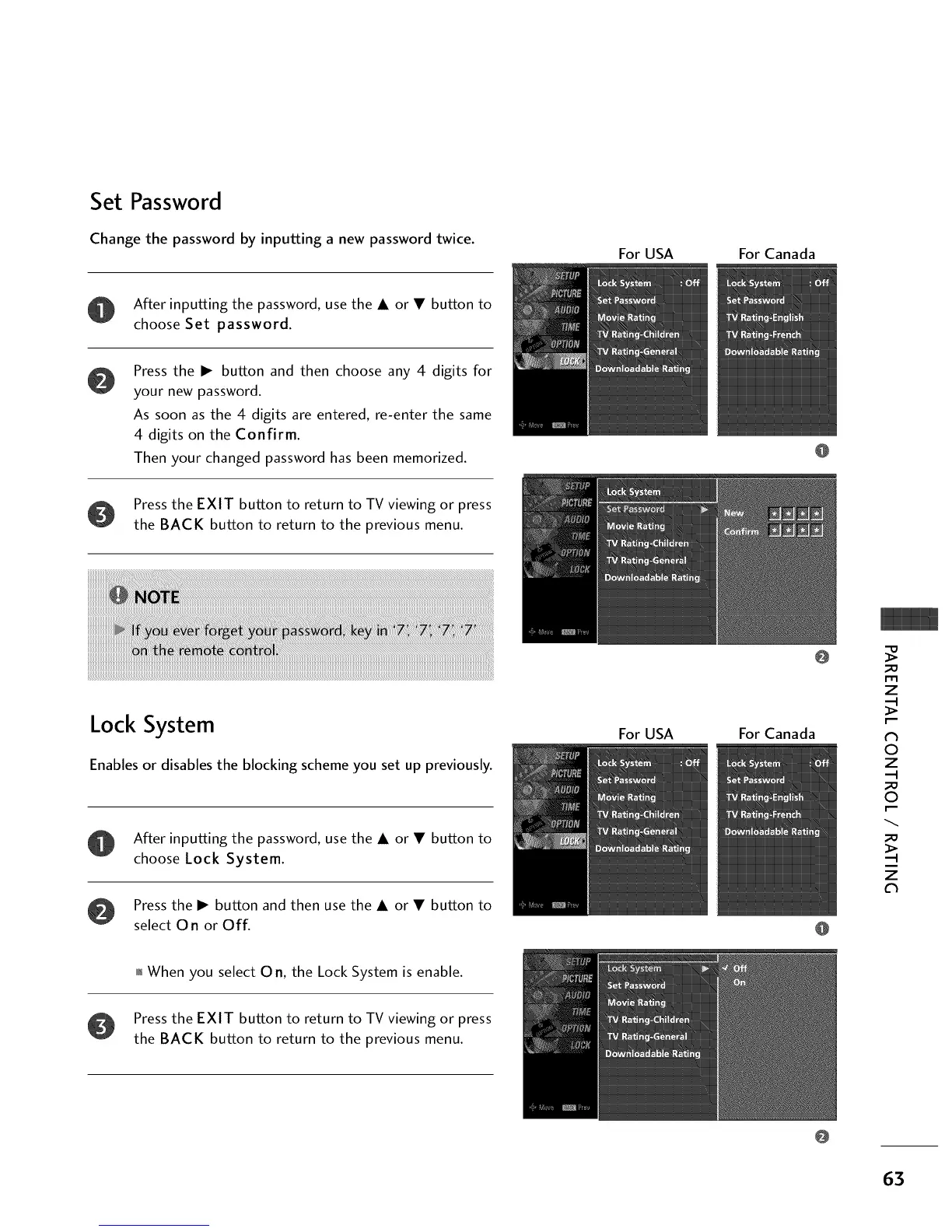
Change the password by inputting a new password twice.
For USA For Canada
After inputting the password, use the • or • button to
choose Set password.
Press the • button and then choose any 4 digits for
your new password.
As soon as the 4 digits are entered, re-enter the same
4 digits on the Confirm.
Then your changed password has been memorized.
Press the EXIT button to return to TV viewing or press
the BACK button to return to the previous menu.
Lock System
Enables or disables the blocking scheme you set up previously.
After inputting the password, usethe • or • button to
choose Lock System.
Press the • button and then use the • or • button to
select 0 n or Off.
For USA
@
For Canada
@
@
m
z
N
©
z
©
z
01_When you select 0 n, the Lock System is enable.
Press the EXIT button to return to TV viewing or press
the BACK button to return to the previous menu.
63



 To Next Page