EasyManua.ls Logo

LG 22LD310 - Picture Reset Function

LG 22LD310
60 pages
Print Icon
To Next Page IconTo Next Page
To Previous Page IconTo Previous Page
Loading...
PICTURE CONTROL
40
PICTURE CONTROL
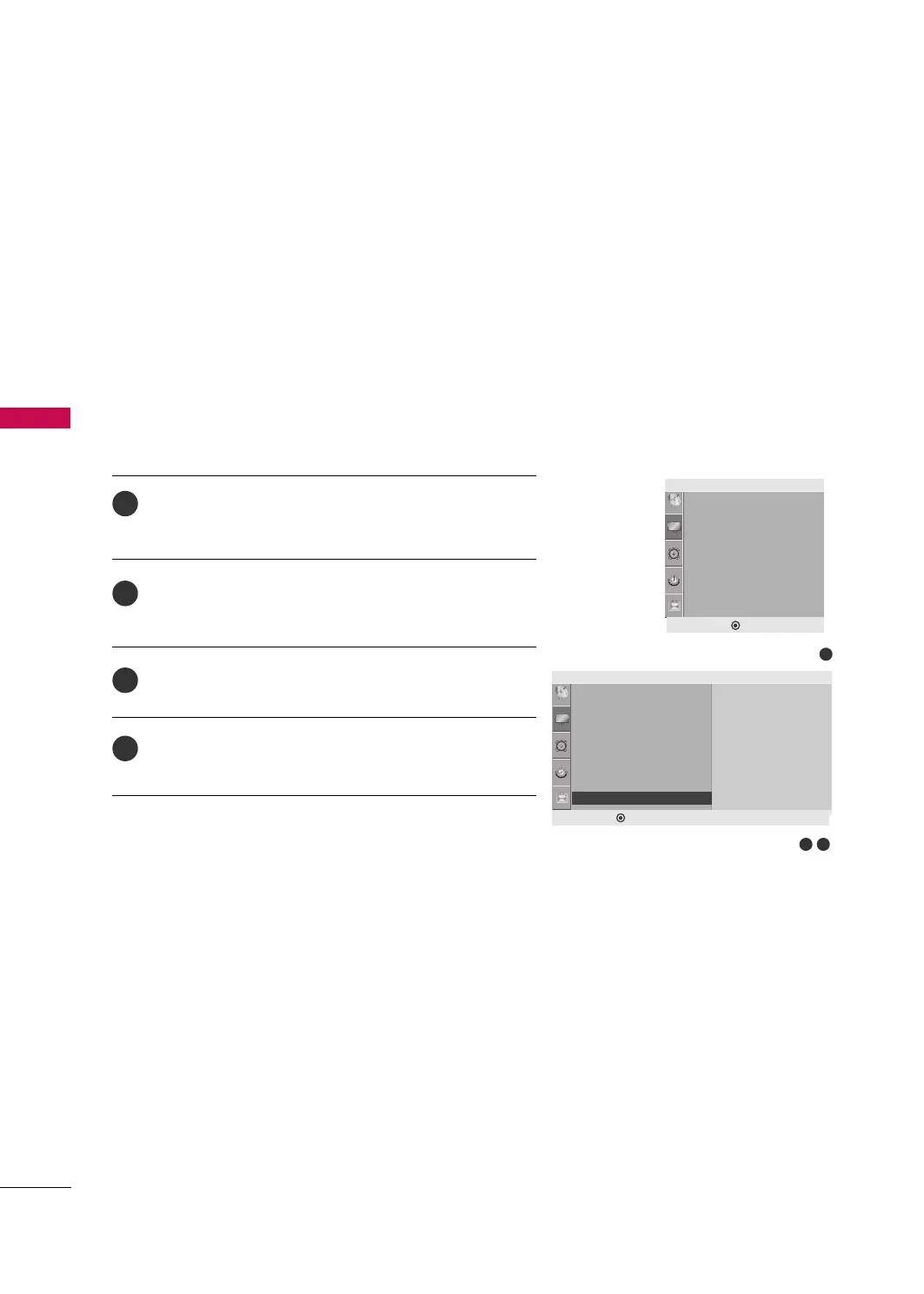
PICTURE RESET
Press the
MMEENNUU
button and then
DD
or
EE
button to select
the
PPiiccttuurree
menu.
Press the
GG
button and then
DD
or
EE
button to select
PPiiccttuurree RReesseett
.
Press the
GG
button to initialize the adjusted value.
Press the
MMEENNUU
button to move to the previous menu.
Returns to the default factory setting for Picture Mode,
Advanced.
1
2
3
4
32
Picture
• Backlight 100
• Contrast 100
• Brightness 50
• Sharpness 70
• Color 70
• Tint 0
• Advanced
• Picture Reset
• Picture Reset
G
OK
1
DEF G MENU
• Backlight 100
• Contrast 100
• Brightness 50
• Sharpness 70
• Color 70
• Tint 0
• Advanced
• Picture Reset
Picture
DEF G MENU
E
E
MFL41469218-en 7/12/10 4:58 PM Page 40

Other manuals for LG 22LD310

Related product manuals