30
ENG
ENGLISH
CUSTOMIZING SETTINGS
NOTE
Thisissubsidiaryforcolorweaknessuser.Thereforeifyoufeeluncomfortablewiththescreen,please
turnoffthisfunction.
Thisfunctioncan’tdistinguishsomecolorsinsomeimages.
IfoptionofColorWizardisnotOff,ReaderModeandSMARTENERGYSAVINGwillbeOffand
PictureModewillautomaticallybeCustom.
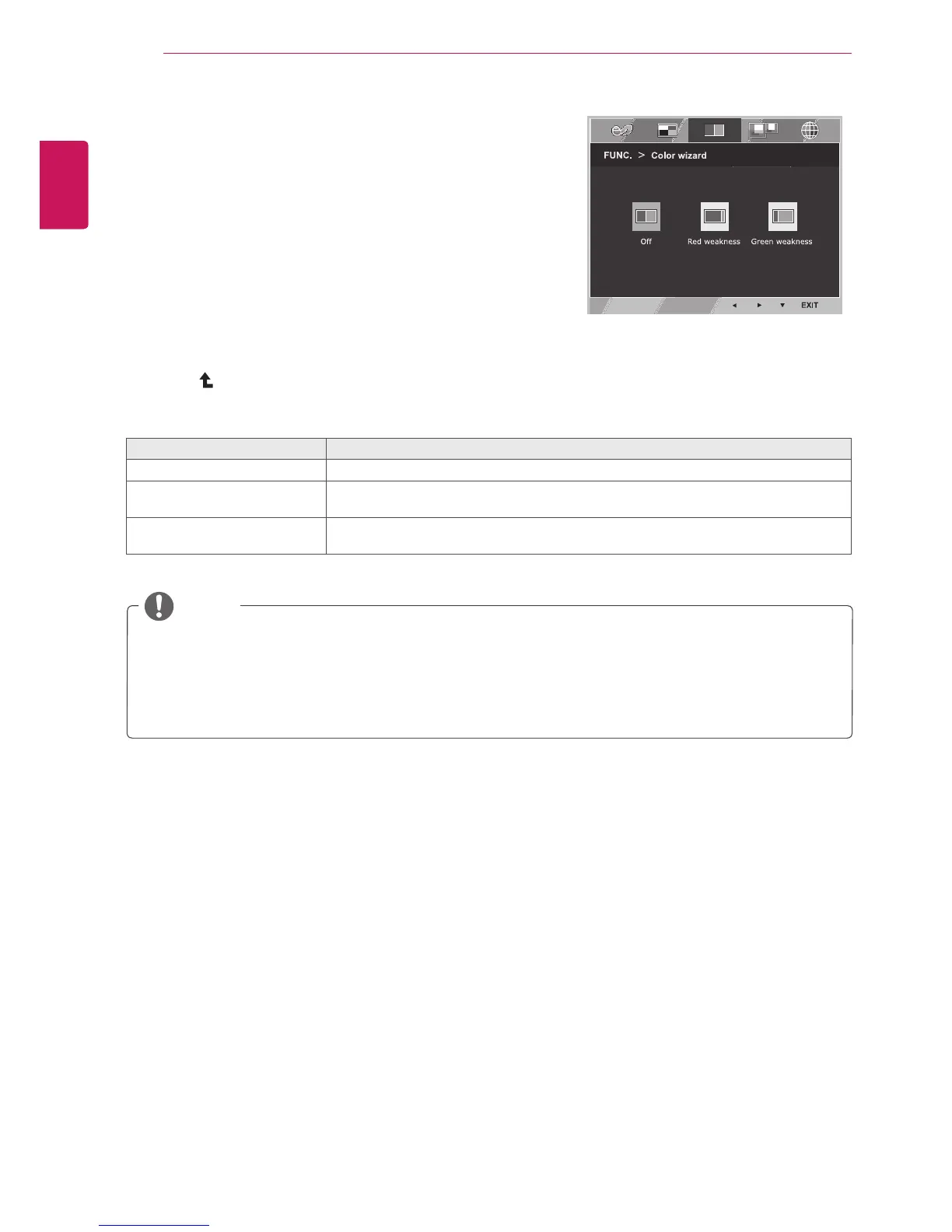
1
Press
FUNC.
buttononthebottomoftheMonitorset
todisplaythe
FUNC.
OSD.
2
Select
Colorwizard
bypressingthe►button.
3
Enterto
Colorwizard
bypressingthe▼button.
4
Settheoptionsbypressingthe◄or►buttons.
5
Select
EXIT
toleavetheOSDmenu.Toreturntothe
uppermenuorsetothermenuitems,usetheup
arrow( )button.
Eachoptionisexplainedbelow.
Colorwizard Description
Off
ItisamodethatColorWizardmodeisoff.
Redweakness Itisamodeforuserwhohasinabilitytoseeredcolor.Itmakecolorweaknessuser
caneasilydistinguishredcolors.
Greenweakness Itisamodeforuserwhohasinabilitytoseegreencolor.Itmakecolorweaknessuser
caneasilydistinguishgreencolors.
Colorwizard



 To Next Page